Join us at FabCon Atlanta from March 16 - 20, 2026, for the ultimate Fabric, Power BI, AI and SQL community-led event. Save $200 with code FABCOMM.
Register now!The Power BI Data Visualization World Championships is back! Get ahead of the game and start preparing now! Learn more
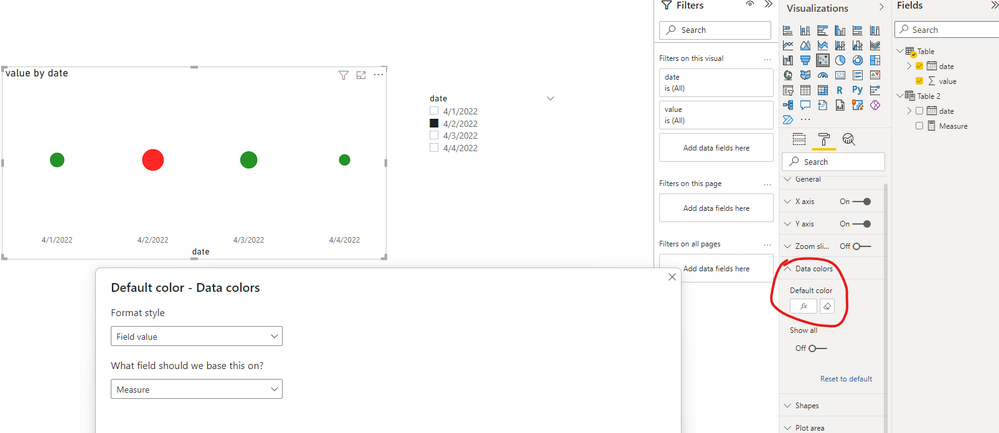
I have the same problem as mentioned here (https://community.powerbi.com/t5/Desktop/Help-Highlight-graph-by-Slice/td-p/930919 ) but only difference is instead of bar graph I have scatter chart. The slicer is date slicer. The suggested approach in url is not working for scatter chart. Can anyone please help me on this and if possible also share pbix file for same. It would be really helpful. Thanks
Solved! Go to Solution.
Hi @Anonymous ,
Create an independent slicer table.
Then create a measure like below and use it as conditional formatting value.
Best Regards,
Jay
Hi @Anonymous ,
Create an independent slicer table.
Then create a measure like below and use it as conditional formatting value.
Best Regards,
Jay
Check out the November 2025 Power BI update to learn about new features.
Advance your Data & AI career with 50 days of live learning, contests, hands-on challenges, study groups & certifications and more!
| User | Count |
|---|---|
| 169 | |
| 109 | |
| 91 | |
| 55 | |
| 44 |