This time we’re going bigger than ever. Fabric, Power BI, SQL, AI and more. We're covering it all. You won't want to miss it.
Learn moreLevel up your Power BI skills this month - build one visual each week and tell better stories with data! Get started
Hello,
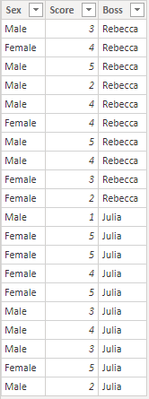
I have a table that looks like this:
I have created a measure that calculates an index based on the column Score.
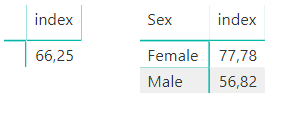
I visualize this with two matrices, one for total index and one by Sex:
I also use a filter by Boss in my visualization, but additionally I need a hidden condition for the Sex-matrix: Only show index if the females and males is at least 5 respectively. For example, If I filter by "Julia" I see all three indexes, but if I filter by "Rebecca" I only see the total index (Since there is only 4 females that has her as their boss).
Thankful for any help on this.
Solved! Go to Solution.
Hi @Anonymous ,
You may create bookmarks for every selected options of Boss, and create measure. This measure will see what is selected in the Boss slicer, then return the appropriate calculation and report page. For references: Use bookmarks to share insights and build stories in Power BI , Dynamic Visuals using Buttons.
Best Regards,
Amy
Community Support Team _ Amy
If this post helps, then please consider Accept it as the solution to help the other members find it more quickly.
Hi @Anonymous ,
You may create bookmarks for every selected options of Boss, and create measure. This measure will see what is selected in the Boss slicer, then return the appropriate calculation and report page. For references: Use bookmarks to share insights and build stories in Power BI , Dynamic Visuals using Buttons.
Best Regards,
Amy
Community Support Team _ Amy
If this post helps, then please consider Accept it as the solution to help the other members find it more quickly.
Check out the April 2026 Power BI update to learn about new features.
Sign up to receive a private message when registration opens and key events begin.
If you have recently started exploring Fabric, we'd love to hear how it's going. Your feedback can help with product improvements.
| User | Count |
|---|---|
| 37 | |
| 32 | |
| 27 | |
| 24 | |
| 17 |
| User | Count |
|---|---|
| 70 | |
| 50 | |
| 31 | |
| 26 | |
| 22 |