
Join us at FabCon Atlanta from March 16 - 20, 2026, for the ultimate Fabric, Power BI, AI and SQL community-led event. Save $200 with code FABCOMM.
Register now!The Power BI Data Visualization World Championships is back! Get ahead of the game and start preparing now! Learn more
Hi all,
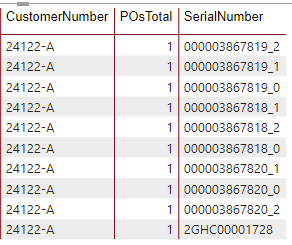
I have a table with data from SQL Server, and I would like to have the following solved:
In my table, I have rows where some columns have same values, but in other column a unique value.
Now, I'd like to group the values which are the same, show the totals of the unique value.
This the current situation:
Now I wish to have a result like this:
| CustomerNumber | PosTotal |
| 24122-A | 10 |
How can I achieve this? Thanks for the feedback.
Solved! Go to Solution.
Hi @mariosss45 ,
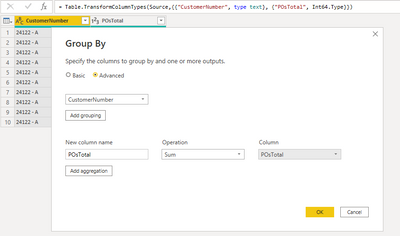
You can make use of "Group By" option from the Transform section of the Power Query editor and can select the required columns using which you need to group by the data by selecting the required aggregation function.
1) You will have to select the levels by which you need to group by and select the POsTotal column aggregating it to Sum as shown below
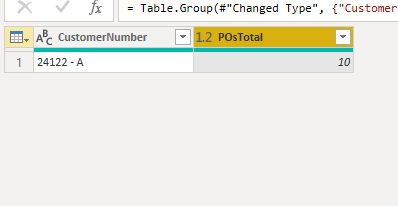
And this will give you the below grouped results
Hope this helps!
Please accept the solution if this answers your query.
Thanks,
Avantika
The Power BI Data Visualization World Championships is back! Get ahead of the game and start preparing now!
| User | Count |
|---|---|
| 38 | |
| 36 | |
| 33 | |
| 31 | |
| 28 |
| User | Count |
|---|---|
| 129 | |
| 88 | |
| 79 | |
| 68 | |
| 63 |