FabCon is coming to Atlanta
Join us at FabCon Atlanta from March 16 - 20, 2026, for the ultimate Fabric, Power BI, AI and SQL community-led event. Save $200 with code FABCOMM.
Register now!- Power BI forums
- Get Help with Power BI
- Desktop
- Service
- Report Server
- Power Query
- Mobile Apps
- Developer
- DAX Commands and Tips
- Custom Visuals Development Discussion
- Health and Life Sciences
- Power BI Spanish forums
- Translated Spanish Desktop
- Training and Consulting
- Instructor Led Training
- Dashboard in a Day for Women, by Women
- Galleries
- Data Stories Gallery
- Themes Gallery
- Contests Gallery
- QuickViz Gallery
- Quick Measures Gallery
- Visual Calculations Gallery
- Notebook Gallery
- Translytical Task Flow Gallery
- TMDL Gallery
- R Script Showcase
- Webinars and Video Gallery
- Ideas
- Custom Visuals Ideas (read-only)
- Issues
- Issues
- Events
- Upcoming Events
The Power BI Data Visualization World Championships is back! Get ahead of the game and start preparing now! Learn more
- Power BI forums
- Forums
- Get Help with Power BI
- Desktop
- Hide and Show based on Slicer selection
- Subscribe to RSS Feed
- Mark Topic as New
- Mark Topic as Read
- Float this Topic for Current User
- Bookmark
- Subscribe
- Printer Friendly Page

- Mark as New
- Bookmark
- Subscribe
- Mute
- Subscribe to RSS Feed
- Permalink
- Report Inappropriate Content
Hide and Show based on Slicer selection
Hi All,
Based on slicer selection my card should get hid and show. In below eg. If i select ID = 1 then my card will display "Yes" in the status and card should be visible. If i select ID = 2 then my card should get Hide. And If i select ID=3 then card should display as "Yes".
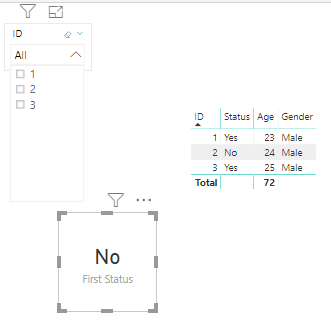
Same with the table If i select ID as 1 or 3 then table should show all details and if i select ID as 2 it should get hide.
OR in other words:
Status = Yes then show
Status = No Hide
If i select "Show All" option in slicer then both slicer and table should get hide.
Is there a way to achieve this functionality? Is it possible to hide and show based on Filter selection?
Thanks in Advance
Prakash

- Mark as New
- Bookmark
- Subscribe
- Mute
- Subscribe to RSS Feed
- Permalink
- Report Inappropriate Content
Kind of a workaround, but I used the "Advance Card" visual add-on (free) to put conditions on the card and change the text color to match the background when the condition was met. Not sure if this helps your situation or not.


- Mark as New
- Bookmark
- Subscribe
- Mute
- Subscribe to RSS Feed
- Permalink
- Report Inappropriate Content
@Anonymous You can create a measure to show the status using below dax syntex. Also turn off the category on the card showing the value.
Status =
(
IF(HASONEFILTER(Data_Type_Selected[ID]),
SWITCH(SELECTEDVALUE(Data_Type_Selected[ID]),
"1", "YES",
"2", "",
"3", "NO"
),
BLANK()
)
Did I answer your question? Mark my post as a solution!
Appreciate your Kudos
Proud to be a Super User!
Follow me on linkedin
- Mark as New
- Bookmark
- Subscribe
- Mute
- Subscribe to RSS Feed
- Permalink
- Report Inappropriate Content
Hi @negi007 ,
Thanks for your response. But if i have more no. of ID's like 10,000 ID's i cant give it manually so do we have any alternate way for the Status column like status = "Yes" Show else Status = "No" the hide.
Thanks
Prakash


- Mark as New
- Bookmark
- Subscribe
- Mute
- Subscribe to RSS Feed
- Permalink
- Report Inappropriate Content
Then the only way for you - use measures that return empty string (for a card) or blank() (for a table) and conditional formatting to hide all visible elements of a card / table. You don't need write a measure like the above with one row of DAX per each ID, you can use a column in your table.
A measure should return you either visible value or empty string. And you'll need some measures for conditional formatting to hide elements like Category in a card by changing font color to background color.
- Mark as New
- Bookmark
- Subscribe
- Mute
- Subscribe to RSS Feed
- Permalink
- Report Inappropriate Content
Example:
will return an ID if selected an id with Status = 'Yes' or empty string if Status = 'No'
- Mark as New
- Bookmark
- Subscribe
- Mute
- Subscribe to RSS Feed
- Permalink
- Report Inappropriate Content
Hi @avatorl ,
Yes it is working fine but how to hide column headers in Tables when the status is "No"?
I dont want to show the entire table if the status is No. I can able to hide the values with your suggession but i couldn't able to hide column names.
Thanks
Prakash
- Mark as New
- Bookmark
- Subscribe
- Mute
- Subscribe to RSS Feed
- Permalink
- Report Inappropriate Content
Hi @avatorl ,
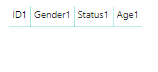
If i select ID no. in slicer which has status as "No" then the values are getting hided but the column headers are still showing.
I want this column header too to get hided. Could you please let me know that whether is that possible?
Thanks,
Prakash
- Mark as New
- Bookmark
- Subscribe
- Mute
- Subscribe to RSS Feed
- Permalink
- Report Inappropriate Content
Cover your table (or just columns you wnat to hide) with a card.
Card value measure:
Blank := ""
Card background conditional formatting measure:
Background := IF( <your rule is here>, "#FFF0","#FFF" )
If TRUE then transparent color (what is behind the card is visible), if false then white color (what is behind the card is hidden)
See this topic https://community.powerbi.com/t5/Power-Query/write-unique-password-to-see-the-data-of-that-partucal-.... It should be usefull.
- Mark as New
- Bookmark
- Subscribe
- Mute
- Subscribe to RSS Feed
- Permalink
- Report Inappropriate Content
Hi @avatorl ,
Yes It is working absolutely fine.
But i have 1 issue is there especially in one to many scenario.
In Table 1 for ID one i have 1 row. In Table 2 for ID one let us imagine i have 2 rows as shown in below example.
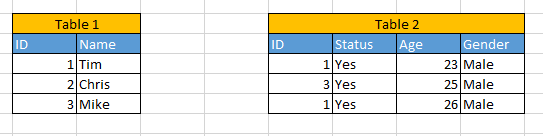
when i select ID (Table1) from dropdown then the expected output which i am looking for is:
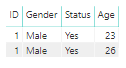
But since i have created all the four fields as measure on selecting ID 1 in slicer i am getting:
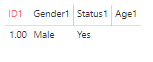
Since it is present in measure i am not getting the expected output. Apart from this it is working fine for everything. It is not working for one to many scenarios.
Could we get the expected output?
Thanks in Advance
- Mark as New
- Bookmark
- Subscribe
- Mute
- Subscribe to RSS Feed
- Permalink
- Report Inappropriate Content
First column should be a column. Not measure.
- Mark as New
- Bookmark
- Subscribe
- Mute
- Subscribe to RSS Feed
- Permalink
- Report Inappropriate Content
Hi @avatorl ,
If i keep first column as column (not measuer) then i am not getting the expected output. You can see from the below screenshot that if i select ID as 1 from table 1 in the drop down and in the grid we are getting ID 1 as well as ID 3 not sure why this is happening...

Thanks
Prakash
- Mark as New
- Bookmark
- Subscribe
- Mute
- Subscribe to RSS Feed
- Permalink
- Report Inappropriate Content
Use BLANK() instead of "" in your measures.
- Mark as New
- Bookmark
- Subscribe
- Mute
- Subscribe to RSS Feed
- Permalink
- Report Inappropriate Content
Probably the only way is to put a card in front of a column header (just hide the header behind a card). And then you can control font color via conditional formatting based on a new measure.
- Mark as New
- Bookmark
- Subscribe
- Mute
- Subscribe to RSS Feed
- Permalink
- Report Inappropriate Content
There is no easy way to show/hide visuals depends on slicer selection. What you can do:
1) vote for an idea https://ideas.powerbi.com/forums/265200-power-bi-ideas?query=slicer%20hide%20visual
2) if your list of slicer values is short and predifined (like your 1, 2 and 3 options) then use buttons and bookmarks instead of slicer.
3) you can hide card data and category caption using conditional formatting and making font color same as backgroud color. Probably you'll be able to hide table as well using contitonal formatting and maybe measures that return BLANK() depends on slicer selection. This is just a workaround.
Helpful resources

Power BI Dataviz World Championships
The Power BI Data Visualization World Championships is back! Get ahead of the game and start preparing now!

Power BI Monthly Update - November 2025
Check out the November 2025 Power BI update to learn about new features.

FabCon Atlanta 2026
Join us at FabCon Atlanta, March 16-20, for the ultimate Fabric, Power BI, AI and SQL community-led event. Save $200 with code FABCOMM.

| User | Count |
|---|---|
| 59 | |
| 43 | |
| 42 | |
| 23 | |
| 17 |


| User | Count |
|---|---|
| 190 | |
| 122 | |
| 96 | |
| 66 | |
| 46 |


