cancel
Showing results for 
Search instead for 
Did you mean: 

The Power BI Data Visualization World Championships is back! Get ahead of the game and start preparing now! Learn more

Reply
Anonymous
Not applicable

Hide Text In Roll Up Totals In Matrix

Hi all, 


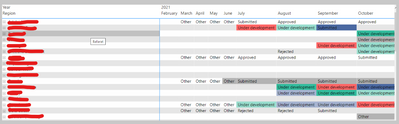
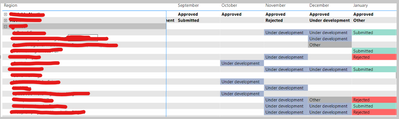
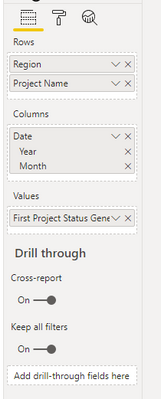
I have made an activity tracker in Power BI and would like to remove the roll up totals when the rows are collapsed. Essentially I have a Region followed by the projects for that region. Then I have their status according which is reported monthly. The problem I have is when the region is collapsed it BI is displaying a "rolled up total" which makes the table confusing to look at. 


Image 1 

Bman335_1-1649901113664.png

Image 2 

Bman335_2-1649901301985.png


Image 3 

Bman335_3-1649901395019.png


Is there anyway I can display no values in the matrix when the region rows are collapsed and only display them when a row is expanded? I have tried a few DAX solutions with little success as I am relatively new to Power BI. 


Thank you very much in advance for any help.


1 REPLY 1
amitchandak
Super User
Super User

@Anonymous , I doubt we can capture an expanded event. We have isinscope to check scope, but that will not help here

https://www.kasperonbi.com/use-isinscope-to-get-the-right-hierarchy-level-in-dax/


Share with Power BI Enthusiasts: Full Power BI Video (20 Hours) YouTube
Microsoft Fabric Series 60+ Videos YouTube
Microsoft Fabric Hindi End to End YouTube

Helpful resources

Announcements
Power BI DataViz World Championships

Power BI Dataviz World Championships

The Power BI Data Visualization World Championships is back! Get ahead of the game and start preparing now!

December 2025 Power BI Update Carousel

Power BI Monthly Update - December 2025

Check out the December 2025 Power BI Holiday Recap!

FabCon Atlanta 2026 carousel

FabCon Atlanta 2026

Join us at FabCon Atlanta, March 16-20, for the ultimate Fabric, Power BI, AI and SQL community-led event. Save $200 with code FABCOMM.