FabCon is coming to Atlanta
Join us at FabCon Atlanta from March 16 - 20, 2026, for the ultimate Fabric, Power BI, AI and SQL community-led event. Save $200 with code FABCOMM.
Register now!- Power BI forums
- Get Help with Power BI
- Desktop
- Service
- Report Server
- Power Query
- Mobile Apps
- Developer
- DAX Commands and Tips
- Custom Visuals Development Discussion
- Health and Life Sciences
- Power BI Spanish forums
- Translated Spanish Desktop
- Training and Consulting
- Instructor Led Training
- Dashboard in a Day for Women, by Women
- Galleries
- Data Stories Gallery
- Themes Gallery
- Contests Gallery
- QuickViz Gallery
- Quick Measures Gallery
- Visual Calculations Gallery
- Notebook Gallery
- Translytical Task Flow Gallery
- TMDL Gallery
- R Script Showcase
- Webinars and Video Gallery
- Ideas
- Custom Visuals Ideas (read-only)
- Issues
- Issues
- Events
- Upcoming Events
Learn from the best! Meet the four finalists headed to the FINALS of the Power BI Dataviz World Championships! Register now
- Power BI forums
- Forums
- Get Help with Power BI
- Desktop
- Hide Sorted Column - Table Chart
- Subscribe to RSS Feed
- Mark Topic as New
- Mark Topic as Read
- Float this Topic for Current User
- Bookmark
- Subscribe
- Printer Friendly Page

- Mark as New
- Bookmark
- Subscribe
- Mute
- Subscribe to RSS Feed
- Permalink
- Report Inappropriate Content
Hide Sorted Column - Table Chart
Hi There,
I have a source of table, it contains 3 columns.
| ID | Fruit | Active |
| 4 | Apple | Y |
| 3 | Banane | Y |
| 2 | Orange | Y |
| 1 | Mango | Y |
| 5 | Kiwi | N |
I am using the visualization "Table".
I want to show only Fruit column, like a table, because user will select the fruit.
It will affect other charts later on.
I want to show only Active Fruits.
I want to show Fruits in Sorted Order 1...5
However I do not want to workaround such
- set the color of column header and value to white color.
- set the column width to 0
How I can show active, sorted Fruits without doing any workarounds?
I am using Power BI - desktop - Version: 2.110.1085.0 64-bit (October 2022)
Many Thanks,
Aykut
Solved! Go to Solution.


- Mark as New
- Bookmark
- Subscribe
- Mute
- Subscribe to RSS Feed
- Permalink
- Report Inappropriate Content
Hi,
In the Data tab, sort the Fruit column by the Sort Order column.
Regards,
Ashish Mathur
http://www.ashishmathur.com
https://www.linkedin.com/in/excelenthusiasts/
- Mark as New
- Bookmark
- Subscribe
- Mute
- Subscribe to RSS Feed
- Permalink
- Report Inappropriate Content
And finally I found the solution here at powerbi.com 🙂
Solved: Sort Slicer Value By A Different Column - Microsoft Power BI Community
- Mark as New
- Bookmark
- Subscribe
- Mute
- Subscribe to RSS Feed
- Permalink
- Report Inappropriate Content
Hi,
It works just fine. See the screenshots below
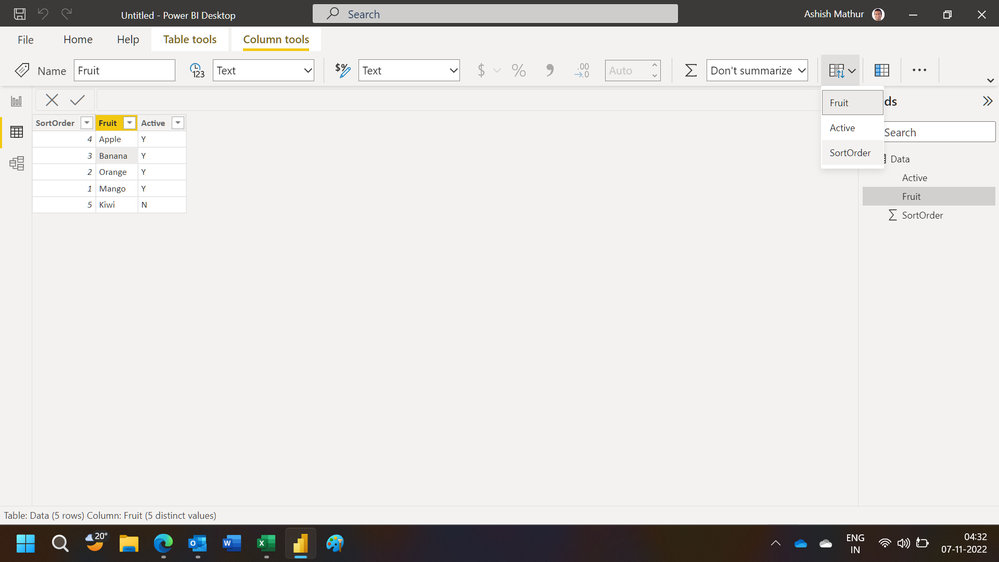
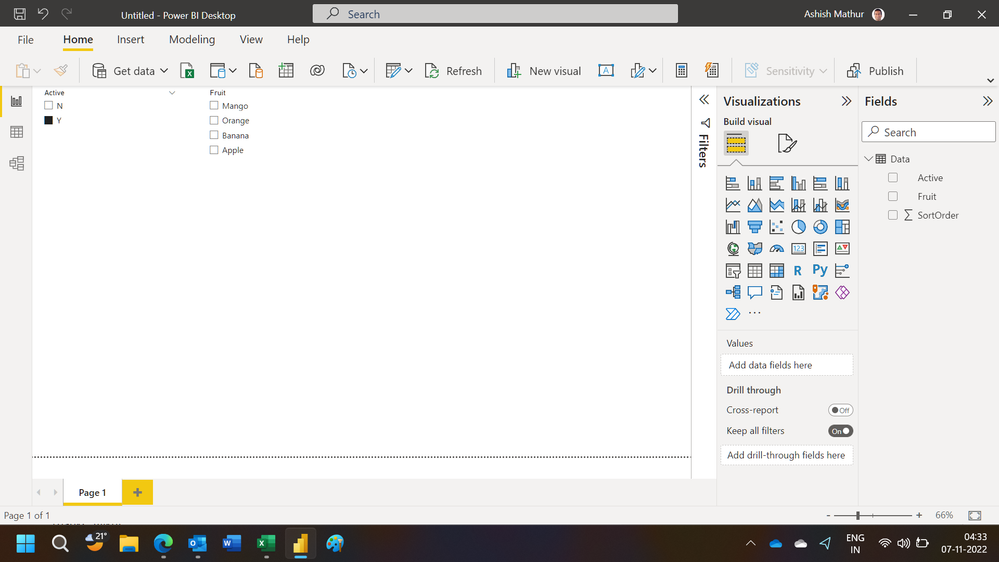
Regards,
Ashish Mathur
http://www.ashishmathur.com
https://www.linkedin.com/in/excelenthusiasts/
- Mark as New
- Bookmark
- Subscribe
- Mute
- Subscribe to RSS Feed
- Permalink
- Report Inappropriate Content
And finally I found the solution here at powerbi.com 🙂
Solved: Sort Slicer Value By A Different Column - Microsoft Power BI Community


- Mark as New
- Bookmark
- Subscribe
- Mute
- Subscribe to RSS Feed
- Permalink
- Report Inappropriate Content
If I understand your question clearly. The below can be the possible solution.
If you only want to show the active fruits, you can set the page filter as below.
I want to show only Active Fruits.
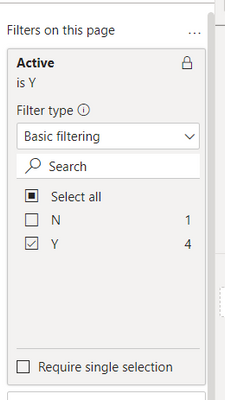
I want to show Fruits in Sorted Order 1...5
I want to show only Fruit column, like a table, because user will select the fruit.
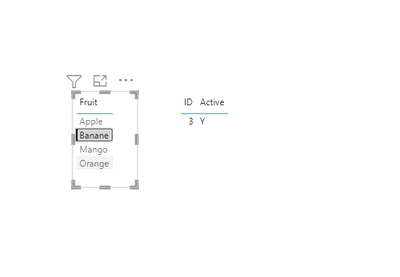
Hope it helps, if not please provide a sample output that you desire.
- Mark as New
- Bookmark
- Subscribe
- Mute
- Subscribe to RSS Feed
- Permalink
- Report Inappropriate Content
Hi AbbasG,
Thank you for your feedback.
This was the original list.
| SortOrder | Fruit | Active |
| 4 | Apple | Y |
| 3 | Banana | Y |
| 2 | Orange | Y |
| 1 | Mango | Y |
| 5 | Kiwi | N |
I want to show the Fruits in Sorted Order
| Fruit |
| Mango |
| Orange |
| Banana |
| Apple |
So, how can I make the sort without showing the column?
Thanks, Aykut
- Mark as New
- Bookmark
- Subscribe
- Mute
- Subscribe to RSS Feed
- Permalink
- Report Inappropriate Content
Hi,
In the Data tab, sort the Fruit column by the Sort Order column.
Regards,
Ashish Mathur
http://www.ashishmathur.com
https://www.linkedin.com/in/excelenthusiasts/
- Mark as New
- Bookmark
- Subscribe
- Mute
- Subscribe to RSS Feed
- Permalink
- Report Inappropriate Content
Hi Ashish,
thanks providing this approach.
Applying a sort on the "Sort Order" column under Data tab has no impact on the visual. 😞
I now have also applied the visualization "Slicer",
which looks pretty. But also not be able to sort on a hidden column.
I will go with the workaround hiding: the column by setting the column size to 0
Thanks, Aykut
- Mark as New
- Bookmark
- Subscribe
- Mute
- Subscribe to RSS Feed
- Permalink
- Report Inappropriate Content
Hi,
It works just fine. See the screenshots below
Regards,
Ashish Mathur
http://www.ashishmathur.com
https://www.linkedin.com/in/excelenthusiasts/
- Mark as New
- Bookmark
- Subscribe
- Mute
- Subscribe to RSS Feed
- Permalink
- Report Inappropriate Content
I now understand what to do ...
you 1st select the column you want to be ordered,
you then select in the Picklist "Sort by Column" the column which order should be taken.

Helpful resources

Join our Fabric User Panel
Share feedback directly with Fabric product managers, participate in targeted research studies and influence the Fabric roadmap.

Power BI Monthly Update - February 2026
Check out the February 2026 Power BI update to learn about new features.

FabCon Atlanta 2026
Join us at FabCon Atlanta, March 16-20, for the ultimate Fabric, Power BI, AI and SQL community-led event. Save $200 with code FABCOMM.

| User | Count |
|---|---|
| 49 | |
| 46 | |
| 35 | |
| 15 | |
| 14 |


| User | Count |
|---|---|
| 90 | |
| 75 | |
| 41 | |
| 26 | |
| 26 |


