cancel
Showing results for 
Search instead for 
Did you mean: 

The Power BI Data Visualization World Championships is back! Get ahead of the game and start preparing now! Learn more

Reply
Rosenmeyer
Frequent Visitor

Help with excluding after work hours from a date range

TICKET_CREATEDTICKET_FINISHED
01-02-2019 08:43:5001-02-2019 08:48:33
01-02-2019 10:36:1101-02-2019 11:08:40
01-02-2019 10:48:1504-02-2019 12:18:01
01-02-2019 10:54:4204-02-2019 10:52:32
01-02-2019 10:58:3526-02-2019 11:29:12
01-02-2019 11:16:5301-02-2019 11:17:12
01-02-2019 11:22:1701-02-2019 15:20:15
01-02-2019 11:58:5101-02-2019 12:03:57
01-02-2019 14:56:2201-02-2019 14:56:39
01-02-2019 15:50:5803-02-2019 17:10:28
04-02-2019 09:20:5204-02-2019 09:21:40
04-02-2019 11:54:5004-02-2019 11:55:19
05-02-2019 08:53:5205-02-2019 11:26:49
05-02-2019 09:00:0405-02-2019 09:00:33


If you check the table above, you have two different dates, but our work hours only range from 08:00-16:00. Can someone help me filtering out excess after hours? Weekend days are also holiday days and are therefore not included in the calculation either.

1 ACCEPTED SOLUTION
v-danhe-msft
Microsoft Employee
Microsoft Employee

Hi @Rosenmeyer ,

Based on my test, you could refer to below formulas:

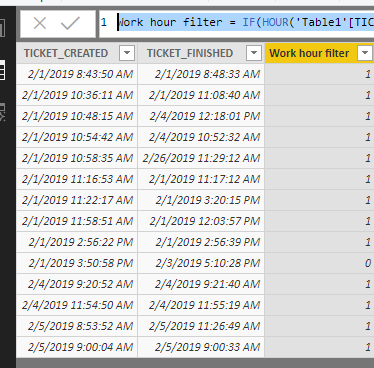
Work hour filter = IF(HOUR('Table1'[TICKET_CREATED])>=8&&HOUR('Table1'[TICKET_FINISHED])<=16,1,0)

Above formula could filter the work hour:

1.PNG

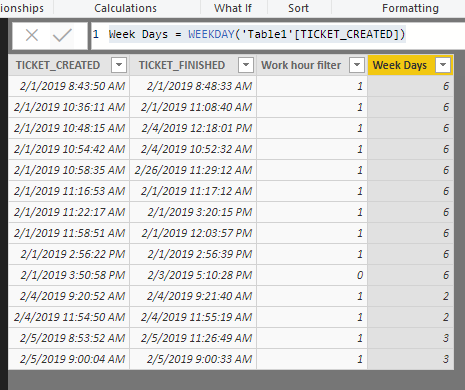
Week Days = WEEKDAY('Table1'[TICKET_CREATED])

WEEKDAY function could return a number from 1 to 7 identifying the day of the week of a date:

https://docs.microsoft.com/en-us/dax/weekday-function-dax

2.PNG

If you problem could not be solved, could you please offer your desired result if possible?

Also you could download the pbix file to have a view.


Regards,

Daniel He

Community Support Team _ Daniel He
If this post helps, then please consider Accept it as the solution to help the other members find it more quickly.

View solution in original post

1 REPLY 1
v-danhe-msft
Microsoft Employee
Microsoft Employee

Hi @Rosenmeyer ,

Based on my test, you could refer to below formulas:

Work hour filter = IF(HOUR('Table1'[TICKET_CREATED])>=8&&HOUR('Table1'[TICKET_FINISHED])<=16,1,0)

Above formula could filter the work hour:

1.PNG

Week Days = WEEKDAY('Table1'[TICKET_CREATED])

WEEKDAY function could return a number from 1 to 7 identifying the day of the week of a date:

https://docs.microsoft.com/en-us/dax/weekday-function-dax

2.PNG

If you problem could not be solved, could you please offer your desired result if possible?

Also you could download the pbix file to have a view.


Regards,

Daniel He

Community Support Team _ Daniel He
If this post helps, then please consider Accept it as the solution to help the other members find it more quickly.

Helpful resources

Announcements
Power BI DataViz World Championships

Power BI Dataviz World Championships

The Power BI Data Visualization World Championships is back! Get ahead of the game and start preparing now!

December 2025 Power BI Update Carousel

Power BI Monthly Update - December 2025

Check out the December 2025 Power BI Holiday Recap!

FabCon Atlanta 2026 carousel

FabCon Atlanta 2026

Join us at FabCon Atlanta, March 16-20, for the ultimate Fabric, Power BI, AI and SQL community-led event. Save $200 with code FABCOMM.