Join us at FabCon Atlanta from March 16 - 20, 2026, for the ultimate Fabric, Power BI, AI and SQL community-led event. Save $200 with code FABCOMM.
Register now!The Power BI Data Visualization World Championships is back! Get ahead of the game and start preparing now! Learn more
Hello,
Im hoping this is a simple solution . How can I add variance column that calculates difference between Q1 and Q2 to the table?
Solved! Go to Solution.
Hi, @Anonymous
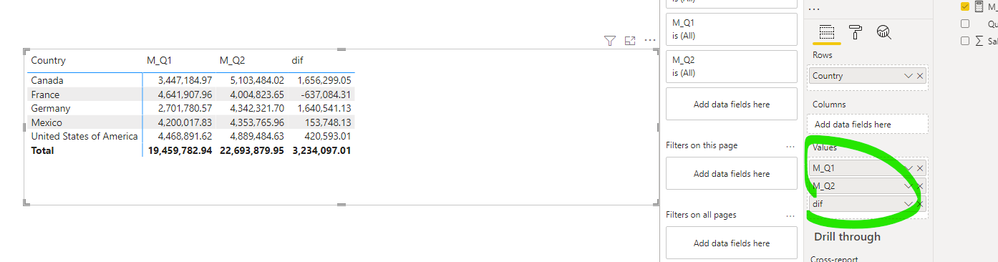
I think your original matrix should be similar to this.
It is not recommended to apply the 'quarter' field to the matrix column, you need to consider adding new measures to calculate the values of q1, q2, difference between Q1 and Q2.
M_Q1 = CALCULATE(SUM('Table'[Sales] ),FILTER('Table','Table'[Quarter]="Q1"))M_Q2 = CALCULATE(SUM('Table'[Sales] ),FILTER('Table','Table'[Quarter]="Q2"))dif = [M_Q2]-[M_Q1]
Please check my attachment for more information.
Best Regards,
Community Support Team _ Eason
If this post helps, then please consider Accept it as the solution to help the other members find it more quickly.
Hi, @Anonymous
I think your original matrix should be similar to this.
It is not recommended to apply the 'quarter' field to the matrix column, you need to consider adding new measures to calculate the values of q1, q2, difference between Q1 and Q2.
M_Q1 = CALCULATE(SUM('Table'[Sales] ),FILTER('Table','Table'[Quarter]="Q1"))M_Q2 = CALCULATE(SUM('Table'[Sales] ),FILTER('Table','Table'[Quarter]="Q2"))dif = [M_Q2]-[M_Q1]
Please check my attachment for more information.
Best Regards,
Community Support Team _ Eason
If this post helps, then please consider Accept it as the solution to help the other members find it more quickly.
The Power BI Data Visualization World Championships is back! Get ahead of the game and start preparing now!
| User | Count |
|---|---|
| 38 | |
| 35 | |
| 33 | |
| 32 | |
| 29 |
| User | Count |
|---|---|
| 132 | |
| 90 | |
| 78 | |
| 66 | |
| 65 |