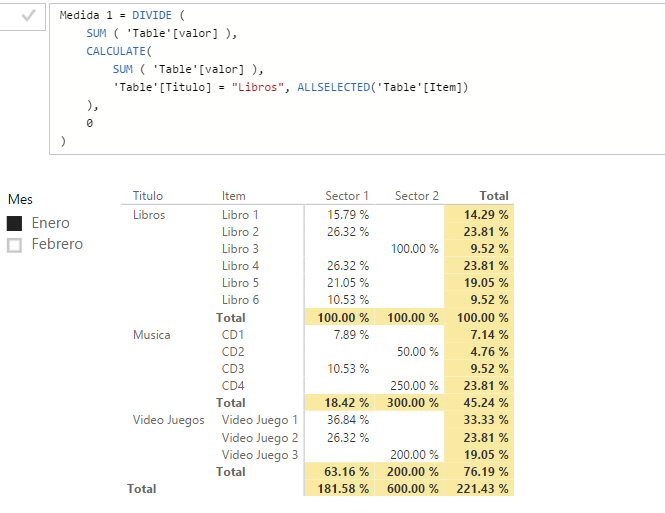
Some days ago I start a query about Help Percentage with conditions in this link:
https://community.powerbi.com/t5/Desktop/Help-with-Percentage-with-conditions-DAX-formula/m-p/83715#...
Now, I have a new issue derivated from the first query.
My data (into Excel) looks like this:
| Titulo | Mes | Sector | Item | valor |
| Libros | Enero | Sector 1 | Libro 1 | 30 |
| Libros | Enero | Sector 1 | Libro 2 | 50 |
| Libros | Enero | Sector 2 | Libro 3 | 20 |
| Libros | Enero | Sector 1 | Libro 4 | 50 |
| Libros | Enero | Sector 1 | Libro 5 | 40 |
| Libros | Enero | Sector 1 | Libro 6 | 20 |
| Video Juegos | Enero | Sector 1 | Video Juego 1 | 70 |
| Video Juegos | Enero | Sector 1 | Video Juego 2 | 50 |
| Video Juegos | Enero | Sector 2 | Video Juego 3 | 40 |
| Musica | Enero | Sector 1 | CD1 | 15 |
| Musica | Enero | Sector 2 | CD2 | 10 |
| Musica | Enero | Sector 1 | CD3 | 20 |
| Musica | Enero | Sector 2 | CD4 | 50 |
| Libros | Febrero | Sector 1 | Libro 1 | 10 |
| Libros | Febrero | Sector 2 | Libro 2 | 15 |
| Libros | Febrero | Sector 1 | Libro 3 | 20 |
| Libros | Febrero | Sector 2 | Libro 4 | 25 |
| Libros | Febrero | Sector 1 | Libro 5 | 32 |
| Libros | Febrero | Sector 2 | Libro 6 | 20 |
| Video Juegos | Febrero | Sector 1 | Video Juego 1 | 70 |
| Video Juegos | Febrero | Sector 1 | Video Juego 2 | 50 |
| Video Juegos | Febrero | Sector 2 | Video Juego 3 | 40 |
| Musica | Febrero | Sector 1 | CD1 | 15 |
| Musica | Febrero | Sector 2 | CD2 | 10 |
| Musica | Febrero | Sector 2 | CD3 | 20 |
| Musica | Febrero | Sector 2 | CD4 | 50 |
And with this measure (named medida 1):
=DIVIDE (
    SUM ( Tabla1[valor] );
    CALCULATE(
        SUM ( Tabla1[valor] );
        ALLSELECTED ( ); Tabla1[Titulo] = "Libros"
    );
    0
)
Try to calculate the percentage based on Libros title. I got this results (like picture):
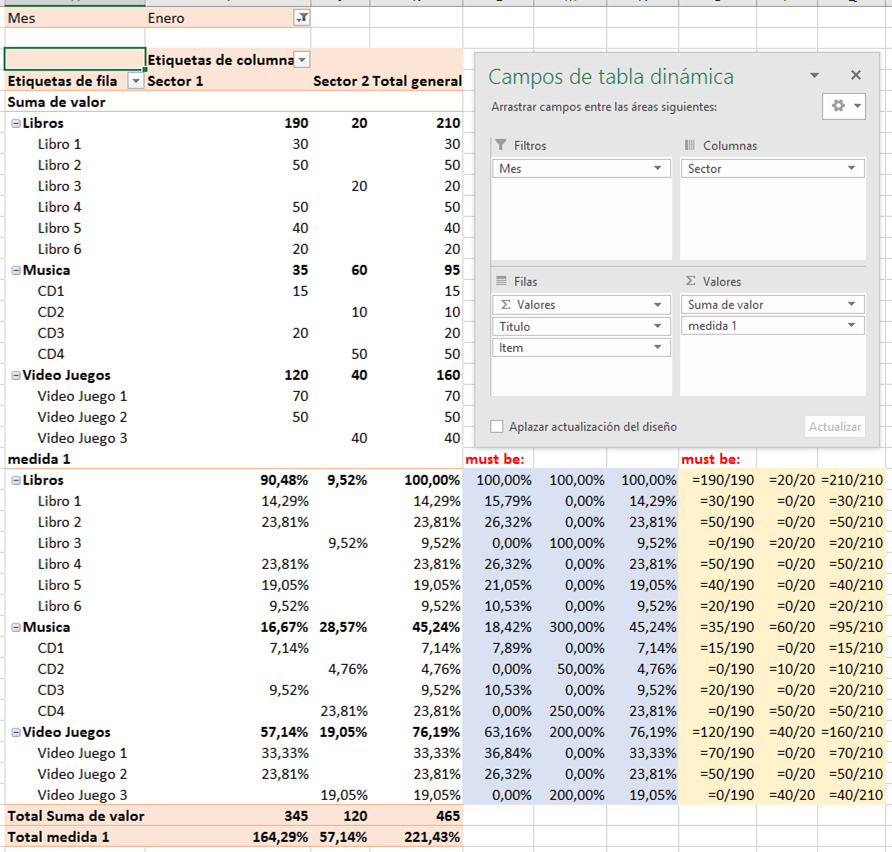
The results that I want to get is at the right of Pivot Table, the "must be:" part. In blue is the result that I want with DAX formula, and Yellow is the description of the formulae used for calculate this percentages.
Any help must be apreciated. Blessings!