cancel
Showing results for 
Search instead for 
Did you mean: 

We've captured the moments from FabCon & SQLCon that everyone is talking about, and we are bringing them to the community, live and on-demand. Starts on April 14th. Register now

Reply
MitaSaxena
Frequent Visitor

Help with Count

Hi,

Will really appreciate any suggestions; new to Power BI and have tried everything.

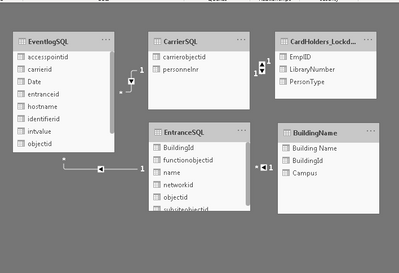
I want to run a report on how many people have used an access card point, but to exclude a group who works everywhere. I have an eventslog table which has access card 'carrierobjectid' which links with the carrier (staff list); and carrier list table has personnel number which then links with CardHolder table. I have built the relationships.

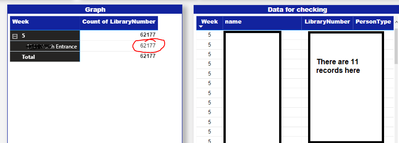
When I use Table visualisation - the data looks correct - I have column for date, reader name, and library card number (which excludes the excluded group). My issue is that if I turn it into a graph or matrix so that I can count the card numbers, it counts all the personnel number from carrier table, or all the card numbers from CardHolder table.  So on table - I see 11 records, but on graph there are over 60k!

I cannot count carrierobjectids from eventslog because I have no way to exclude the numbers I need to exclude.

Any suggestion will be much appreciated.

Thanks

Mita


MitaSaxena_0-1611768182176.png


MitaSaxena_1-1611768553222.png


1 ACCEPTED SOLUTION

Hi, I wanted to delete this off, since I am now sorted... I gave us trying directquery with SQL and used excel instead. Instead of relate function used lookupvalue which worked well.

lookupvalue does not work on directquery unless this is done, which has been blocked by the organisation.

View solution in original post

3 REPLIES 3
vanessafvg
Community Champion
Community Champion

can you share more information, is it possible to share the pbix or sample data (in text format)

no doubt the relationships you have created might not have been set up correctly , another way to do it is also to denormalise the table ie merge your tables in power query into one table.  Also your bi directional relationship might be creating an issue.


sharing some sample data in text form would be useful of all the tables


If I took the time to answer your question and I came up with a solution, please mark my post as a solution and /or give kudos freely for the effort 🙂 Thank you!

Proud to be a Super User!


Hi,
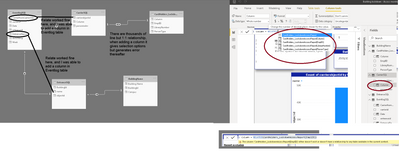
Thank you so much for your reply, in an effort to replicate the issue and create pbix example, I was able to resolve by using relate and then distinctcountnoblank in the sample file; but in the actual file even though there is 1:1 relationship, when relate is used - it gives the selection, but then an error is generated as per the image below.
Any suggestion would be gratefully received.
Thanks

Mita

MitaSaxena_0-1611854485044.png


Hi, I wanted to delete this off, since I am now sorted... I gave us trying directquery with SQL and used excel instead. Instead of relate function used lookupvalue which worked well.

lookupvalue does not work on directquery unless this is done, which has been blocked by the organisation.

Helpful resources

Announcements
New to Fabric survey Carousel

New to Fabric Survey

If you have recently started exploring Fabric, we'd love to hear how it's going. Your feedback can help with product improvements.

Power BI DataViz World Championships carousel

Power BI DataViz World Championships - June 2026

A new Power BI DataViz World Championship is coming this June! Don't miss out on submitting your entry.

Join our Fabric User Panel

Join our Fabric User Panel

Share feedback directly with Fabric product managers, participate in targeted research studies and influence the Fabric roadmap.

March Power BI Update Carousel

Power BI Community Update - March 2026

Check out the March 2026 Power BI update to learn about new features.