cancel
Showing results for 
Search instead for 
Did you mean: 

Get Fabric Certified for FREE during Fabric Data Days. Don't miss your chance! Request now

Reply
Syndicate_Admin
Administrator
Administrator

Help with Accumulated

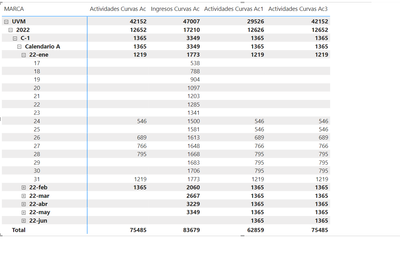
How are you, I hope you can help me... I have the requirement to make a cumulative over time, I have a table of activities that relates directly to the calendar table by the date of the activity. It's not every day that there are activities. However, in the table they are expected to be seen every day. When a day has no values, the previous value must be displayed. And once the maximum date of the activity for that calendar, cycle, year and brand is reached, the calculation must be stopped. In the image, AC Curves Activities performs the cumulative in the correct period, that is, from the minimum date of activity to the maximum date, however it leaves empty spaces on the days when there is no activity. On the right side we have Activities Ac1 and Ac3 that perform the cumulative including the days without activity and repeat the previous value but should stop up to the maximum value of the activity. That is, it should be displayed until Feb. 22. and from then on show nothing. I've tried different alternatives and can't find how to adjust the metric.

JesusR_0-1701978322874.png

The metrics in question:

Activities Curves Ac =
WHERE FechaActual2 = MAX('PERFECT_LAST_ATTEMPT'[LAST_ATTEMPT_DATE])
WHERE FechaActual = MAX('Calendar'[Date])
where fechamin = MIN('Calendar'[Date])
WHERE ANIO = MAX(Cycles[Anio])
WHERE ANIO2 = YEAR(FechaActual2)
where acu2 = CALCULATE(
COALESCE(
SUM(PERFECT_LAST_ATTEMPT[Students]),
CALCULATE(
VALUES(PERFECT_LAST_ATTEMPT[Students]),
FILTER(
ALLSELECTED(Calendar),
Calendar[Date] = FechaActual
)
)
),
FILTER(
ALLSELECTED(Calendar),
Calendar[Date] <= FechaActual &&
'Calendar'[Year] <= ANIO2 --MAX('Calendar'[Year])
)
)
return acu2

Ac1 Curve Activities:
Activities Curves Ac1 =
--VAR FechaActual = MAX('PERFECT_LAST_ATTEMPT'[LAST_ATTEMPT_DATE])
--VAR FechaActual = CALCULATE( MAX(Calendario[Date]), DATEADD('Calendario'[Date], - 1 , DAY))
--var fechamin = MIN(PERFECT_LAST_ATTEMPT[LAST_ATTEMPT_DATE])
WHERE FechaActual2 = MAX('PERFECT_LAST_ATTEMPT'[LAST_ATTEMPT_DATE])
WHERE FechaActual = MAX('Calendar'[Date])
where fechamin = MIN('Calendar'[Date])
WHERE ANIO = MAX(Cycles[Anio])
WHERE ANIO2 = YEAR(FechaActual2)
where acu2 = CALCULATE(
COALESCE(
SUM(PERFECT_LAST_ATTEMPT[Students]),
CALCULATE(
VALUES(PERFECT_LAST_ATTEMPT[Students]),
FILTER(
ALLSELECTED(Calendar),
Calendar[Date] = FechaActual
)
)
),
)
return acu2
I hope you understand and you can guide me.
1 ACCEPTED SOLUTION
amitchandak
Super User
Super User

@Syndicate_Admin , If you need cumulative with date/calendar table, use meausre like


Cumm Sales = CALCULATE(SUM(Sales[Sales Amount]),filter(all('Date'),'Date'[date] <=max('Date'[date])))

Cumm Sales = CALCULATE(SUM(Sales[Sales Amount]),filter(allselected(date),date[date] <=max(date[Date])))

Cumm Based on Date = CALCULATE([Net], Window(1,ABS,0,REL, ALL('date'[date]),ORDERBY('Date'[date],ASC)))

Cumm Based on Date = CALCULATE([Net], Window(1,ABS,0,REL, ALLSELECTED('date'[date]),ORDERBY('Date'[date],ASC)))


Use Column date table in measure, visual and slicer


If you need the last-day value for a simple sum


Cumm Sales = CALCULATE(lastnonblankvalue('Date'[Date]), SUM(Sales[Sales Amount])) ,filter(allselected(date),date[date] <=max(date[Date])))

Share with Power BI Enthusiasts: Full Power BI Video (20 Hours) YouTube
Microsoft Fabric Series 60+ Videos YouTube
Microsoft Fabric Hindi End to End YouTube

View solution in original post

1 REPLY 1
amitchandak
Super User
Super User

@Syndicate_Admin , If you need cumulative with date/calendar table, use meausre like


Cumm Sales = CALCULATE(SUM(Sales[Sales Amount]),filter(all('Date'),'Date'[date] <=max('Date'[date])))

Cumm Sales = CALCULATE(SUM(Sales[Sales Amount]),filter(allselected(date),date[date] <=max(date[Date])))

Cumm Based on Date = CALCULATE([Net], Window(1,ABS,0,REL, ALL('date'[date]),ORDERBY('Date'[date],ASC)))

Cumm Based on Date = CALCULATE([Net], Window(1,ABS,0,REL, ALLSELECTED('date'[date]),ORDERBY('Date'[date],ASC)))


Use Column date table in measure, visual and slicer


If you need the last-day value for a simple sum


Cumm Sales = CALCULATE(lastnonblankvalue('Date'[Date]), SUM(Sales[Sales Amount])) ,filter(allselected(date),date[date] <=max(date[Date])))

Share with Power BI Enthusiasts: Full Power BI Video (20 Hours) YouTube
Microsoft Fabric Series 60+ Videos YouTube
Microsoft Fabric Hindi End to End YouTube

Helpful resources

Announcements
November Power BI Update Carousel

Power BI Monthly Update - November 2025

Check out the November 2025 Power BI update to learn about new features.

Fabric Data Days Carousel

Fabric Data Days

Advance your Data & AI career with 50 days of live learning, contests, hands-on challenges, study groups & certifications and more!

FabCon Atlanta 2026 carousel

FabCon Atlanta 2026

Join us at FabCon Atlanta, March 16-20, for the ultimate Fabric, Power BI, AI and SQL community-led event. Save $200 with code FABCOMM.

Top Solution Authors
Top Kudoed Authors