cancel
Showing results for 
Search instead for 
Did you mean: 

The Power BI Data Visualization World Championships is back! Get ahead of the game and start preparing now! Learn more

Reply
DRJ1994
Helper I
Helper I

Help to calculate a percentage

Hi all,


I hope somebody is able to assist with my query. I am not 100% sure what I am trying to do is actually possible.


I would like to create a percentage of an overall value.


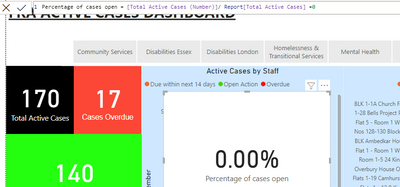
DRJ1994_0-1659093425630.png

The 170 on the left is the maximum number. What I would like to achieve is when I click on the slicer at the top that it generates the % for each team.

The card with the percentage on should in my opinion be 100% when the slicer is not selected, however it is showing as 0.00%. I have included the DAX I am trying to use at the top of the screenshot.


Any assistance or advice would be appreciated.


Thank you,

DRJ. 

1 ACCEPTED SOLUTION

Hi, @DRJ1994 

If you want the card to be 100% when the slicer is not selected, you can try to use the function ISFILTERED  to get the state of the slicer.

Please add another measure like:

New Percentage =
IF ( ISFILTERED ( 'Slicer'[field] ), [percentage of cases open], 1 )

Apply it to the card visual and display it in % format.


Best Regards,
Community Support Team _ Eason


View solution in original post

3 REPLIES 3
rajulshah
Resident Rockstar
Resident Rockstar

Hello @DRJ1994 ,


Would you be able to share what is in the measures?

Hi @rajulshah 


The 2 measures are identical really. They are both counts of how many rows are in the 'open case' part of my source data. I just assumed if you divide one by the other it would give me 100%, and then I can use the slicer to get the individual % for each team. 

Hi, @DRJ1994 

If you want the card to be 100% when the slicer is not selected, you can try to use the function ISFILTERED  to get the state of the slicer.

Please add another measure like:

New Percentage =
IF ( ISFILTERED ( 'Slicer'[field] ), [percentage of cases open], 1 )

Apply it to the card visual and display it in % format.


Best Regards,
Community Support Team _ Eason


Helpful resources

Announcements
Power BI DataViz World Championships

Power BI Dataviz World Championships

The Power BI Data Visualization World Championships is back! Get ahead of the game and start preparing now!

December 2025 Power BI Update Carousel

Power BI Monthly Update - December 2025

Check out the December 2025 Power BI Holiday Recap!

FabCon Atlanta 2026 carousel

FabCon Atlanta 2026

Join us at FabCon Atlanta, March 16-20, for the ultimate Fabric, Power BI, AI and SQL community-led event. Save $200 with code FABCOMM.