Get Fabric or SQL Certified for Free.
Get certified for free when you join Fabric Data Days 2026 and dive into Fabric, Power BI, SQL, AI, and other essential data skills.
Join now- Power BI forums
- Get Help with Power BI
- Desktop
- Service
- Report Server
- Power Query
- Mobile Apps
- Developer
- DAX Commands and Tips
- Custom Visuals Development Discussion
- Health and Life Sciences
- Power BI Spanish forums
- Translated Spanish Desktop
- Training and Consulting
- Instructor Led Training
- Dashboard in a Day for Women, by Women
- Galleries
- Data Stories Gallery
- Themes Gallery
- Contests Gallery
- QuickViz Gallery
- Quick Measures Gallery
- Visual Calculations Gallery
- Notebook Gallery
- Translytical Task Flow Gallery
- TMDL Gallery
- R Script Showcase
- Webinars and Video Gallery
- Ideas
- Custom Visuals Ideas (read-only)
- Issues
- Issues
- Events
- Upcoming Events
Try your skills in the Power BI Dataviz World Championship! Round one ends June 26. Join now
- Power BI forums
- Forums
- Get Help with Power BI
- Desktop
- Help needed on Complex Scenario
- Subscribe to RSS Feed
- Mark Topic as New
- Mark Topic as Read
- Float this Topic for Current User
- Bookmark
- Subscribe
- Printer Friendly Page

- Mark as New
- Bookmark
- Subscribe
- Mute
- Subscribe to RSS Feed
- Permalink
- Report Inappropriate Content
Help needed on Complex Scenario
Hello Community Group,
I have recently came across a scenario where in the input file given link below has a table visual with columns Member & list of details. I wanted to achieve, the list of details field to be splitted across each column because the list of details field in the input file is grouped & concatenate for a member where i wanted to break it down into different columns as shown in the output below. How can we resolve this problem ? For refernce, i have attached the desired output of the screenshot as well.
Input:
@parry2k, @Amin , @Greg @amitchandak @pade @Paddy
Output:

Please do the needful.
Thanks
Jay
Solved! Go to Solution.


- Mark as New
- Bookmark
- Subscribe
- Mute
- Subscribe to RSS Feed
- Permalink
- Report Inappropriate Content
Hi @Anonymous ,
You can do this on the query editor and this will work has a single step using the split columns by delimiter:
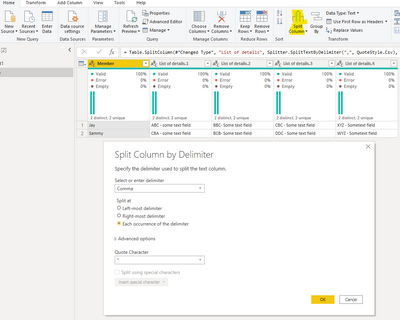
Or you can do it using DAX to do columns you need to add the following syntax:
Column:
Test Column 1 = PATHITEM(SUBSTITUTE(Sheet1[List of details], ", ", "|"), 1)

Test Column 2 = PATHITEM(SUBSTITUTE(Sheet1[List of details], ", ", "|"), 2)

Test Column 3 = PATHITEM(SUBSTITUTE(Sheet1[List of details], ", ", "|"), 3)

Test Column 4 = PATHITEM(SUBSTITUTE(Sheet1[List of details], ", ", "|"), 4)
Measures:
Test Measure 1 = PATHITEM(SUBSTITUTE(SELECTEDVALUE(Sheet1[List of details]), ", ", "|"), 1)

Test Measure 2 = PATHITEM(SUBSTITUTE(SELECTEDVALUE(Sheet1[List of details]), ", ", "|"), 2)

Test Measure 3 = PATHITEM(SUBSTITUTE(SELECTEDVALUE(Sheet1[List of details]), ", ", "|"), 3)

Test Measure 4 = PATHITEM(SUBSTITUTE(SELECTEDVALUE(Sheet1[List of details]), ", ", "|"), 4)
Result in attach PBIX.
Regards
Miguel Félix
Did I answer your question? Mark my post as a solution!
Proud to be a Super User!
Check out my blog: Power BI em Português
- Mark as New
- Bookmark
- Subscribe
- Mute
- Subscribe to RSS Feed
- Permalink
- Report Inappropriate Content
Hi @Anonymous ,
You can do this on the query editor and this will work has a single step using the split columns by delimiter:
Or you can do it using DAX to do columns you need to add the following syntax:
Column:
Test Column 1 = PATHITEM(SUBSTITUTE(Sheet1[List of details], ", ", "|"), 1)

Test Column 2 = PATHITEM(SUBSTITUTE(Sheet1[List of details], ", ", "|"), 2)

Test Column 3 = PATHITEM(SUBSTITUTE(Sheet1[List of details], ", ", "|"), 3)

Test Column 4 = PATHITEM(SUBSTITUTE(Sheet1[List of details], ", ", "|"), 4)
Measures:
Test Measure 1 = PATHITEM(SUBSTITUTE(SELECTEDVALUE(Sheet1[List of details]), ", ", "|"), 1)

Test Measure 2 = PATHITEM(SUBSTITUTE(SELECTEDVALUE(Sheet1[List of details]), ", ", "|"), 2)

Test Measure 3 = PATHITEM(SUBSTITUTE(SELECTEDVALUE(Sheet1[List of details]), ", ", "|"), 3)

Test Measure 4 = PATHITEM(SUBSTITUTE(SELECTEDVALUE(Sheet1[List of details]), ", ", "|"), 4)
Result in attach PBIX.
Regards
Miguel Félix
Did I answer your question? Mark my post as a solution!
Proud to be a Super User!
Check out my blog: Power BI em Português- Mark as New
- Bookmark
- Subscribe
- Mute
- Subscribe to RSS Feed
- Permalink
- Report Inappropriate Content
@MFelixThis would definitely work, but in case of import option, my apologize didnt mention the method of connection. However, in my case it is direct query mode (SSAS model). How this scenario can be achieved using this type of connection ?
- Mark as New
- Bookmark
- Subscribe
- Mute
- Subscribe to RSS Feed
- Permalink
- Report Inappropriate Content
You need to use the measures for achieving the result.
Regards
Miguel Félix
Did I answer your question? Mark my post as a solution!
Proud to be a Super User!
Check out my blog: Power BI em Português- Mark as New
- Bookmark
- Subscribe
- Mute
- Subscribe to RSS Feed
- Permalink
- Report Inappropriate Content
@MFelix With the above given measures? Sure, will give it a try and let you know. Thank you for taking time.
- Mark as New
- Bookmark
- Subscribe
- Mute
- Subscribe to RSS Feed
- Permalink
- Report Inappropriate Content
Correct
Regards
Miguel Félix
Did I answer your question? Mark my post as a solution!
Proud to be a Super User!
Check out my blog: Power BI em Português
Helpful resources

Data Days 2026
Don't miss out on Data Days, June 15 through August 7. Learn Fabric, Power BI, SQL, AI and more.

Power BI DataViz World Championships - June 2026
A new Power BI DataViz World Championship is coming this June! Don't miss out on submitting your entry.

| User | Count |
|---|---|
| 22 | |
| 21 | |
| 20 | |
| 20 | |
| 11 |


| User | Count |
|---|---|
| 62 | |
| 55 | |
| 46 | |
| 45 | |
| 34 |


