cancel
Showing results for 
Search instead for 
Did you mean: 

The Power BI Data Visualization World Championships is back! Get ahead of the game and start preparing now! Learn more

Reply
DiogoValentim
New Member

Help creating two mesures

Hello to all, 


I need a big help creating two mesures:


1st - Fees for the Shareholders : I need help creating a formula that Calculate the amont of fee one shareholder must Pay, to do so I must create a sum of fees of "Forecast" by date (Month) multiplied by the share that shareholder holds in the SPE (Company)


Translates:

  • the name "Acionista" = Shareholder
  • The names "Previsao" or "Previsão" = Forecast (Fees)
  • Dcalendario = My date modeling: Data Base=Range of Dates  |   Ano=Year  |   Mês=Month  |   Dia=Day  |   Trimestre=Quarter
  • The Name Participação=Share

2nd - Create a Mesure that see the amount of money one shareholder imput in the SPE (Company) by time less the Fees for the Shareholders create in the first question.


Translates:

  • the name "Aporte" = Money imput by the Shareholder on one month.


The logic behind this Mesures is first, identify the need of pay for any shareholder, and the need of pay equals to the sum of "Previsão" multiplied by the share of each shareholder.

After get what each shareholder must pay, we see the amount of money thei inject in this company, and see if the shareholder has a debt or a credit (Aporte), this seen by time (Year, quarter or month)


The PBI file and database is in the link: https://goo.gl/F0EY3E


Thx for the help, and if i get myself unclear, just ask anyting.

1 ACCEPTED SOLUTION
Anonymous
Not applicable

Hi @DiogoValentim,


You can take a look at below formulas if it works on your side:


Previsao(Data&SPE) =
var currSPE=LASTNONBLANK(Tbl_PlanodeContas[SPE],[SPE])
var currDate=MAX([Data])
Return
SUMX(FILTER(ALL(Tbl_PlanodeContas),[SPE]=currSPE&&[Data]=currDate),[Valor])


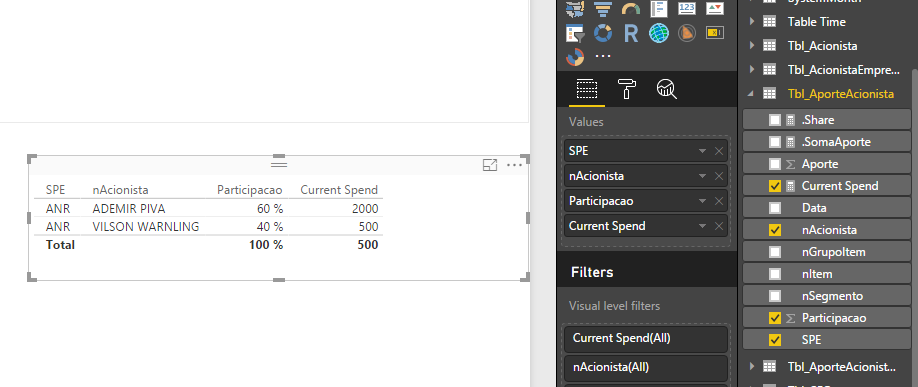
Current Spend =
var currDate=MAX([Data])
var currSPE=LASTNONBLANK(Tbl_AporteAcionista[SPE],[SPE])
var currAcionista=LASTNONBLANK(Tbl_AporteAcionista[nAcionista],[nAcionista])
Return
SUMX(FILTER(ALL(Tbl_AporteAcionista), [nAcionista]=currAcionista&&[SPE]=currSPE&&[Data]=currDate),[Aporte])


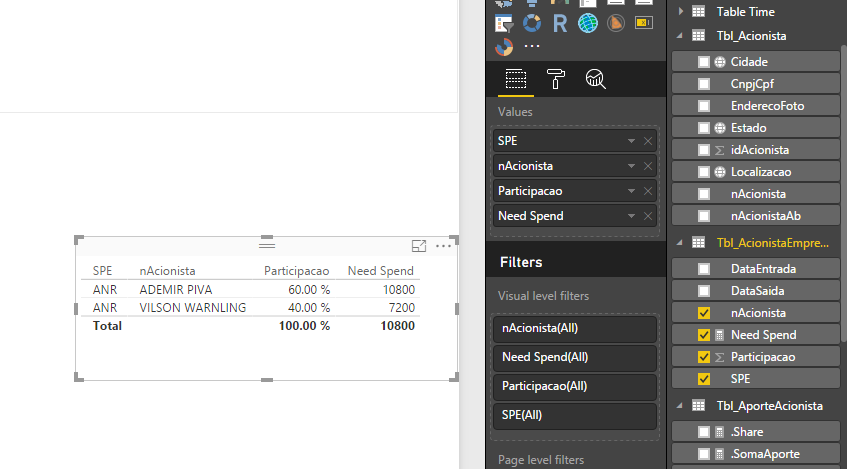
Need Spend =
CALCULATE([Previsao(Data&SPE)],VALUES(Tbl_AcionistaEmpresa[SPE]))* MAX([Participacao])


Result:


12.pngCapture3.PNG


Regards,

Xiaoxin Sheng

View solution in original post

2 REPLIES 2
Anonymous
Not applicable

Hi @DiogoValentim,


You can take a look at below formulas if it works on your side:


Previsao(Data&SPE) =
var currSPE=LASTNONBLANK(Tbl_PlanodeContas[SPE],[SPE])
var currDate=MAX([Data])
Return
SUMX(FILTER(ALL(Tbl_PlanodeContas),[SPE]=currSPE&&[Data]=currDate),[Valor])


Current Spend =
var currDate=MAX([Data])
var currSPE=LASTNONBLANK(Tbl_AporteAcionista[SPE],[SPE])
var currAcionista=LASTNONBLANK(Tbl_AporteAcionista[nAcionista],[nAcionista])
Return
SUMX(FILTER(ALL(Tbl_AporteAcionista), [nAcionista]=currAcionista&&[SPE]=currSPE&&[Data]=currDate),[Aporte])


Need Spend =
CALCULATE([Previsao(Data&SPE)],VALUES(Tbl_AcionistaEmpresa[SPE]))* MAX([Participacao])


Result:


12.pngCapture3.PNG


Regards,

Xiaoxin Sheng

Thx @Anonymous,


I needed to do some minor ajustments, but it worked!


Regards,

Diogo Valentim

Helpful resources

Announcements
Power BI DataViz World Championships

Power BI Dataviz World Championships

The Power BI Data Visualization World Championships is back! Get ahead of the game and start preparing now!

December 2025 Power BI Update Carousel

Power BI Monthly Update - December 2025

Check out the December 2025 Power BI Holiday Recap!

FabCon Atlanta 2026 carousel

FabCon Atlanta 2026

Join us at FabCon Atlanta, March 16-20, for the ultimate Fabric, Power BI, AI and SQL community-led event. Save $200 with code FABCOMM.