cancel
Showing results for 
Search instead for 
Did you mean: 

The Power BI Data Visualization World Championships is back! Get ahead of the game and start preparing now! Learn more

Reply
karimk
Helper III
Helper III

Help: Total days delay across projects, per month

Hey everyone.

I have a database with a list projects, each one with a planned start, planned finish, actual start and actual finish date.

I need to show on a line chart the total ammount of days delayed across all projects, per month. 


The "delayed" concept should be as follows:

a) When I have an actual finish: Difference between the planned finish and the actual finish


b) When I still don´t have an actual finish: Difference between the planned finish and the last day of the month (it is important that the calculation knows how to do this for each month.


Example: If a project is delayed 10 days by the end of April, then it will be 40 days delayed by the end of May. If it´s finished by June 5th, then the project will register a total delay of 45 days, but the 45 will distributed across each month.


Can anyone help?


My actual calculation should use working days, but I know how to do that. I´ll try to work this into whatever solution I´m recommended.


Thank you very much. 

1 ACCEPTED SOLUTION

Hi @v-yulgu-msft!

I actually have to explain it better, but I have a dataset and a desktop file to help.


My goal is to show the sum of delayed days per month across projects.

What dictates my X axis is the planned finish date.

Example: The sum of delayed days in April will only be for the projects with an April planned finish date.


The catch is that I want to be able to check the delay of projects, even if they don´t have an actual finish date yet.

Call it an "actual + temporary" delay of projects.

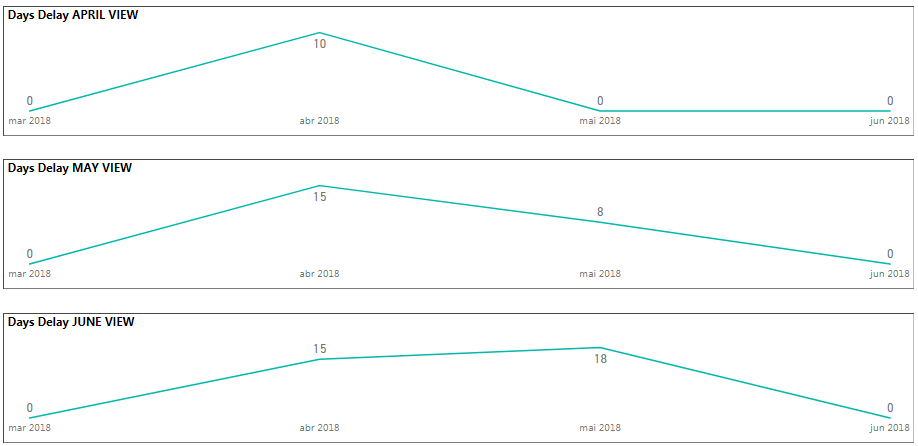
Example 2: Imagine I have a project with a planned finish date of 04/20/18, but the actual finish date is 05/05/18. If I´m checking this report in April, I will see a delay of ~10 days in April (04/30/18 - 04/20/18). When I check the report in May I will see a delay of 15 days in April (05/05/18 - 04/20/18). Remember that my X axis is based on the planned finish date.


Here is a link for the test files:

Onedrive Files


Below is a pic of how my chart would look like on each month I open my report

Charts.PNG

View solution in original post

2 REPLIES 2
v-yulgu-msft
Microsoft Employee
Microsoft Employee

Hi @karimk,


You said you wanted a line chart to show total ammount of days delayed across all projects, per month, so, you would add "Project" to legend, add "Month" to X-axis, right?

Example: If a project is delayed 10 days by the end of April, then it will be 40 days delayed by the end of May. If it´s finished by June 5th, then the project will register a total delay of 45 days, but the 45 will distributed across each month.

 What do you mean "45 will distributed across each month"? Would you please post some dummy data to illustrate this scenario? It would be better to show us your desired output.


Regards,

Yuliana Gu

Community Support Team _ Yuliana Gu
If this post helps, then please consider Accept it as the solution to help the other members find it more quickly.

Hi @v-yulgu-msft!

I actually have to explain it better, but I have a dataset and a desktop file to help.


My goal is to show the sum of delayed days per month across projects.

What dictates my X axis is the planned finish date.

Example: The sum of delayed days in April will only be for the projects with an April planned finish date.


The catch is that I want to be able to check the delay of projects, even if they don´t have an actual finish date yet.

Call it an "actual + temporary" delay of projects.

Example 2: Imagine I have a project with a planned finish date of 04/20/18, but the actual finish date is 05/05/18. If I´m checking this report in April, I will see a delay of ~10 days in April (04/30/18 - 04/20/18). When I check the report in May I will see a delay of 15 days in April (05/05/18 - 04/20/18). Remember that my X axis is based on the planned finish date.


Here is a link for the test files:

Onedrive Files


Below is a pic of how my chart would look like on each month I open my report

Charts.PNG

Helpful resources

Announcements
November Power BI Update Carousel

Power BI Monthly Update - November 2025

Check out the November 2025 Power BI update to learn about new features.

Fabric Data Days Carousel

Fabric Data Days

Advance your Data & AI career with 50 days of live learning, contests, hands-on challenges, study groups & certifications and more!

FabCon Atlanta 2026 carousel

FabCon Atlanta 2026

Join us at FabCon Atlanta, March 16-20, for the ultimate Fabric, Power BI, AI and SQL community-led event. Save $200 with code FABCOMM.

Top Solution Authors
Top Kudoed Authors