FabCon is coming to Atlanta
Join us at FabCon Atlanta from March 16 - 20, 2026, for the ultimate Fabric, Power BI, AI and SQL community-led event. Save $200 with code FABCOMM.
Register now!- Power BI forums
- Get Help with Power BI
- Desktop
- Service
- Report Server
- Power Query
- Mobile Apps
- Developer
- DAX Commands and Tips
- Custom Visuals Development Discussion
- Health and Life Sciences
- Power BI Spanish forums
- Translated Spanish Desktop
- Training and Consulting
- Instructor Led Training
- Dashboard in a Day for Women, by Women
- Galleries
- Data Stories Gallery
- Themes Gallery
- Contests Gallery
- QuickViz Gallery
- Quick Measures Gallery
- Visual Calculations Gallery
- Notebook Gallery
- Translytical Task Flow Gallery
- TMDL Gallery
- R Script Showcase
- Webinars and Video Gallery
- Ideas
- Custom Visuals Ideas (read-only)
- Issues
- Issues
- Events
- Upcoming Events
The Power BI Data Visualization World Championships is back! Get ahead of the game and start preparing now! Learn more
- Power BI forums
- Forums
- Get Help with Power BI
- Desktop
- Help Calculating Average QOQ% Change for Year or m...
- Subscribe to RSS Feed
- Mark Topic as New
- Mark Topic as Read
- Float this Topic for Current User
- Bookmark
- Subscribe
- Printer Friendly Page


- Mark as New
- Bookmark
- Subscribe
- Mute
- Subscribe to RSS Feed
- Permalink
- Report Inappropriate Content
Help Calculating Average QOQ% Change for Year or more
having trouble figuring out if I can get an average of a QOQ% MEasure I created? the first table shows how my data is set up.
my QOQ % calculations are working fine
| Qtr | Item | waste (is a measure) | QOQ% (also dynamic measure) |
| 1 | 1234 | 10 | |
| 1 | 567 | 12 | |
| 1 | 8910 | 19 | |
| 1 | 1121314 | 20 | |
| 2 | 1234 | 11 | 10% |
| 2 | 567 | 12 | 0% |
| 2 | 8910 | 23 | 21% |
| 2 | 1121314 | 9 | -55% |
| 3 | 1234 | 2 | -82% |
| 3 | 567 | 5 | -58% |
| 3 | 8910 | 64 | 178% |
| 3 | 1121314 | 24 | 167% |
| 4 | 1234 | 32 | 1500% |
| 4 | 567 | 53 | 960% |
| 4 | 8910 | 64 | 0% |
| 4 | 1121314 | 64 | 167% |
I want to achieve the table below with Average % change of the QOQ%, i also dont want any filter apply to the dates so its just a running change as we keep adding years or additional quarters.
| Item | Average change (no filters should apply always) | |
| 1234 | 476% | average change between all quarters (so adding 3 quarters QOQ% divide by 4) |
| 567 | 300% | |
| 8910 | 66.30% | |
| 1121314 | 93% |
-----------------------
FYI The original request was to find the trend but didnt think this was easy in PBI so instead just calculating the "average change" instead of linest function from excel
Solved! Go to Solution.


- Mark as New
- Bookmark
- Subscribe
- Mute
- Subscribe to RSS Feed
- Permalink
- Report Inappropriate Content
Hey @powerbihelp87 ,
I guess this measure provides what you are looking for:
Measure =
AVERAGEX(
    ADDCOLUMNS(
        CROSSJOIN(
            VALUES('Table'[Item])
            , ALL('Table'[Qtr])
        )
        , "_measure " , [QOQ% (also dynamic measure)]
    )
    , [_measure ]
)
It allows to create these table visuals:
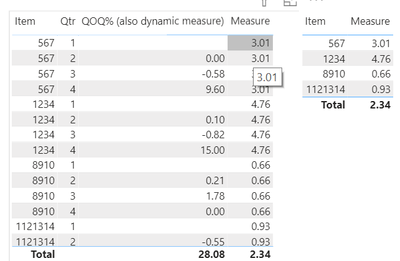
Hopefully, this provides what you are looking for.
Regards,
Tom
stay safe, stay healthy, and Power On
Did I answer your question? Mark my post as a solution, this will help others!
Proud to be a Super User!
I accept Kudos 😉
Hamburg, Germany
- Mark as New
- Bookmark
- Subscribe
- Mute
- Subscribe to RSS Feed
- Permalink
- Report Inappropriate Content
Hey @powerbihelp87 ,
I guess this measure provides what you are looking for:
Measure =
AVERAGEX(
    ADDCOLUMNS(
        CROSSJOIN(
            VALUES('Table'[Item])
            , ALL('Table'[Qtr])
        )
        , "_measure " , [QOQ% (also dynamic measure)]
    )
    , [_measure ]
)
It allows to create these table visuals:
Hopefully, this provides what you are looking for.
Regards,
Tom
stay safe, stay healthy, and Power On
Did I answer your question? Mark my post as a solution, this will help others!
Proud to be a Super User!
I accept Kudos 😉
Hamburg, Germany
- Mark as New
- Bookmark
- Subscribe
- Mute
- Subscribe to RSS Feed
- Permalink
- Report Inappropriate Content

- Mark as New
- Bookmark
- Subscribe
- Mute
- Subscribe to RSS Feed
- Permalink
- Report Inappropriate Content
You can get last qtr by using last qtr no like
Last Qtr waste = calculate([waste ], filter(Table,Table[Qtr] <=max(Table[Qtr])-1))
but better if you have qtr year column like this(YYYYQQ) and create a rank
Rank = Rankx(all(Table),Table[Qtr])
Last Qtr waste = calculate([waste ], filter(Table,Table[Rank] <=max(Table[Rank])-1))
My advice would be to Qtr to a different table as all will remove other filters
Refer how to use Rank for prior - https://www.dropbox.com/s/d9898a48e76wmvl/sales_analytics_weekWise.pbix?dl=0
If you have date, then use date calendar and Time intelligence
QTD Sales = CALCULATE(SUM(Sales[Sales Amount]),DATESQTD(('Date'[Date])))

Last QTD Sales = CALCULATE(SUM(Sales[Sales Amount]),DATESQTD(dateadd('Date'[Date],-1,QUARTER)))
Last complete QTD Sales = CALCULATE(SUM(Sales[Sales Amount]),DATESQTD( ENDOFQUARTER(dateadd('Date'[Date],-1,QUARTER))))

Last to last QTD Sales = CALCULATE(SUM(Sales[Sales Amount]),DATESQTD(dateadd('Date'[Date],-2,QUARTER)))
Next QTD Sales = CALCULATE(SUM(Sales[Sales Amount]),DATESQTD(dateadd('Date'[Date],1,QUARTER)))

Last year same QTD Sales = CALCULATE(SUM(Sales[Sales Amount]),DATESQTD(dateadd('Date'[Date],-1,Year)))
Last year same QTD Sales = CALCULATE(SUM(Sales[Sales Amount]),DATESQTD(ENDOFQUARTER(dateadd('Date'[Date],-1,Year))))

trailing QTR = CALCULATE(SUM(Sales[Sales Amount]),dateadd('Date'[Date],-1,QUARTER))
trailing  4 QTR = CALCULATE(SUM(Sales[Sales Amount]),dateadd('Date'[Date],-4,QUARTER))
To get the best of the time intelligence function. Make sure you have a date calendar and it has been marked as the date in model view. Also, join it with the date column of your fact/s. Refer :
https://radacad.com/creating-calendar-table-in-power-bi-using-dax-functions
https://www.archerpoint.com/blog/Posts/creating-date-table-power-bi
https://www.sqlbi.com/articles/creating-a-simple-date-table-in-dax/
- Mark as New
- Bookmark
- Subscribe
- Mute
- Subscribe to RSS Feed
- Permalink
- Report Inappropriate Content
just noticed the second half didnt populate when I first viewed it! I will try and see how it works out thank you!
- Mark as New
- Bookmark
- Subscribe
- Mute
- Subscribe to RSS Feed
- Permalink
- Report Inappropriate Content
@amitchandak Thank you for looking into my issue!
I am able to get the QOQ% but want the average for all quarters, not sure if that is possible.
so lets say item 1234
q1- 10% QOQ
q2-23% QOQ
q3-10% QOQ
calculation is (10+23+10)/3

Helpful resources

Power BI Dataviz World Championships
The Power BI Data Visualization World Championships is back! Get ahead of the game and start preparing now!

Power BI Monthly Update - December 2025
Check out the December 2025 Power BI Holiday Recap!

FabCon Atlanta 2026
Join us at FabCon Atlanta, March 16-20, for the ultimate Fabric, Power BI, AI and SQL community-led event. Save $200 with code FABCOMM.

| User | Count |
|---|---|
| 38 | |
| 38 | |
| 36 | |
| 28 | |
| 28 |


| User | Count |
|---|---|
| 124 | |
| 88 | |
| 74 | |
| 66 | |
| 65 |


