Don't miss your chance to take the Fabric Data Engineer (DP-600) exam for FREE! Find out how by attending the DP-600 session on April 23rd (pacific time), live or on-demand.
Learn moreJoin the FabCon + SQLCon recap series. Up next: Power BI, Real-Time Intelligence, IQ and AI, and Data Factory take center stage. All sessions are available on-demand after the live show. Register now
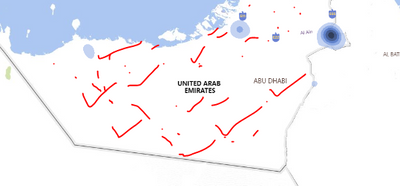
This is my current heat map file, it shoudl cover all area here , but it is not givign desired result
when i am looking in heat map it is only pointing to certain location but my location is sorrounded to full UAE , but is poiting to only 2 area
desried output is this full are sohudl get covered
my file https://we.tl/t-SEMb5Sweb1
Hi @bilalkhokar73 ,
You could take a look at this: https://doc.arcgis.com/en/maps-for-powerbi/. It introduces ArcGIS map in great detail. Maybe it can help you a little.
Best Regards,
Liu Yang
If this post helps, then please consider Accept it as the solution to help the other members find it more quickly.
@bilalkhokar73 , fill or shape map is a better idea, But for that, you have to add JSON for region or need to check if that is available
Check out the April 2026 Power BI update to learn about new features.
If you have recently started exploring Fabric, we'd love to hear how it's going. Your feedback can help with product improvements.
A new Power BI DataViz World Championship is coming this June! Don't miss out on submitting your entry.
| User | Count |
|---|---|
| 48 | |
| 46 | |
| 41 | |
| 20 | |
| 17 |
| User | Count |
|---|---|
| 70 | |
| 69 | |
| 32 | |
| 27 | |
| 26 |