
Join us at FabCon Atlanta from March 16 - 20, 2026, for the ultimate Fabric, Power BI, AI and SQL community-led event. Save $200 with code FABCOMM.
Register now!Learn from the best! Meet the four finalists headed to the FINALS of the Power BI Dataviz World Championships! Register now
Hi! I'd like to count the number of months over a target margin but the measure I wrote is giving me an error:
Months over Target Margin =
VAR Target =
DIVIDE(
[2022 Total Amount Converted] - [2022 Total Costs], [2022 Total Amount Converted]
)
return
CALCULATE(
COUNTA('Calendar'[Month]),
Target >= .5
)
I'm pretty new to DAX so any help is appreciated!
@Arete , Try like
Months over Target Margin =
VAR Target =
DIVIDE(
[2022 Total Amount Converted] - [2022 Total Costs], [2022 Total Amount Converted]
)
return
CALCULATE(
COUNTROWS(Filter(Values('Calendar'[Month]),Target >= .5))
)
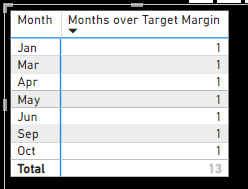
Thanks for the reply! It looks like it's working but I need the discount count of months:
It should be 7 but instead, it says 13. Any suggestions?
Share feedback directly with Fabric product managers, participate in targeted research studies and influence the Fabric roadmap.
Check out the February 2026 Power BI update to learn about new features.
| User | Count |
|---|---|
| 52 | |
| 50 | |
| 34 | |
| 15 | |
| 14 |
| User | Count |
|---|---|
| 94 | |
| 77 | |
| 41 | |
| 26 | |
| 25 |