cancel
Showing results for 
Search instead for 
Did you mean: 

The Power BI Data Visualization World Championships is back! Get ahead of the game and start preparing now! Learn more

Reply
RMDNA
Solution Sage
Solution Sage

Have drill-through keep one of the selected item filters but clear the others?

Hi all - I'm having a bit of difficulty explaining what I'm looking for, but here we go:

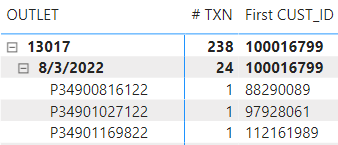
I have a matrix on my main page with a list of unique IDs (P349...), which have a customer ID attached to them (8829...)


RMDNA_0-1660933720552.png


I want to drill on that specific customer (8829), but not keep the other filters for that entry - I need that customer to be the only filter that gets carried through to the next page. The goal is to pick a line item for a specific customer, then be able to view all historical activity for that customer on the drillthrough page.

Alternately, is there another method to select a value out of a table and use it as a filter on a different page? I haven't really worked with drill-throughs much, and experimentation hasn't gotten me what I need. Thanks!

6 REPLIES 6
AwesomeEngineer
New Member

Almost 3 years late to this but I found this while researching an issue of my own. I realized that the "Keep all filters" selection in the drilldown box does exactly this. I was able to drill down by a value in a column (in a table which had a lot of filters) to then see all values for that value in a different page. Posting in case somebody comes across this again. 

lbendlin
Super User
Super User

Two options


- on your drillthrough target page utilize measures that remove certain filters from the result

- teach your users how to operate the filter pane, how to distinguish between regular and drillthrough filters, and how to clear filters. 

Hi @lbendlin - I guess I'll need to go the measure route. My users are fairly adept at Power BI, but the whole point was to remove their need to mess around with any filters on their own.

What general approach would you recommend for removing filters within measures?

but the whole point was to remove their need to mess around with any filters on their own.

You may be solving the wrong problem here. Power BI is supposed to empower your citizen data scientists, not constrict them.


Within reason of course - asking them to modify measures on the fly might be a bit too much.

I think that's overreaching - I'm looking for this specific drillthrough to be locked down to a single customer ID of their choosing. They have free reign of the rest of the report to do whatever they'd like. I know what Power BI is for.

If you have some suggestions on how to implement the measure filters, I'll take them. Otherwise, I'll mark your initial response as accepted.

What general approach would you recommend for removing filters within measures?

In general you would use REMOVEFILTERS(), but you can also consider using ALLEXCEPT() which is a bit more blunt.

Helpful resources

Announcements
Power BI DataViz World Championships

Power BI Dataviz World Championships

The Power BI Data Visualization World Championships is back! Get ahead of the game and start preparing now!

December 2025 Power BI Update Carousel

Power BI Monthly Update - December 2025

Check out the December 2025 Power BI Holiday Recap!

FabCon Atlanta 2026 carousel

FabCon Atlanta 2026

Join us at FabCon Atlanta, March 16-20, for the ultimate Fabric, Power BI, AI and SQL community-led event. Save $200 with code FABCOMM.