cancel
Showing results for 
Search instead for 
Did you mean: 

The Power BI Data Visualization World Championships is back! Get ahead of the game and start preparing now! Learn more

Reply
jts_
Helper I
Helper I

HELP!!! Reversed cumulative total by group with criteria

Hi, I am working on building a customer retention analysis.

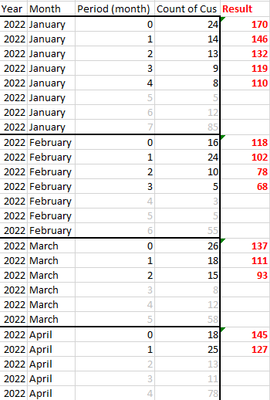
Below is my sample data- New customer counts by year month.

Column "Periods" is a calculated column, breaking down those customers who joined at that year-month, and how many months they have been with us.


YearMonthPeriod (month)Count of Cus 
2022January024170
2022January114146
2022January213132
2022January39119
2022January48110
2022January55 
2022January612 
2022January785 
2022February016118
2022February124102
2022February21078
2022February3568
2022February43 
2022February55 
2022February655 
2022March026137
2022March118111
2022March21593
2022March38 
2022March412 
2022March558 
2022April018145
2022April125127
2022April213 
2022April311 
2022April478 

84851683-9e1a-43cd-bf32-7851543316ac.png


My main struggles are 2 points:

1. I would like to calculate the Reversed Running Total by each month as a group (decreasing by periods)

2. Due to the business logic, I would like to omit the latest 3 periods of each month group.


The preferred result is the most right column. And since most of the columns in my data are calculated columns, solutions via power query will not be ideal. Thank you in advance!

1 ACCEPTED SOLUTION
liuqi_pbi
Resolver III
Resolver III

Hi @jts_ 


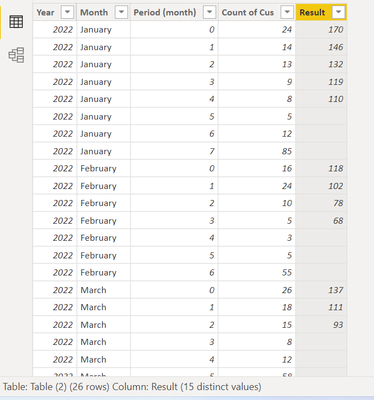
You can add a calculated column with this code.

Result = 
VAR _period = 'Table (2)'[Period (month)]
VAR _latestPeriod = CALCULATE( MAX('Table (2)'[Period (month)]), ALLEXCEPT('Table (2)', 'Table (2)'[Year], 'Table (2)'[Month]))
RETURN
IF( _period < _latestPeriod - 2, CALCULATE( SUM('Table (2)'[Count of Cus]), ALLEXCEPT('Table (2)', 'Table (2)'[Year], 'Table (2)'[Month]), 'Table (2)'[Period (month)] >= _period), BLANK())

liuqi_pbi_0-1660035040835.png


Cheers

If this reply helps solve the problem, please mark it as Solution! Kudos are appreciated too!

View solution in original post

3 REPLIES 3
liuqi_pbi
Resolver III
Resolver III

Hi @jts_ 


You can add a calculated column with this code.

Result = 
VAR _period = 'Table (2)'[Period (month)]
VAR _latestPeriod = CALCULATE( MAX('Table (2)'[Period (month)]), ALLEXCEPT('Table (2)', 'Table (2)'[Year], 'Table (2)'[Month]))
RETURN
IF( _period < _latestPeriod - 2, CALCULATE( SUM('Table (2)'[Count of Cus]), ALLEXCEPT('Table (2)', 'Table (2)'[Year], 'Table (2)'[Month]), 'Table (2)'[Period (month)] >= _period), BLANK())

liuqi_pbi_0-1660035040835.png


Cheers

If this reply helps solve the problem, please mark it as Solution! Kudos are appreciated too!

Thanks for the help! It works great!!

ribisht17
Super User
Super User

Helpful resources

Announcements
Power BI DataViz World Championships

Power BI Dataviz World Championships

The Power BI Data Visualization World Championships is back! Get ahead of the game and start preparing now!

December 2025 Power BI Update Carousel

Power BI Monthly Update - December 2025

Check out the December 2025 Power BI Holiday Recap!

FabCon Atlanta 2026 carousel

FabCon Atlanta 2026

Join us at FabCon Atlanta, March 16-20, for the ultimate Fabric, Power BI, AI and SQL community-led event. Save $200 with code FABCOMM.