cancel
Showing results for 
Search instead for 
Did you mean: 

Next up in the FabCon + SQLCon recap series: The roadmap for Microsoft SQL and Maximizing Developer experiences in Fabric. All sessions are available on-demand after the live show. Register now

Reply
nhoff
Advocate I
Advocate I

Grouping/summarizing one measure by another measure - with possibility of filter

I have two tables:

- Cases (CaseID, ClientID, RegionID)

- Tasks (TaskID, refCaseID)

1 case can have many tasks. Tables are linked by CaseID


I would like to create an overview of how many cases have 1, 2, 3....n tasks and I would like to be able to filter results by columns from Cases, e.g. RegionID. Example data:


CountCases CountTasks
5120
2391
1122
373
<blank>4
125

Example: 112 cases has exactly 2 associated tasks.


I have created this table, but I does not respond to filters/slicers fro table Cases, e.g. filtering the result table by RegionID


CasesWithTask =
var tbltemp = GENERATESERIES(0;20)
return
CALCULATETABLE(
SUMMARIZE(tbltemp;
[Value]; --default column name from GenerateSeries
"CountCases";
CALCULATE(
[CountCases];   --measure counting rows from table Cases
FILTER('Cases';[Count Tasks] = [Value])  --measure counting rows from table Tasks
)
)
)
 
Any suggestions?
1 ACCEPTED SOLUTION
PaulDBrown
Community Champion
Community Champion

@nhoff 


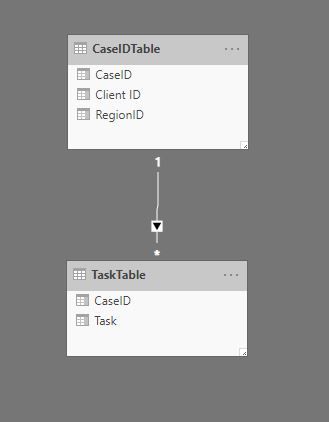
See if this works for you. For this exercise, I'm using these tables:

Tables.JPG


And have the model set up like this:

Orig Model.JPG


now calculate the number of tasks (DISTINCTCOUNT in this example) for each Case ID:


Count of tasks = DISTINCTCOUNT(TaskTable[Task]) +0 


Next generate a new table using the "New Table" option under "Modeling" in the ribbon using the DAX:


Summarized CaseID tasks = SUMMARIZE(CaseIDTable; CaseIDTable[CaseID]; 
                            "Numb of tasks" ; [Count of tasks])


Go to the modeling pane and set up a relationship between your CaseIDTable and the new table you've just created to look like this:
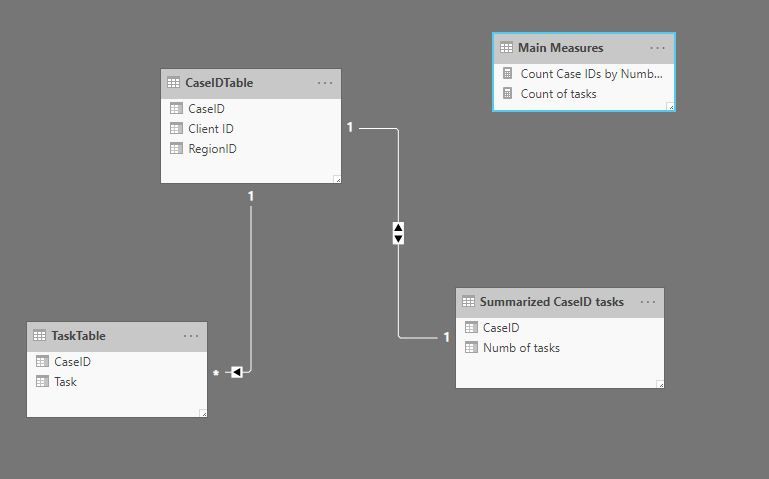
Final Model.JPG


Next create a measure to count the rows in the new table:


Count Case IDs by Numb of tasks = COUNTROWS('Summarized CaseID tasks')


And now  you can create a table visual using the "Numb of tasks" column from the new table and the last measure you've created:
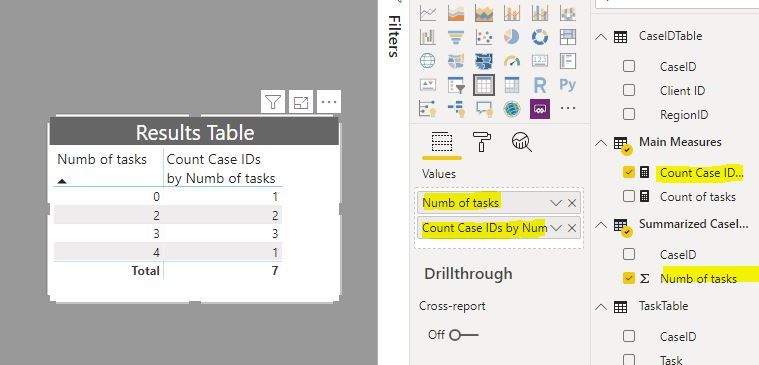
Results table.JPG


add your slicers from the CaseIdTable and you get this:
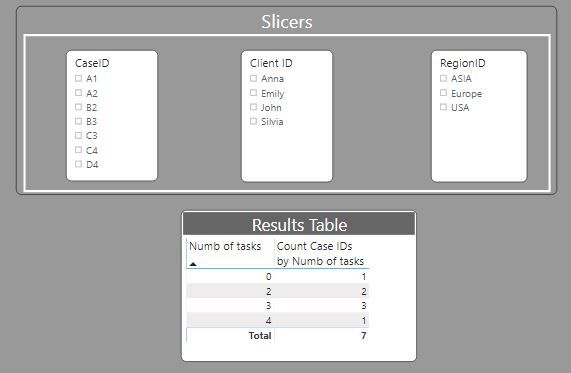
Results.JPGResults filtered.JPG


Did I answer your question? Mark my post as a solution!
In doing so, you are also helping me. Thank you!

Proud to be a Super User!
Paul on Linkedin.


View solution in original post

2 REPLIES 2
PaulDBrown
Community Champion
Community Champion

@nhoff 


See if this works for you. For this exercise, I'm using these tables:

Tables.JPG


And have the model set up like this:

Orig Model.JPG


now calculate the number of tasks (DISTINCTCOUNT in this example) for each Case ID:


Count of tasks = DISTINCTCOUNT(TaskTable[Task]) +0 


Next generate a new table using the "New Table" option under "Modeling" in the ribbon using the DAX:


Summarized CaseID tasks = SUMMARIZE(CaseIDTable; CaseIDTable[CaseID]; 
                            "Numb of tasks" ; [Count of tasks])


Go to the modeling pane and set up a relationship between your CaseIDTable and the new table you've just created to look like this:

Final Model.JPG


Next create a measure to count the rows in the new table:


Count Case IDs by Numb of tasks = COUNTROWS('Summarized CaseID tasks')


And now  you can create a table visual using the "Numb of tasks" column from the new table and the last measure you've created:

Results table.JPG


add your slicers from the CaseIdTable and you get this:
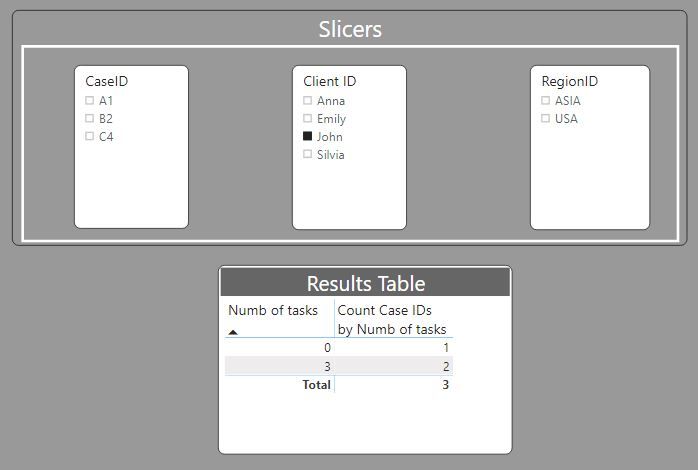
Results.JPGResults filtered.JPG


Did I answer your question? Mark my post as a solution!
In doing so, you are also helping me. Thank you!

Proud to be a Super User!
Paul on Linkedin.


@PaulDBrown 

Thanks a lot! Worked perfectly.


I would have preferred to not have (yet) another physical table as my model already is far too crowded, even though my own suggestion included this.


I appreciate the effort and meticulousness you put into it. Great.


Rgds

Nick


Helpful resources

Announcements
New to Fabric survey Carousel

New to Fabric Survey

If you have recently started exploring Fabric, we'd love to hear how it's going. Your feedback can help with product improvements.

Power BI DataViz World Championships carousel

Power BI DataViz World Championships - June 2026

A new Power BI DataViz World Championship is coming this June! Don't miss out on submitting your entry.

Join our Fabric User Panel

Join our Fabric User Panel

Share feedback directly with Fabric product managers, participate in targeted research studies and influence the Fabric roadmap.

March Power BI Update Carousel

Power BI Community Update - March 2026

Check out the March 2026 Power BI update to learn about new features.