Don't miss your chance to take exam DP-600 or DP-700 on us!
Request nowLearn from the best! Meet the four finalists headed to the FINALS of the Power BI Dataviz World Championships! Register now
Hi.
I have a problem that on the surface seems really simple, but I can't wrap my head around how to do this with M (I am completely new to Power BI and Query Languages in general). I have a table of time stamped system events, logged towards a specific System ID for each event. Something like this (a lot more columns, but only these of interest):
Date | System ID | Event Type
From this, I want to create a metric I term "Active Users" which is a count of all unique System IDs that satisfy the following rule: "having at least 1 event registered in the last 7 days and at least 1 event registered more than 14 days ago". Simple enough if it was just a matter of checking for now(), but i want to display it as a time series graph (line) for the 2+ years I have events from, meaning I need the active count grouped for every day that I have events from.
Example:
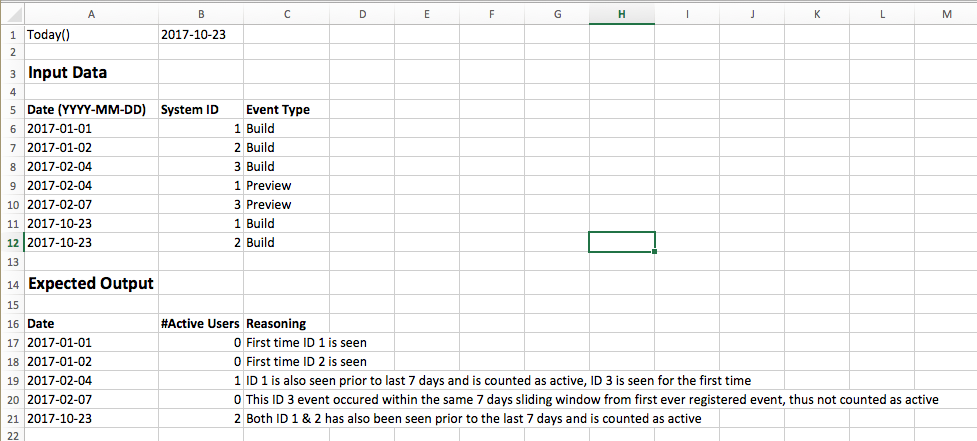
Note; the event type is simply there because I need to filter out irrelevant ones before I attempt to calculate the "active user"
Regardless how I try to iterate over each row, I don't seem to find a function that allows me to do the necessary logical check before grouping, thereby losing info in the process.
Solved! Go to Solution.
Hi @chrila,
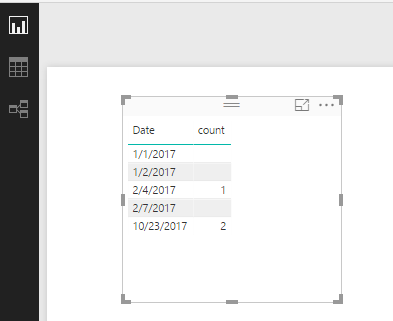
You can create a calculated column below:
Rankrow = CALCULATE(COUNTROWS('Table1'),FILTER('Table1','Table1'[System ID]=EARLIER(Table1[System ID])&&'Table1'[Date]<EARLIER(Table1[Date])&& DATEDIFF('Table1'[Date],EARLIER(Table1[Date]),DAY)>7))
Then create a measure:
count = COUNTROWS(FILTER(Table1,'Table1'[Rankrow]<>BLANK()))
Best Regards,
Qiuyun Yu
@chrila wrote:Simple enough if it was just a matter of checking for now(), but i want to display it as a time series graph (line) for the 2+ years I have events from,
I don't see the difference between NOW() and a silcer based application fo the time. If you can do it simply with NOW(), you shoudl be able to do it simply with a slicer. Instead of hard coding NOW(), you just replace the NOW() portion of the formula with a measure that will "Harvest" the last selected date from a slicer (or row or column etc). So if you have a slicer on the date column and somone clicks on 1/1/2017, then LASTDATE(Calendar[Date]) = 1/1/2017 and you can use that in your formula instead of NOW. eg (in part)
FILTER(ALL(Calendar),some formula <=LASTDATE(Calendar[Date]))
The calc column solution posted above looks good to me.
Hi @chrila,
You can create a calculated column below:
Rankrow = CALCULATE(COUNTROWS('Table1'),FILTER('Table1','Table1'[System ID]=EARLIER(Table1[System ID])&&'Table1'[Date]<EARLIER(Table1[Date])&& DATEDIFF('Table1'[Date],EARLIER(Table1[Date]),DAY)>7))
Then create a measure:
count = COUNTROWS(FILTER(Table1,'Table1'[Rankrow]<>BLANK()))
Best Regards,
Qiuyun Yu
That did it! Thanks a lot 🙂
One additional note; this table has millions of rows, so complicated join functions (O(n^n-1)) completely kills the machine I'm on
Share feedback directly with Fabric product managers, participate in targeted research studies and influence the Fabric roadmap.
Check out the February 2026 Power BI update to learn about new features.
| User | Count |
|---|---|
| 55 | |
| 45 | |
| 38 | |
| 16 | |
| 14 |
| User | Count |
|---|---|
| 87 | |
| 68 | |
| 38 | |
| 29 | |
| 26 |