
cancel
Showing results for 
Search instead for 
Did you mean: 

The Power BI Data Visualization World Championships is back! Get ahead of the game and start preparing now! Learn more

Reply
Anonymous
Not applicable

Grouping Names

Hi,


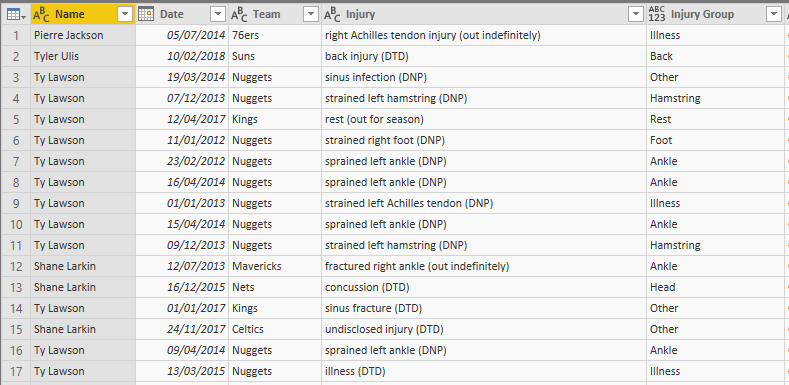
Currently this is the table I have.

Short injury table.PNG


I would like the table to be in this format.

  Bynum.PNG


How do I group the names, so there is only one player and the count of the injuries for that player are summed up. 


Thanks in advance

1 ACCEPTED SOLUTION

Hi @Anonymous,


Try this formula, please. It doesn't help. Please provide a sample in TEXT mode that we can copy from and the expected result.


Breakdown =
CONCATENATEX (
    SUMMARIZE (
        'table',
        [name],
        [Injury Group],
        "countOfInjury", COUNT ( [injury] )
    ),
    [countOfInjury] & " "
        & [Injury Group],
    ","
)


Best Regards,

Community Support Team _ Dale
If this post helps, then please consider Accept it as the solution to help the other members find it more quickly.

View solution in original post

4 REPLIES 4
v-jiascu-msft
Microsoft Employee
Microsoft Employee

Hi @Anonymous,


Could you please mark the proper answers as solutions?


Best Regards,

Community Support Team _ Dale
If this post helps, then please consider Accept it as the solution to help the other members find it more quickly.
Stachu
Community Champion
Community Champion

you need to use CONCATENATEX
https://docs.microsoft.com/en-us/dax/concatenatex-function-dax


can you share the original data table in copiable format?


Did I answer your question? Mark my post as a solution!
Thank you for the kudos 🙂

Anonymous
Not applicable

Hi @Stachu,

Concar.PNG


The aim is to be able to slice by team and date .Select one player and see the injury history with and the injury groups with counts for both of them.


Thank you for your help

Hi @Anonymous,


Try this formula, please. It doesn't help. Please provide a sample in TEXT mode that we can copy from and the expected result.


Breakdown =
CONCATENATEX (
    SUMMARIZE (
        'table',
        [name],
        [Injury Group],
        "countOfInjury", COUNT ( [injury] )
    ),
    [countOfInjury] & " "
        & [Injury Group],
    ","
)


Best Regards,

Community Support Team _ Dale
If this post helps, then please consider Accept it as the solution to help the other members find it more quickly.

Helpful resources

Announcements
Power BI DataViz World Championships

Power BI Dataviz World Championships

The Power BI Data Visualization World Championships is back! Get ahead of the game and start preparing now!

December 2025 Power BI Update Carousel

Power BI Monthly Update - December 2025

Check out the December 2025 Power BI Holiday Recap!

FabCon Atlanta 2026 carousel

FabCon Atlanta 2026

Join us at FabCon Atlanta, March 16-20, for the ultimate Fabric, Power BI, AI and SQL community-led event. Save $200 with code FABCOMM.