cancel
Showing results for 
Search instead for 
Did you mean: 

Get Fabric Certified for FREE during Fabric Data Days. Don't miss your chance! Request now

Reply
mammenga
Regular Visitor

Group by columns are not saving when I'm trying to configure my Aggregations table

Hello Community! 

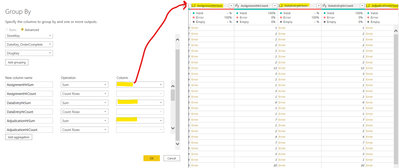
I'm trying to create an aggregations tables to agg average hours in multiple columns.  To do this, I have used Group By to create new sum and count columns.  I get it to work and save the file but when I reopen the file, I'm receiving errors in the Group By sum columns and have to go into power query and reselect the column I want to sum for each sum.  I don't think this is a modeling issue as I have my agg table set as import, my dim tables set as Dual, and my fact table set as direct query.  I guess I can always create a view table and pull it into power BI but I was hoping I could figure out how to do this in power query. Any ideas?

Thanks

mammenga_0-1629893079118.png


1 REPLY 1
Anonymous
Not applicable

@mammenga 
Try change the tables into import storage mode.  And what is the error message? Select the error cells to check.


Paul Zheng _ Community Support Team

Helpful resources

Announcements
November Power BI Update Carousel

Power BI Monthly Update - November 2025

Check out the November 2025 Power BI update to learn about new features.

Fabric Data Days Carousel

Fabric Data Days

Advance your Data & AI career with 50 days of live learning, contests, hands-on challenges, study groups & certifications and more!

FabCon Atlanta 2026 carousel

FabCon Atlanta 2026

Join us at FabCon Atlanta, March 16-20, for the ultimate Fabric, Power BI, AI and SQL community-led event. Save $200 with code FABCOMM.

Top Solution Authors
Top Kudoed Authors