FabCon is coming to Atlanta
Join us at FabCon Atlanta from March 16 - 20, 2026, for the ultimate Fabric, Power BI, AI and SQL community-led event. Save $200 with code FABCOMM.
Register now!- Power BI forums
- Get Help with Power BI
- Desktop
- Service
- Report Server
- Power Query
- Mobile Apps
- Developer
- DAX Commands and Tips
- Custom Visuals Development Discussion
- Health and Life Sciences
- Power BI Spanish forums
- Translated Spanish Desktop
- Training and Consulting
- Instructor Led Training
- Dashboard in a Day for Women, by Women
- Galleries
- Data Stories Gallery
- Themes Gallery
- Contests Gallery
- QuickViz Gallery
- Quick Measures Gallery
- Visual Calculations Gallery
- Notebook Gallery
- Translytical Task Flow Gallery
- TMDL Gallery
- R Script Showcase
- Webinars and Video Gallery
- Ideas
- Custom Visuals Ideas (read-only)
- Issues
- Issues
- Events
- Upcoming Events
Learn from the best! Meet the four finalists headed to the FINALS of the Power BI Dataviz World Championships! Register now
- Power BI forums
- Forums
- Get Help with Power BI
- Desktop
- Getting Selected Columns for Matrix Visual
- Subscribe to RSS Feed
- Mark Topic as New
- Mark Topic as Read
- Float this Topic for Current User
- Bookmark
- Subscribe
- Printer Friendly Page


- Mark as New
- Bookmark
- Subscribe
- Mute
- Subscribe to RSS Feed
- Permalink
- Report Inappropriate Content
Getting Selected Columns for Matrix Visual
Hi,
I am trying to Display year wise budgetary columns in matrix visual, but NOT all columns from every year.
Currently I am getting 6 columns for each year at different categories (rows) level as below:

But I dont want every column for every year. Like my requirement is to display :
- All 6 columns for Year 2019
- Only "Actual" columns for 2016, 2017 and 2018
- Average of "Actual" columns for 2016, 2017 and 2018.
Any help will be highly appreciated....
Solved! Go to Solution.


- Mark as New
- Bookmark
- Subscribe
- Mute
- Subscribe to RSS Feed
- Permalink
- Report Inappropriate Content
hi @Arshadjehan
If so, you could only try these two workaround:
1. Unpivot the these six columns and then get it as above.
https://radacad.com/pivot-and-unpivot-with-power-bi
2. disable the "Word wrap" in Format-> Column headers of matrix, then reduce the column width to 0 manually for year 2016/2017/2018.
Regards,
Lin
If this post helps, then please consider Accept it as the solution to help the other members find it more quickly.
- Mark as New
- Bookmark
- Subscribe
- Mute
- Subscribe to RSS Feed
- Permalink
- Report Inappropriate Content
hi @Arshadjehan
You could try this way as below:
Step1:
Add a dim categories table as below:
Dim categories = UNION(VALUES('Table'[categories]),ROW("categories","Average of Actual"))Then create a relationship with basic fact table
Step2:
Create a measrue as below logic:
or
Result:
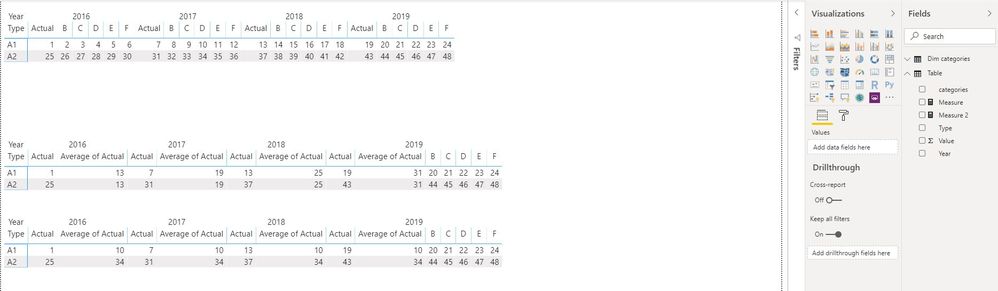
And here is sample pbix file, please try it.
Regards,
Lin
If this post helps, then please consider Accept it as the solution to help the other members find it more quickly.
- Mark as New
- Bookmark
- Subscribe
- Mute
- Subscribe to RSS Feed
- Permalink
- Report Inappropriate Content
Thanks @v-lili6-msft for detailed answer.
But "Categories" you used in sample fact table as ROWS, are actualy columns in my table.
Here is the sample snapshot;
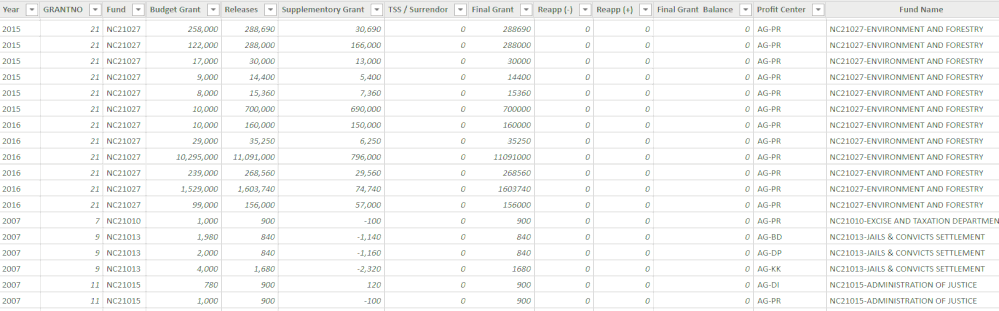
How can I refer to these columns, and get the similar solution you gave, withing the matrix I pointed to in my first post?
- Mark as New
- Bookmark
- Subscribe
- Mute
- Subscribe to RSS Feed
- Permalink
- Report Inappropriate Content
hi @Arshadjehan
If so, you could only try these two workaround:
1. Unpivot the these six columns and then get it as above.
https://radacad.com/pivot-and-unpivot-with-power-bi
2. disable the "Word wrap" in Format-> Column headers of matrix, then reduce the column width to 0 manually for year 2016/2017/2018.
Regards,
Lin
If this post helps, then please consider Accept it as the solution to help the other members find it more quickly.


- Mark as New
- Bookmark
- Subscribe
- Mute
- Subscribe to RSS Feed
- Permalink
- Report Inappropriate Content
Hi @Arshadjehan
there is no such option for matrix visual. you can hide columns only the same for each year
do not hesitate to give a kudo to useful posts and mark solutions as solution
- Mark as New
- Bookmark
- Subscribe
- Mute
- Subscribe to RSS Feed
- Permalink
- Report Inappropriate Content
Hi @az38
Thanks, but how can I hide certain columns for one year and display all columns for other?
- Mark as New
- Bookmark
- Subscribe
- Mute
- Subscribe to RSS Feed
- Permalink
- Report Inappropriate Content
I dont see any chance to do it
do not hesitate to give a kudo to useful posts and mark solutions as solution

Helpful resources

Join our Fabric User Panel
Share feedback directly with Fabric product managers, participate in targeted research studies and influence the Fabric roadmap.

Power BI Monthly Update - February 2026
Check out the February 2026 Power BI update to learn about new features.

FabCon Atlanta 2026
Join us at FabCon Atlanta, March 16-20, for the ultimate Fabric, Power BI, AI and SQL community-led event. Save $200 with code FABCOMM.

| User | Count |
|---|---|
| 60 | |
| 53 | |
| 40 | |
| 15 | |
| 14 |


| User | Count |
|---|---|
| 97 | |
| 81 | |
| 35 | |
| 29 | |
| 25 |


