cancel
Showing results for 
Search instead for 
Did you mean: 

Learn from the best! Meet the four finalists headed to the FINALS of the Power BI Dataviz World Championships! Register now

Reply
Anonymous
Not applicable

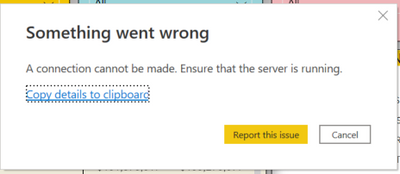
Getting Error

Parth2692_0-1668490012030.png

Hi Folks, 

I am getting error while refreshing data models. If someone has encountered similar problem kindly help me out in this. Here connectin with sharpoint file establi


ThankYou. 

1 ACCEPTED SOLUTION

Hi @Anonymous ,

Anyway, glad your problem was solved!

If the problem don't persist, would you please accept your reply as solution? Then we are able to close the thread.


Best Regards,
Community Support Team _ kalyj

View solution in original post

3 REPLIES 3
Anonymous
Not applicable

Problem Solved How I dont Know!


 I was trying to refresh data model for the report when I was working remotely. I had tried whole day but couldn't able to solve the problem. I was getting above error message. 


Next day I went to Office and tried to refresh data model again got the same error message. 


Then, I had opened other report and tried refreshing data model and I got succeed.  Straight away after that I had opened the report which was thgrowing error Initially and that report  got Successfully refreshed. 


Which raises two Points, 


1) Becasue I was in office and accessing the office network the problem got solved or

2) It's Power BI internal server problem that got solved when I had opened other report and It got refreshed succesfully leads main report's problem got fixed. 


Thank you!

Hi @Anonymous ,

Anyway, glad your problem was solved!

If the problem don't persist, would you please accept your reply as solution? Then we are able to close the thread.


Best Regards,
Community Support Team _ kalyj

v-yanjiang-msft
Community Support
Community Support

Hi @Anonymous ,

Please see if solution in the similar thread can help:

A connection cannot be made; Ensure that the server is running - ASCMD from remote computer (microsoft.com)

olap cube - A connection cannot be made. Ensure that the server is running - Stack Overflow

ssas - A connection cannot be made. Ensure that the server is running - Database Administrators Stack Exchange


Best Regards,
Community Support Team _ kalyj

If this post helps, then please consider Accept it as the solution to help the other members find it more quickly.

Helpful resources

Announcements
Power BI DataViz World Championships carousel

Power BI DataViz World Championships - June 2026

A new Power BI DataViz World Championship is coming this June! Don't miss out on submitting your entry.

Join our Fabric User Panel

Join our Fabric User Panel

Share feedback directly with Fabric product managers, participate in targeted research studies and influence the Fabric roadmap.

March Power BI Update Carousel

Power BI Community Update - March 2026

Check out the March 2026 Power BI update to learn about new features.