cancel
Showing results for 
Search instead for 
Did you mean: 

The Power BI Data Visualization World Championships is back! It's time to submit your entry. Live now!

Reply
Sania-F
Resolver I
Resolver I

Getting EOF error while creating custome column

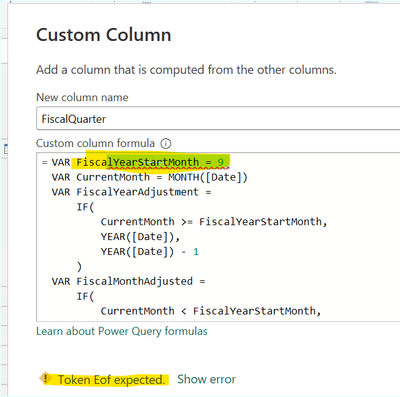
I am trying to create a custom column based on calendar date to calculate fiscal quarter but getting EOF error. Kindly help.
SaniaF_0-1702884153419.png

 
FiscalQuarter 
=VAR FiscalYearStartMonth = 9 //this line giving error
VAR CurrentMonth = MONTH('YourTable'[CalendarDate])
VAR FiscalYearAdjustment =
IF(
CurrentMonth >= FiscalYearStartMonth,
YEAR('YourTable'[CalendarDate]),
YEAR('YourTable'[CalendarDate]) - 1
)
VAR FiscalMonthAdjusted =
IF(
CurrentMonth < FiscalYearStartMonth,
CurrentMonth + 12,
CurrentMonth
)
VAR Quarter = INT((FiscalMonthAdjusted - FiscalYearStartMonth) / 3) + 1
RETURN
"Q" & Quarter & " " & FiscalYearAdjustment

1 ACCEPTED SOLUTION
Sania-F
Resolver I
Resolver I

I was trying to add custom column from power query editor and was getting error. 

Then I discarded creating custom column from there and went into report view.

In report view , I went to desired table and added new column. That helped me get rid of error and calculate the quarter successfully.

View solution in original post

3 REPLIES 3
Sania-F
Resolver I
Resolver I

I was trying to add custom column from power query editor and was getting error. 

Then I discarded creating custom column from there and went into report view.

In report view , I went to desired table and added new column. That helped me get rid of error and calculate the quarter successfully.

PijushRoy
Super User
Super User

Hi @Sania-F 

Please download the pbix file and go to Power Query and check how I calculate FiscalQuarter

Assuming Fiscal Year start from April and end is March (please change the custom column logic as per your requirement)
So April, May, June - Quarter 1
July, Aug, Sep - Quarter 2 
so

https://drive.google.com/file/d/1z4gz5hDIh9QZdfxQXXt-q88Sa9bmXW3l/view?usp=sharing


If solved your requirement, please mark this answer as SOLUTION.
If this comment helps you, appreciate your KUDOS

Thanks 

Pijush


Did I answer your question? Mark my post as a solution!
Appreciate your Like/Kudos

Proud to be a Super User!


Hi @Sania-F 

If it is solved, please mark it as a solution and close it.


Did I answer your question? Mark my post as a solution!
Appreciate your Like/Kudos

Proud to be a Super User!


Helpful resources

Announcements
Power BI DataViz World Championships

Power BI Dataviz World Championships

The Power BI Data Visualization World Championships is back! It's time to submit your entry.

January Power BI Update Carousel

Power BI Monthly Update - January 2026

Check out the January 2026 Power BI update to learn about new features.

FabCon Atlanta 2026 carousel

FabCon Atlanta 2026

Join us at FabCon Atlanta, March 16-20, for the ultimate Fabric, Power BI, AI and SQL community-led event. Save $200 with code FABCOMM.