cancel
Showing results for 
Search instead for 
Did you mean: 

Level up your Power BI skills this month - build one visual each week and tell better stories with data! Get started

Reply
joeywong
Helper I
Helper I

Get the value of a specific row

Hi all,


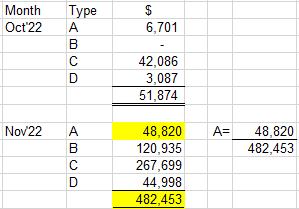
I need help here. I have a table with subtotals by month. I need to divide a specific row with the subtotal.


For denomitor, i used this formula A(D)=calculate([A],DATESMTD(Dates[MonthEnding]))

For numerator, may I know how to get the value of the specific row? 


joeywong_0-1671371762346.png


Thanks!


Best Regards,

Joey


6 REPLIES 6
v-yalanwu-msft
Community Support
Community Support

Hi, @joeywong ;

In the image above, I don't see the 'Date' [MonthYear] column, you can try to put it in. Or try changing the formula:


D =
DIVIDE (
    SUM ( 'Table'[Column] ),
    CALCULATE (
        SUM ( 'Table'[Column] ),
        FILTER ( ALLSELECTED ( 'Date' ), 'Date'[MonthYear] = MAX ( 'Date'[MonthYear] ) )
    )
)


If the above one can't help you get the desired result, please provide some sample data in your tables (exclude sensitive data) with Text format and your expected result with backend logic and special examples. It is better if you can share a simplified pbix file. You can refer the following link to upload the file to the community. Thank you.

Solved: How to upload PBI in Community - Microsoft Power BI Community


Best Regards,
Community Support Team _ Yalan Wu
If this post helps, then please consider Accept it as the solution to help the other members find it more quickly.

sevenhills
Super User
Super User

In addition to @v-yalanwu-msft answer,

For your understanding, typically, you will use sum / max / min /  count to get values of a selected row. 


-- Select the type of the current row
var _selT = SELECTEDVALUE(Table2[Type])

-- To get the same row amount value, you can use sum amount as below:
var _v = CALCULATE(sum(Table2[Amount]), filter(Table2, Table2[Type] = _selT))


Check similar requirement I answered

https://community.powerbi.com/t5/Desktop/Cost-by-Category-Measure-to-divide-1-Category-by-Another-in...

Ashish_Mathur
Super User
Super User

Hi,

Your question is not clear.  Is the image that you have shared a Table visual that you have already created?  Share the download link of your PBI file.


Regards,
Ashish Mathur
http://www.ashishmathur.com
https://www.linkedin.com/in/excelenthusiasts/
v-yalanwu-msft
Community Support
Community Support

Hi, @joeywong ;

If you wan get the value of specific row, you could try Sum([colum]) in measure. as follow:

Measure = DIVIDE(SUM('Table'[Value]),CALCULATE(SUM([Value]),ALLEXCEPT('Table','Table'[Month])))

The final show:

vyalanwumsft_0-1671418872896.png


Best Regards,
Community Support Team _ Yalan Wu
If this post helps, then please consider Accept it as the solution to help the other members find it more quickly.

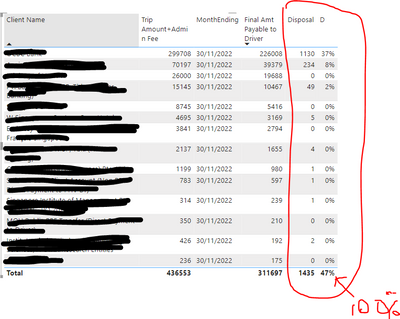
Hi Yalan,


Thank you for your suggestions. However, when I incorporate the formula, the % total does not come up to 100%.


joeywong_0-1671441723551.png

Is there anything wrong with the following formulas?

D = Divide(

        sum('Table'[Column]),

        Calculate(Sum('Table'[Column]),

        ALLEXCEPT('Date','Date'[MonthYear])))


Thanks!


Hi Yalan,


Thank you for your suggestions. However, when I incorporate the formula, the % total does not come up to 100%.


joeywong_0-1671441723551.png

Is there anything wrong with the following formulas?

D = Divide(

        sum('Table'[Column]),

        Calculate(Sum('Table'[Column]),

        ALLEXCEPT('Date','Date'[MonthYear])))


Thanks!


Helpful resources

Announcements
April Power BI Update Carousel

Power BI Monthly Update - April 2026

Check out the April 2026 Power BI update to learn about new features.

Fabric SQL PBI Data Days

Data Days 2026 coming soon!

Sign up to receive a private message when registration opens and key events begin.

New to Fabric survey Carousel

New to Fabric Survey

If you have recently started exploring Fabric, we'd love to hear how it's going. Your feedback can help with product improvements.

Power BI DataViz World Championships carousel

Power BI DataViz World Championships - June 2026

A new Power BI DataViz World Championship is coming this June! Don't miss out on submitting your entry.