FabCon is coming to Atlanta
Join us at FabCon Atlanta from March 16 - 20, 2026, for the ultimate Fabric, Power BI, AI and SQL community-led event. Save $200 with code FABCOMM.
Register now!- Power BI forums
- Get Help with Power BI
- Desktop
- Service
- Report Server
- Power Query
- Mobile Apps
- Developer
- DAX Commands and Tips
- Custom Visuals Development Discussion
- Health and Life Sciences
- Power BI Spanish forums
- Translated Spanish Desktop
- Training and Consulting
- Instructor Led Training
- Dashboard in a Day for Women, by Women
- Galleries
- Data Stories Gallery
- Themes Gallery
- Contests Gallery
- QuickViz Gallery
- Quick Measures Gallery
- Visual Calculations Gallery
- Notebook Gallery
- Translytical Task Flow Gallery
- TMDL Gallery
- R Script Showcase
- Webinars and Video Gallery
- Ideas
- Custom Visuals Ideas (read-only)
- Issues
- Issues
- Events
- Upcoming Events
The Power BI Data Visualization World Championships is back! Get ahead of the game and start preparing now! Learn more
- Power BI forums
- Forums
- Get Help with Power BI
- Desktop
- Get the Count of Applications per job Ignoring the...
- Subscribe to RSS Feed
- Mark Topic as New
- Mark Topic as Read
- Float this Topic for Current User
- Bookmark
- Subscribe
- Printer Friendly Page

- Mark as New
- Bookmark
- Subscribe
- Mute
- Subscribe to RSS Feed
- Permalink
- Report Inappropriate Content
Get the Count of Applications per job Ignoring the date Slicer
Hi Experts,
I'm trying to display the number of applications received per job (If the job received applications in the selected month) irrespective of the date/Month selected in slicer i.e from the start of Job to the selected Month.
My Measure is :
Applications_tillDate = SUMX(SUMMARIZE(Table,Table[Job Number]),CALCULATE(DISTINCTCOUNT(Table[Application Date]),ALL(Table[Application Date])))
It's giving the count of applications for all the jobs in the selected month and not giving from start date.
Sample Data:
| Job Number | Open Date | Application Code | Application Date |
| BI9554 | 20/10/2022 | BI9554864330 | 22/10/2022 |
| BI9554 | 20/10/2022 | BI9554242843 | 25/10/2022 |
| BI9554 | 20/10/2022 | BI955445204 | 25/10/2022 |
| BI9554 | 20/10/2022 | BI9554127111 | 7/11/2022 |
| BI9554 | 20/10/2022 | BI9554894748 | 7/11/2022 |
| BI9554 | 20/10/2022 | BI9554424913 | 26/11/2022 |
| BI9554 | 20/10/2022 | BI9554276395 | 26/11/2022 |
| BI9554 | 20/10/2022 | BI9554770209 | 1/12/2022 |
| BI9554 | 20/10/2022 | BI9554560325 | 5/12/2022 |
| BI9554 | 20/10/2022 | BI9554534472 | 5/12/2022 |
| BI9554 | 20/10/2022 | BI9554941889 | 13/01/2023 |
| BI9554 | 20/10/2022 | BI9554542851 | 13/01/2023 |
| BI9554 | 20/10/2022 | BI9554145393 | 14/01/2023 |
| BI9554 | 20/10/2022 | BI9554746932 | 17/01/2023 |
| RE2257 | 15/11/2022 | RE2257819998 | 19/11/2022 |
| RE2257 | 15/11/2022 | RE2257873320 | 19/11/2022 |
| RE2257 | 15/11/2022 | RE2257233096 | 19/11/2022 |
| RE2257 | 15/11/2022 | RE2257705116 | 19/11/2022 |
| RE2257 | 15/11/2022 | RE2257134603 | 19/11/2022 |
| RE2257 | 15/11/2022 | RE2257481453 | 19/11/2022 |
| RE2257 | 15/11/2022 | RE2257121437 | 11/12/2022 |
| RE2257 | 15/11/2022 | RE22571101 | 12/12/2022 |
| RE2257 | 15/11/2022 | RE2257371847 | 22/12/2022 |
| RE2257 | 15/11/2022 | RE2257162059 | 22/12/2022 |
| RE2257 | 15/11/2022 | RE225799878 | 22/12/2022 |
| RE2257 | 15/11/2022 | RE2257989344 | 22/12/2022 |
| RE2257 | 15/11/2022 | RE2257208176 | 22/12/2022 |
| HR0245 | 7/09/2022 | HR0245514315 | 7/09/2022 |
| HR0245 | 7/09/2022 | HR0245498064 | 7/09/2022 |
| HR0245 | 7/09/2022 | HR0245240044 | 7/09/2022 |
| HR0245 | 7/09/2022 | HR0245311099 | 7/09/2022 |
| HR0245 | 7/09/2022 | HR024521280 | 9/09/2022 |
| HR0245 | 7/09/2022 | HR0245824590 | 9/09/2022 |
| HR0245 | 7/09/2022 | HR0245323782 | 9/09/2022 |
| HR0245 | 7/09/2022 | HR0245573726 | 9/09/2022 |
| HR0245 | 7/09/2022 | HR0245270571 | 12/10/2022 |
| HR0245 | 7/09/2022 | HR0245761094 | 12/10/2022 |
| HR0245 | 7/09/2022 | HR0245856280 | 12/10/2022 |
| HR0245 | 7/09/2022 | HR0245381733 | 12/10/2022 |
| HR0245 | 7/09/2022 | HR0245967161 | 29/10/2022 |
| HR0245 | 7/09/2022 | HR0245397917 | 29/10/2022 |
| HR0245 | 7/09/2022 | HR0245135814 | 29/10/2022 |
| HR0245 | 7/09/2022 | HR0245309322 | 15/11/2022 |
| HR0245 | 7/09/2022 | HR0245122313 | 15/11/2022 |
| HR0245 | 7/09/2022 | HR0245822735 | 15/11/2022 |
| HR0245 | 7/09/2022 | HR0245328365 | 11/12/2022 |
| HR0245 | 7/09/2022 | HR0245180718 | 11/12/2022 |
| HR0245 | 7/09/2022 | HR0245806617 | 11/12/2022 |
| HR0245 | 7/09/2022 | HR0245345103 | 11/12/2022 |
| CL0122 | 5/11/2022 | CL0122678110 | 17/12/2022 |
| CL0122 | 5/11/2022 | CL0122773181 | 17/12/2022 |
| CL0122 | 5/11/2022 | CL0122425838 | 17/12/2022 |
| CL0122 | 5/11/2022 | CL0122505852 | 17/12/2022 |
| CL0122 | 5/11/2022 | CL0122598264 | 17/12/2022 |
| CL0122 | 5/11/2022 | CL0122388757 | 17/12/2022 |
| CL0122 | 5/11/2022 | CL0122996762 | 17/12/2022 |
| CL0122 | 5/11/2022 | CL0122224302 | 22/12/2022 |
| CL0122 | 5/11/2022 | CL0122216997 | 22/12/2022 |
| CL0122 | 5/11/2022 | CL012220134 | 22/12/2022 |
| CL0122 | 5/11/2022 | CL0122424468 | 22/12/2022 |
| CL0122 | 5/11/2022 | CL0122926763 | 22/12/2022 |
| CL0122 | 5/11/2022 | CL0122402312 | 22/12/2022 |
| CL0122 | 5/11/2022 | CL0122437865 | 22/12/2022 |
| CL0122 | 5/11/2022 | CL0122303239 | 22/12/2022 |
| CL0122 | 5/11/2022 | CL0122489314 | 22/12/2022 |
| CL0122 | 5/11/2022 | CL0122683000 | 22/12/2022 |
| CL0122 | 5/11/2022 | CL0122986673 | 22/12/2022 |
| CL0122 | 5/11/2022 | CL0122408032 | 22/12/2022 |
| CL0122 | 5/11/2022 | CL0122563460 | 22/12/2022 |
| CL0122 | 5/11/2022 | CL0122954966 | 22/12/2022 |
| CL0122 | 5/11/2022 | CL0122532899 | 5/01/2023 |
| CL0122 | 5/11/2022 | CL0122547090 | 5/01/2023 |
| CL0122 | 5/11/2022 | CL0122327724 | 5/01/2023 |
| CL0122 | 5/11/2022 | CL0122279014 | 5/01/2023 |
| CL0122 | 5/11/2022 | CL0122432685 | 5/01/2023 |
| CL0122 | 5/11/2022 | CL0122560916 | 5/01/2023 |
| CL0122 | 5/11/2022 | CL0122109401 | 5/01/2023 |
| CL0122 | 5/11/2022 | CL0122772706 | 5/01/2023 |
| CL0122 | 5/11/2022 | CL0122854399 | 5/01/2023 |
| CL0122 | 5/11/2022 | CL0122169053 | 13/01/2023 |
| CL0122 | 5/11/2022 | CL0122568025 | 13/01/2023 |
| CL0122 | 5/11/2022 | CL0122395190 | 13/01/2023 |
| CL0122 | 5/11/2022 | CL0122315630 | 13/01/2023 |
| CL0122 | 5/11/2022 | CL0122566878 | 13/01/2023 |
| CL0122 | 5/11/2022 | CL0122910970 | 13/01/2023 |
| CL0122 | 5/11/2022 | CL0122803402 | 13/01/2023 |
Current output:
Slicer Selection : January 2023
No.of Applications received: 20
| BI9554 | 4 |
| CL0122 | 16 |
Expected Output:
Slicer Selection : January 2023
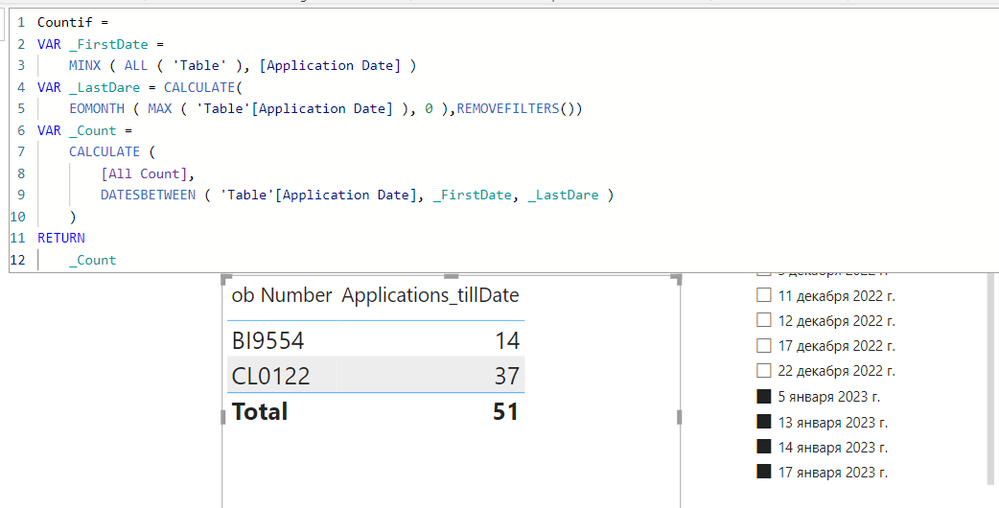
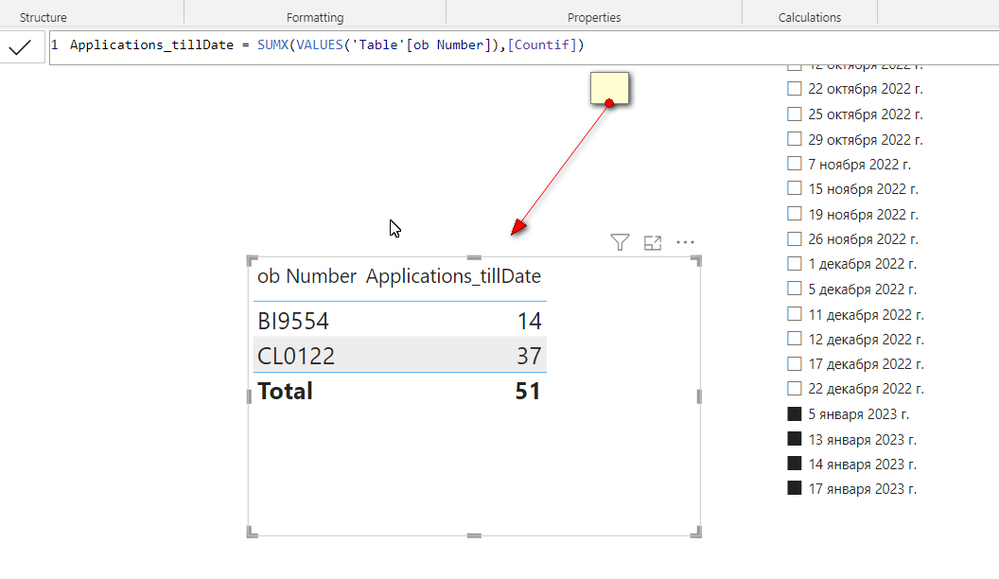
No.of Applications received: 51
| BI9554 | 14 |
| CL0122 | 37 |
Solved! Go to Solution.


- Mark as New
- Bookmark
- Subscribe
- Mute
- Subscribe to RSS Feed
- Permalink
- Report Inappropriate Content
Sample PBIX file attached
https://1drv.ms/u/s!AiUZ0Ws7G26RhiQz0pJ--IC9mKN9?e=Gp4lzp
- Mark as New
- Bookmark
- Subscribe
- Mute
- Subscribe to RSS Feed
- Permalink
- Report Inappropriate Content
Hi Ahmed,
Thanks for the quick reply. I'm expecting something similar to this. But I don't have a separate calendar table and I want to display only jobs that had applications in January. (i.e HR0245 and RE2257 are not required as they didn't receive applications in January). I tried the logic you suggested but am still getting the previous results only. Can it be done without creating an additional calendar table.
- Mark as New
- Bookmark
- Subscribe
- Mute
- Subscribe to RSS Feed
- Permalink
- Report Inappropriate Content
Sample PBIX file attached
https://1drv.ms/u/s!AiUZ0Ws7G26RhiQz0pJ--IC9mKN9?e=Gp4lzp
- Mark as New
- Bookmark
- Subscribe
- Mute
- Subscribe to RSS Feed
- Permalink
- Report Inappropriate Content
and you have in the slice the name of the month where it comes from?
- Mark as New
- Bookmark
- Subscribe
- Mute
- Subscribe to RSS Feed
- Permalink
- Report Inappropriate Content
It comes from Application Date - Hierarchy
- Mark as New
- Bookmark
- Subscribe
- Mute
- Subscribe to RSS Feed
- Permalink
- Report Inappropriate Content
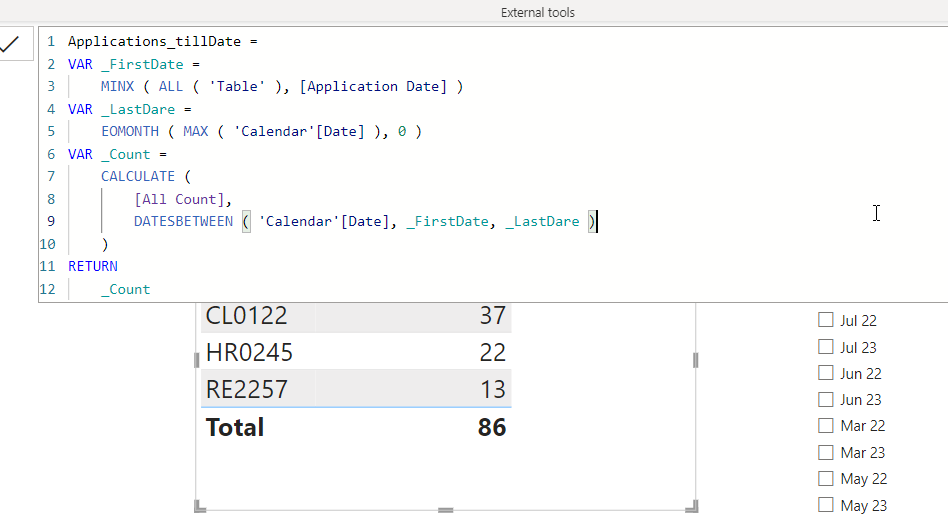
Is this what you are looking for?
https://1drv.ms/u/s!AiUZ0Ws7G26RhiQz0pJ--IC9mKN9?e=YDhNVX



Helpful resources

Power BI Dataviz World Championships
The Power BI Data Visualization World Championships is back! Get ahead of the game and start preparing now!

Power BI Monthly Update - December 2025
Check out the December 2025 Power BI Holiday Recap!

FabCon Atlanta 2026
Join us at FabCon Atlanta, March 16-20, for the ultimate Fabric, Power BI, AI and SQL community-led event. Save $200 with code FABCOMM.

| User | Count |
|---|---|
| 41 | |
| 38 | |
| 36 | |
| 31 | |
| 28 |


| User | Count |
|---|---|
| 129 | |
| 88 | |
| 79 | |
| 68 | |
| 63 |


