Join us at FabCon Atlanta from March 16 - 20, 2026, for the ultimate Fabric, Power BI, AI and SQL community-led event. Save $200 with code FABCOMM.
Register now!The Power BI Data Visualization World Championships is back! Get ahead of the game and start preparing now! Learn more
Hi, I have been trying to create my first Power BI report for Dynamcis Data. I'd like to show list of all users in Dynamcis and also the security roles associated to them (N:N relation). Below is how my query looks after adjusting to what my columns look like and systemuserroles_association and teammembership_association are the N;N relations.
When I click on the table I'm able to see all the info I need.
All I want is to see is highlighted blue column values within one box adjecent to user. Then I can convert the secondary table from vertical view to Horizontal view. This is something I want my final report to look like. The column headers doesn't have to look this way though.
Please advise.
Hi @Anonymous ,
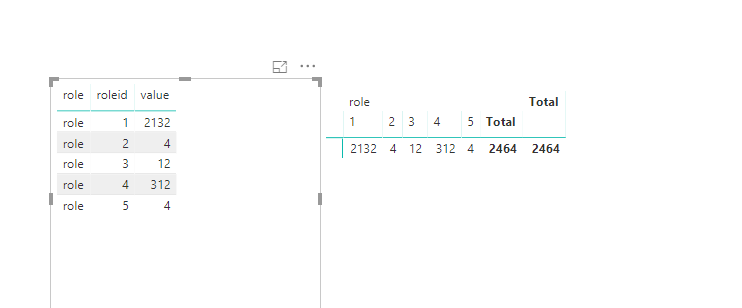
To use matrix should work. Please refer to the picture as below.
Hi @Anonymous ,
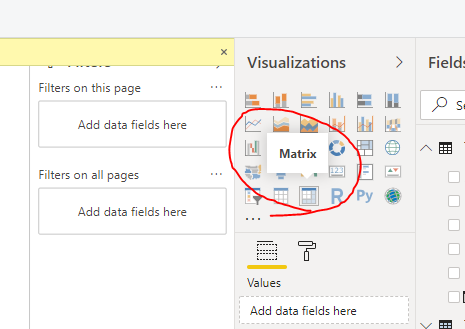
To use this visual to work on it.
Hi Frank, thanks for the reply. Can you please eloberate your answer?
The Power BI Data Visualization World Championships is back! Get ahead of the game and start preparing now!
| User | Count |
|---|---|
| 38 | |
| 38 | |
| 37 | |
| 28 | |
| 28 |
| User | Count |
|---|---|
| 124 | |
| 89 | |
| 73 | |
| 66 | |
| 65 |