Join us at FabCon Atlanta from March 16 - 20, 2026, for the ultimate Fabric, Power BI, AI and SQL community-led event. Save $200 with code FABCOMM.
Register now!View all the Fabric Data Days sessions on demand. View schedule
Hello. Looking for help please!
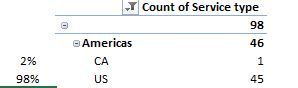
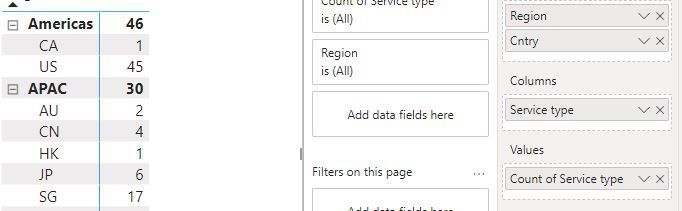
I have a table in excel that i am trying to duplicate in power BI, but there is also a separate calculated field to get a percentage to the left of the table. It is taking the count and then dividing by the count for that group.
ie CA = 1/46
US= 45/46
How do i calculate this on the row based on the subtotal of the groups total.
Excel
Solved! Go to Solution.
@kitcatnj , Create a new measure and use
M1 = divide(Count(Table[Service Type]), calculate(Count(Table[Service Type]), removefilters(Table[Cntry]) ) )
Percent of Total and Percent of SubTotal https://www.youtube.com/watch?v=6jTildcV2ho
https://www.youtube.com/watch?v=cN8AO3_vmlY&t=24270s
Can I ask another question relating to this?
The specs change slightly. They want the SUM %
This worked perfectly for COUNT. When i change it to sum it breaks. When i change it to sumx it breaks. Is there a trick to this?
M1 = divide(Count(Table[Service Type]), calculate(Count(Table[Service Type]), removefilters(Table[Cntry]) ) )
THANK YOU IN ADVANCE!!!
THANK YOU!!!!!
@kitcatnj , Create a new measure and use
M1 = divide(Count(Table[Service Type]), calculate(Count(Table[Service Type]), removefilters(Table[Cntry]) ) )
Percent of Total and Percent of SubTotal https://www.youtube.com/watch?v=6jTildcV2ho
https://www.youtube.com/watch?v=cN8AO3_vmlY&t=24270s
Check out the November 2025 Power BI update to learn about new features.
Advance your Data & AI career with 50 days of live learning, contests, hands-on challenges, study groups & certifications and more!