cancel
Showing results for 
Search instead for 
Did you mean: 

Get Fabric Certified for FREE during Fabric Data Days. Don't miss your chance! Request now

Reply
DanielaHo
Frequent Visitor

Get .aspx files (site pages) from SPO page library

Hello,

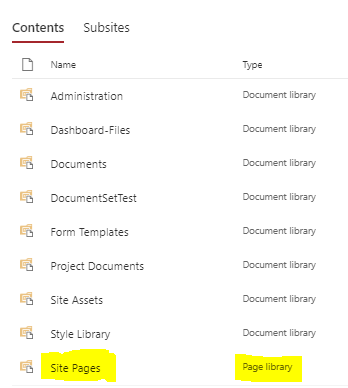
I am hoping to get a list of site pages hosted within a SharePoint Online site. The pages are listed as .aspx files within  the site's page library folder:

Capture2.PNG


I tried using the following 'SharePoint Folder' connector which returns all files within the document libraries (word, excel, pdf files) but does not return the site pages from the page library. 


Source = SharePoint.Files("url", [ApiVersion = 15])

So my question is:

Can Power BI  report on .aspx files within a page libary? And if so, how?


Thanks in advance!!

1 ACCEPTED SOLUTION
Anonymous
Not applicable

@TeigeGao is technically correct, there is not specific connector that will give you the ASPX files specifically.  But that’s only half answering the question.


If you use the “SharePoint Online List” connector, you’ll get a list of all of the items in that site.  Some of those entries will be the ASPX sites.  There is also an item in that list called “Site Pages” which may also contain what you are looking for.

The below code, adding your URL in, will give you a good start.  As time goes on the filter line might require tweaking depending on what changes Microsoft makes, or if you need those elements.

let
    Source = SharePoint.Tables("https://<YourSite>", [ApiVersion = 15]),
    #"Filtered Rows" = Table.SelectRows(Source, each ([Title] <> "appdata" and [Title] <> "appfiles" and [Title] <> "Form Templates" and [Title] <> "List Template Gallery" and [Title] <> "Master Page Gallery" and [Title] <> "Site Assets" and [Title] <> "Solution Gallery" and [Title] <> "Style Library" and [Title] <> "TaxonomyHiddenList" and [Title] <> "Theme Gallery" and [Title] <> "Web Part Gallery"))
in
    #"Filtered Rows"

 

View solution in original post

3 REPLIES 3
TeigeGao
Solution Sage
Solution Sage

HI @DanielaHo ,

This data source is still not unavailable in PowerBI.

Best Regards,

Teige

Anonymous
Not applicable

@TeigeGao is technically correct, there is not specific connector that will give you the ASPX files specifically.  But that’s only half answering the question.


If you use the “SharePoint Online List” connector, you’ll get a list of all of the items in that site.  Some of those entries will be the ASPX sites.  There is also an item in that list called “Site Pages” which may also contain what you are looking for.

The below code, adding your URL in, will give you a good start.  As time goes on the filter line might require tweaking depending on what changes Microsoft makes, or if you need those elements.

let
    Source = SharePoint.Tables("https://<YourSite>", [ApiVersion = 15]),
    #"Filtered Rows" = Table.SelectRows(Source, each ([Title] <> "appdata" and [Title] <> "appfiles" and [Title] <> "Form Templates" and [Title] <> "List Template Gallery" and [Title] <> "Master Page Gallery" and [Title] <> "Site Assets" and [Title] <> "Solution Gallery" and [Title] <> "Style Library" and [Title] <> "TaxonomyHiddenList" and [Title] <> "Theme Gallery" and [Title] <> "Web Part Gallery"))
in
    #"Filtered Rows"


Thanks - just to confirm, I assume you meant that this data source is not available ? 🙂

Helpful resources

Announcements
November Power BI Update Carousel

Power BI Monthly Update - November 2025

Check out the November 2025 Power BI update to learn about new features.

Fabric Data Days Carousel

Fabric Data Days

Advance your Data & AI career with 50 days of live learning, contests, hands-on challenges, study groups & certifications and more!

FabCon Atlanta 2026 carousel

FabCon Atlanta 2026

Join us at FabCon Atlanta, March 16-20, for the ultimate Fabric, Power BI, AI and SQL community-led event. Save $200 with code FABCOMM.

Top Solution Authors
Top Kudoed Authors