Join us at FabCon Atlanta from March 16 - 20, 2026, for the ultimate Fabric, Power BI, AI and SQL community-led event. Save $200 with code FABCOMM.
Register now!The Power BI Data Visualization World Championships is back! Get ahead of the game and start preparing now! Learn more
I'm trying to build a graph that shows a year to date sum over each week for only the last 7 weeks. Currently I'm using this measure:
Qty_Sold_YTD = CALCULATE(SUM(Data[Qty_Sold]), DATESYTD('Calendar'[Date]))and using a custom column that calculates the week number to filter to only weeks that were between now and 7 weeks ago. However, when I apply these filters, all the data from before 7 weeks ago doesn't get included. I have this measure which I think should do it, I'm just not sure how to add this value to Qty_Sold_YTD:
QTY_Sold_Before_7_Weeks_Ago = CALCULATE( SUM(Data[Qty_Sold]), FILTER( Data, WEEKNUM(TODAY())-WEEKNUM(Data[Date])<7 ) )
Solved! Go to Solution.
Hi @travbum,
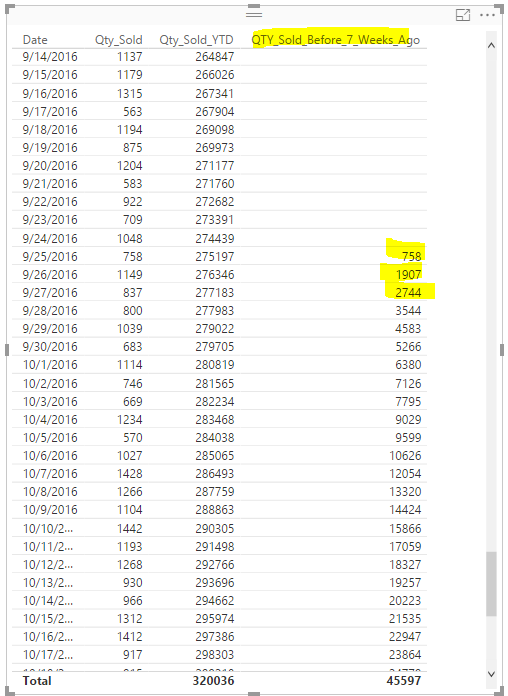
To achieve your requirement, you can use the DAX below.
QTY_Sold_Before_7_Weeks_Ago = CALCULATE(SUM(data[Qty_Sold]),FILTER(ALL(data),data[Date]<=MAX(data[Date])&&(WEEKNUM(TODAY())-WEEKNUM(data[Date]))<7))
Regards,
Charlie Liao
Hi @travbum,
To achieve your requirement, you can use the DAX below.
QTY_Sold_Before_7_Weeks_Ago = CALCULATE(SUM(data[Qty_Sold]),FILTER(ALL(data),data[Date]<=MAX(data[Date])&&(WEEKNUM(TODAY())-WEEKNUM(data[Date]))<7))
Regards,
Charlie Liao
The Power BI Data Visualization World Championships is back! Get ahead of the game and start preparing now!
Check out the November 2025 Power BI update to learn about new features.
| User | Count |
|---|---|
| 59 | |
| 46 | |
| 42 | |
| 23 | |
| 18 |
| User | Count |
|---|---|
| 193 | |
| 123 | |
| 99 | |
| 67 | |
| 49 |