cancel
Showing results for 
Search instead for 
Did you mean: 

The Power BI Data Visualization World Championships is back! Get ahead of the game and start preparing now! Learn more

Reply
hwoehler
Helper I
Helper I

Get Values of last day of month and previous month to calculate the change

Hello everybody,

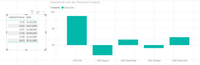
Goal: try to get the last value of each month for my data. In addition, I would like to get the previous end-of-month value in parallel, so that I can use it to calculate the change in %. See the following picture:

Problem: There are several groups (several ISINs). The last value of a month should be filtered out for each ISIN. However, my formulas do not correctly output the value of the last day of the month for all ISINs. This is because the last day for ISIN x is, for example, March 29, 2008 and for ISIN y the last day in March 2008 is March 28, 2008. In the date column, my formulas only search for the last day of the month for all ISINs, i.e. 29.03. in my example. This results in errors for ISIN y (28.03.) And the change in % cannot be calculated. I hope the problem is understandable, here are screenshots for better understanding.

So there must be a formula that outputs the end values ​​and previous end values ​​for each ISIN.

The PBIX-file is attached: https://we.tl/t-yxDQEEokth
The desired result is the bar chart (see pictures) with the changes in %, just without errors if I filter by ISIN.

My formulas at the moment:
LastMonthValue = CALCULATE(Sum(Fact_Stocks[Close]);ENDOFMONTH(Fact_Stocks[Date]))

LastMonthValueIII = if(ISBLANK([LastMonthValue]);BLANK();CALCULATE([LastMonthValue];PREVIOUSMONTH(LASTDATE(Dim_Date[Date]));Fact_Stocks[Date]))

ReturnMonth = if(ISBLANK([LastMonthValue]) || ISBLANK([LastMonthValueIII]);BLANK();DIVIDE([LastMonthValue];[LastMonthValueIII])-1)
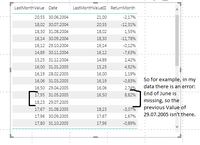
Error in dataError in dataBar ChartBar Chart


I am grateful for any help.
Regards, hwoehler


1 ACCEPTED SOLUTION
sturlaws
Resident Rockstar
Resident Rockstar

Hi, @hwoehler ,


I have a possible solution for you. 


First, to make things a bit easier, create a new column in dim_date like this:

YearMonthNum = (Dim_Date[Year]-1980)*12+month(Dim_Date[Date])


Then change the measures to this:

CurrentMonth =
VAR _currentYearMonthNum =
    CALCULATE ( MAX ( Dim_Date[YearMonthNum] ) )
RETURN
    SUMX (
        Dim_Details;
        VAR _lastDateOfCurrentMonthFact =
            CALCULATE (
                MAX ( Fact_Stocks[Date] );
                FILTER ( ALL ( Dim_Date ); Dim_Date[YearMonthNum] = _currentYearMonthNum )
            )
        RETURN
            CALCULATE (
                SUM ( Fact_Stocks[Close] );
                FILTER ( Dim_Date; Dim_Date[Date] = _lastDateOfCurrentMonthFact )
            )
    )
PreviousMonth =
VAR _previousYearMonthNum =
    CALCULATE ( MAX ( Dim_Date[YearMonthNum] ) ) - 1
RETURN
    SUMX (
        Dim_Details;
        VAR _lastDateOfPreviousMonthFact =
            CALCULATE (
                MAX ( Fact_Stocks[Date] );
                FILTER ( ALL ( Dim_Date ); Dim_Date[YearMonthNum] = _previousYearMonthNum )
            )
        RETURN
            CALCULATE (
                SUM ( Fact_Stocks[Close] );
                FILTER ( ALL ( Dim_Date ); Dim_Date[Date] = _lastDateOfPreviousMonthFact )
            )
    )
return =
VAR _tmp =
    DIVIDE ( [CurrentMonth]; [PreviousMonth] )
RETURN
    IF ( ISBLANK ( _tmp ); BLANK (); _tmp - 1 )


 Cheers,
Sturla

If this post helps, then please consider Accepting it as the solution. Kudos are nice too.

View solution in original post

1 REPLY 1
sturlaws
Resident Rockstar
Resident Rockstar

Hi, @hwoehler ,


I have a possible solution for you. 


First, to make things a bit easier, create a new column in dim_date like this:

YearMonthNum = (Dim_Date[Year]-1980)*12+month(Dim_Date[Date])


Then change the measures to this:

CurrentMonth =
VAR _currentYearMonthNum =
    CALCULATE ( MAX ( Dim_Date[YearMonthNum] ) )
RETURN
    SUMX (
        Dim_Details;
        VAR _lastDateOfCurrentMonthFact =
            CALCULATE (
                MAX ( Fact_Stocks[Date] );
                FILTER ( ALL ( Dim_Date ); Dim_Date[YearMonthNum] = _currentYearMonthNum )
            )
        RETURN
            CALCULATE (
                SUM ( Fact_Stocks[Close] );
                FILTER ( Dim_Date; Dim_Date[Date] = _lastDateOfCurrentMonthFact )
            )
    )
PreviousMonth =
VAR _previousYearMonthNum =
    CALCULATE ( MAX ( Dim_Date[YearMonthNum] ) ) - 1
RETURN
    SUMX (
        Dim_Details;
        VAR _lastDateOfPreviousMonthFact =
            CALCULATE (
                MAX ( Fact_Stocks[Date] );
                FILTER ( ALL ( Dim_Date ); Dim_Date[YearMonthNum] = _previousYearMonthNum )
            )
        RETURN
            CALCULATE (
                SUM ( Fact_Stocks[Close] );
                FILTER ( ALL ( Dim_Date ); Dim_Date[Date] = _lastDateOfPreviousMonthFact )
            )
    )
return =
VAR _tmp =
    DIVIDE ( [CurrentMonth]; [PreviousMonth] )
RETURN
    IF ( ISBLANK ( _tmp ); BLANK (); _tmp - 1 )


 Cheers,
Sturla

If this post helps, then please consider Accepting it as the solution. Kudos are nice too.

Helpful resources

Announcements
Power BI DataViz World Championships

Power BI Dataviz World Championships

The Power BI Data Visualization World Championships is back! Get ahead of the game and start preparing now!

December 2025 Power BI Update Carousel

Power BI Monthly Update - December 2025

Check out the December 2025 Power BI Holiday Recap!

FabCon Atlanta 2026 carousel

FabCon Atlanta 2026

Join us at FabCon Atlanta, March 16-20, for the ultimate Fabric, Power BI, AI and SQL community-led event. Save $200 with code FABCOMM.