Join us at FabCon Atlanta from March 16 - 20, 2026, for the ultimate Fabric, Power BI, AI and SQL community-led event. Save $200 with code FABCOMM.
Register now!Get Fabric Certified for FREE during Fabric Data Days. Don't miss your chance! Request now
Hello,
Need help/advice on creating a calculated table in Power BI...
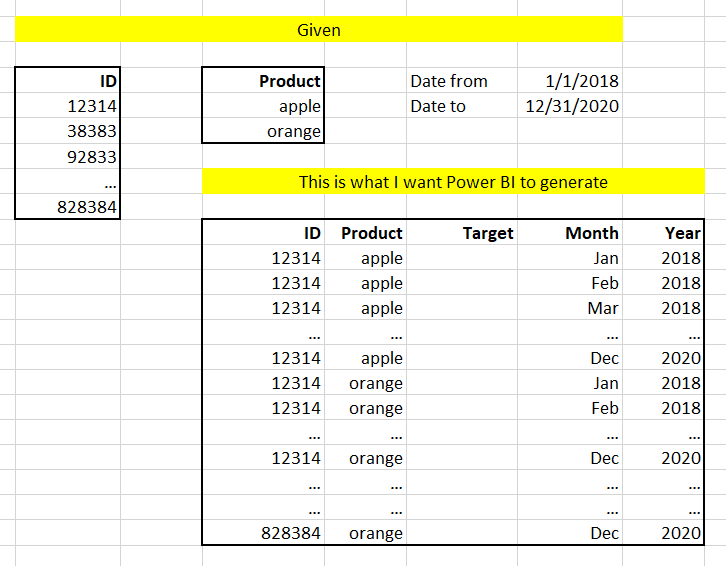
I have a table with IDs and one with Products and I want to create a new calculated table with n rows for each ID (n = number of products x number of months in a date range) and 5 columns (ID, Product, Target, Month, Year)
Thanks!
Solved! Go to Solution.
Hi @Anonymous ,
Check this file: Download PBIX
It creates a cross join between id and product and a list of dates between from/to dates.
If you consider it as a solution, please mark as a solution and kudos.
Ricardo
Hi @Anonymous ,
You may create calculated table like DAX below.
Desired = GENERATEALL(GENERATEALL(GENERATEALL('ID','Product'),VALUES('Date'[Month])),VALUES('Date'[Year]))
You can download the Pbix file from here.
Best Regards,
Amy
Community Support Team _ Amy
If this post helps, then please consider Accept it as the solution to help the other members find it more quickly.
Hi @Anonymous ,
Check this file: Download PBIX
It creates a cross join between id and product and a list of dates between from/to dates.
If you consider it as a solution, please mark as a solution and kudos.
Ricardo
Check out the November 2025 Power BI update to learn about new features.
Advance your Data & AI career with 50 days of live learning, contests, hands-on challenges, study groups & certifications and more!