Join us at FabCon Atlanta from March 16 - 20, 2026, for the ultimate Fabric, Power BI, AI and SQL community-led event. Save $200 with code FABCOMM.
Register now!Get Fabric Certified for FREE during Fabric Data Days. Don't miss your chance! Request now
Hello everyone,
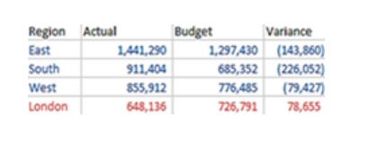
I wondering if I could get some assistance in turning this:
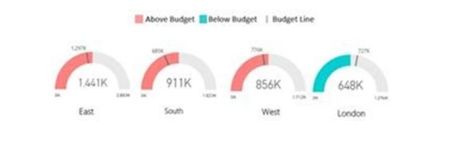
Into this:
Any help would be much appreciated. Thank you!
Solved! Go to Solution.
Hi @brawndo ,
have you tried using the built in gauge of power bi? It has the possbility to conditionally change the color of the gauge, but it is a bit tricky to find, you need to hover the mouse pointer above in the correct area:
Cheers,
Sturla
If this post helps, then please consider Accepting it as the solution. Kudos are nice too.
Hi @brawndo ,
have you tried using the built in gauge of power bi? It has the possbility to conditionally change the color of the gauge, but it is a bit tricky to find, you need to hover the mouse pointer above in the correct area:
Cheers,
Sturla
If this post helps, then please consider Accepting it as the solution. Kudos are nice too.
@sturlaws Yeah I know I need to use a gauge I just dont know how to split them up by region.
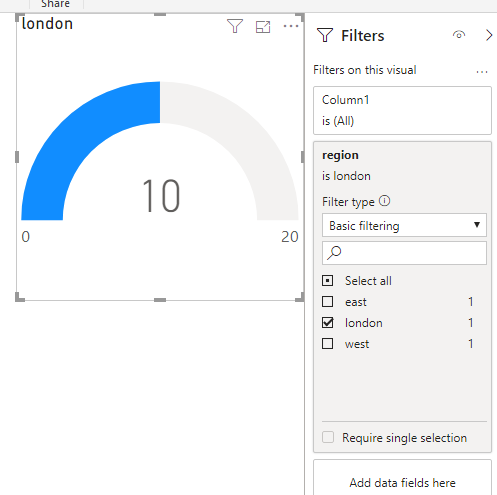
You have to create 4 separate gauges, and add Region to the visual filter pane for each of them, and filter accordingly, like this:
Check out the November 2025 Power BI update to learn about new features.
Advance your Data & AI career with 50 days of live learning, contests, hands-on challenges, study groups & certifications and more!