Join us at FabCon Atlanta from March 16 - 20, 2026, for the ultimate Fabric, Power BI, AI and SQL community-led event. Save $200 with code FABCOMM.
Register now!View all the Fabric Data Days sessions on demand. View schedule
I have been asked to create a gantt chart to go by day of the week. What we are looking for is to show how many days a guest stays based on the day of the week they arrive and type of surgery.
So in the graphic below - those people admitted on Monday that have surgery 1 have an average stay of 3 days. If the same surgery on Wednesday, their average stay is 2 days.
If they have surgery 2 and arrive Monday, their average stay is 4 days and if they have the same surgery on Thursday, they also stay 4 days.
They really want it in this gantt format and not in a matrix. Is this possible?
Solved! Go to Solution.
Hi kattlees,
Based on my test, I find that there is no grant chart could achieve this goal currently. You could use “Gantt Chart By MAQ” from market, you will get below result
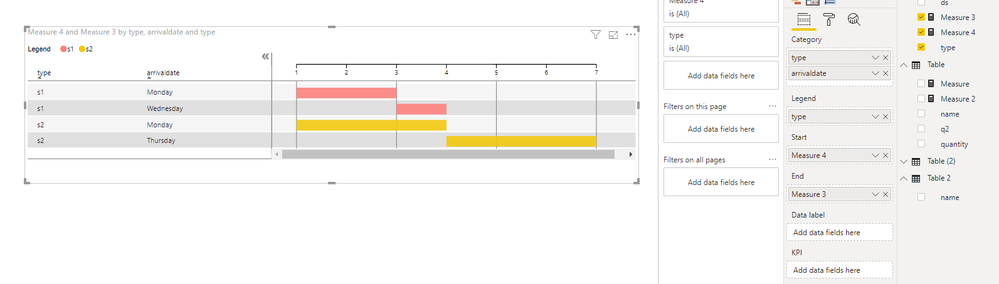
Data sample might be similar to below, create two measures
Measure 4 = MIN(gantt[ds]) Measure 3 = MIN(gantt[ds])+MIN(gantt[days])-1
Best Regards,
Zoe Zhi
If this post helps, then please consider Accept it as the solution to help the other members find it more quickly.
hi kattlees, were you able to create the room schedule dashboard? Would you please share the sample dashboard with me? Thanks!!
Hi kattlees,
Based on my test, I find that there is no grant chart could achieve this goal currently. You could use “Gantt Chart By MAQ” from market, you will get below result
Data sample might be similar to below, create two measures
Measure 4 = MIN(gantt[ds]) Measure 3 = MIN(gantt[ds])+MIN(gantt[days])-1
Best Regards,
Zoe Zhi
If this post helps, then please consider Accept it as the solution to help the other members find it more quickly.
Check out the November 2025 Power BI update to learn about new features.
Advance your Data & AI career with 50 days of live learning, contests, hands-on challenges, study groups & certifications and more!