Join us at FabCon Atlanta from March 16 - 20, 2026, for the ultimate Fabric, Power BI, AI and SQL community-led event. Save $200 with code FABCOMM.
Register now!The Power BI Data Visualization World Championships is back! Get ahead of the game and start preparing now! Learn more
Hello All,
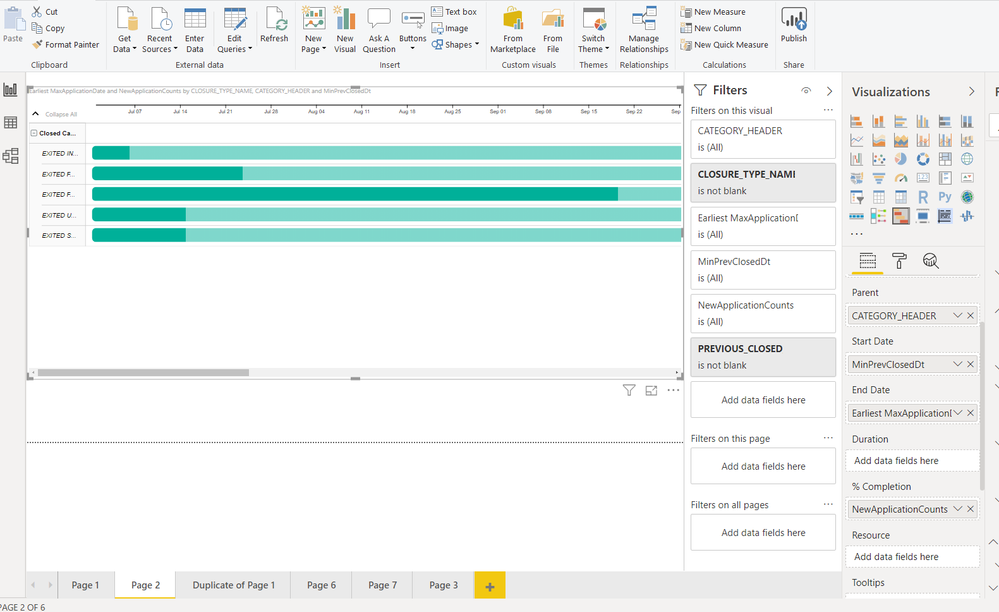
I'm trying to create a Gantt Chart Type Visualization to track the count of cases & average days between case closure and new applications by date.But I don't see any option to display multiple measures . Also how do I display the actual numbers instead of % ?
How to display multiple measures ? is it possible to display the measures even at the parent level ?
I'm trying to use the Gantt 2.2.3 custom visual.
Thanks,
Kalyan
Solved! Go to Solution.
@KalyanU
1. Try used Gantt Chart by MAQ Software, and put the measure on the KPI field.
2. Select a measure, you can change the format from percent to number on the top menu bar.
Paul Zheng _ Community Support Team
If this post helps, then please consider Accept it as the solution to help the other members find it more quickly.
@KalyanU
1. Try used Gantt Chart by MAQ Software, and put the measure on the KPI field.
2. Select a measure, you can change the format from percent to number on the top menu bar.
Paul Zheng _ Community Support Team
If this post helps, then please consider Accept it as the solution to help the other members find it more quickly.
Hello @Anonymous
Will check & let you know.
Thanks
@Anonymous,
Thank You.Will check.
The Power BI Data Visualization World Championships is back! Get ahead of the game and start preparing now!
| User | Count |
|---|---|
| 38 | |
| 36 | |
| 33 | |
| 32 | |
| 29 |
| User | Count |
|---|---|
| 129 | |
| 88 | |
| 79 | |
| 68 | |
| 63 |