Don't miss your chance to take the Fabric Data Engineer (DP-600) exam for FREE! Find out how by attending the DP-600 session on April 23rd (pacific time), live or on-demand.
Learn moreNext up in the FabCon + SQLCon recap series: The roadmap for Microsoft SQL and Maximizing Developer experiences in Fabric. All sessions are available on-demand after the live show. Register now
Hi,
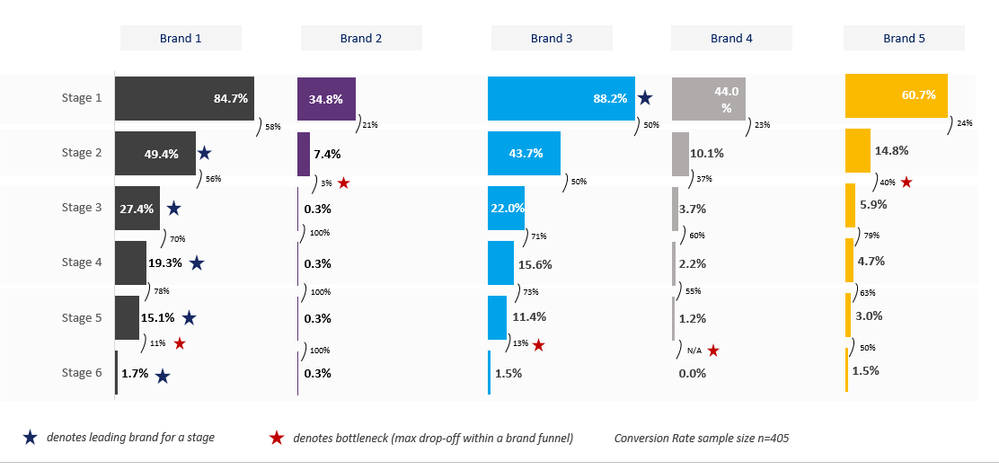
I'm looking into the feasability of creating this (attached) brand funnel chart in Power BI. I know that you can (pretty much) do it in Tableau but am relatively new to Power BI, and want to get a sense of what's possible. Some elements that may be tricky...
1) A column for each brand (maybe have to create 5 separate charts?)
2) Blue star denoting leading brand for each stage (assume can be done using Dax?)
3) Red star denoting max drop-off within each brand funnel (again, assume Dax can handle this)
4) Assume stars will have to be added as a separate chart instead of forming part of the core column chart.
I've attached an image of what I'm looking to create.
Would appreciate any and all help! Thanks.
Thanks @adityavighne , I'll consider that as a Plan B.
Any way to recreate exactly what's in my image?
I don't think so visual is available.
You can try with 3AG systems bar chart - get this visual form app center
If you have recently started exploring Fabric, we'd love to hear how it's going. Your feedback can help with product improvements.
A new Power BI DataViz World Championship is coming this June! Don't miss out on submitting your entry.
Share feedback directly with Fabric product managers, participate in targeted research studies and influence the Fabric roadmap.
| User | Count |
|---|---|
| 48 | |
| 43 | |
| 39 | |
| 19 | |
| 17 |
| User | Count |
|---|---|
| 69 | |
| 63 | |
| 32 | |
| 30 | |
| 23 |