Forum Discussion

masplin's avatar
masplin
Icon for Impactful Individual rankImpactful Individual
6 years ago
Solved

Foxed why ALL calculation not working

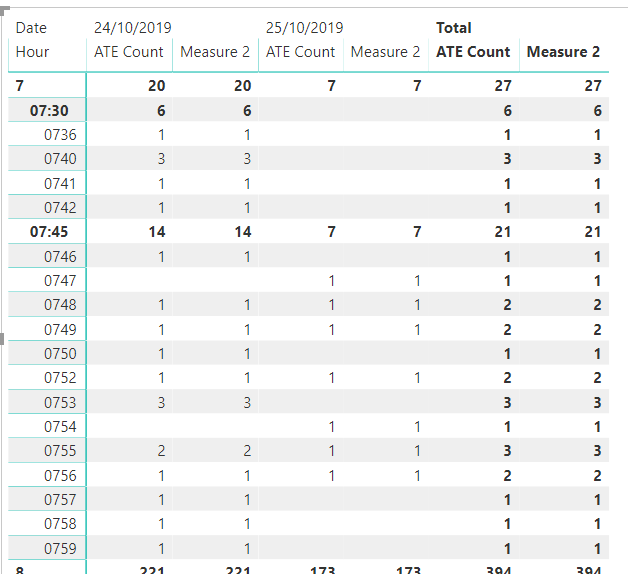
I'm struggling ot understand why this code is not filling in the blanks in this matrix. I was expecting on the row 7:00 it would add up the amounts for both dates which = 6 and put 6 in the Measure 2 value for both dates? 


Measure 2 = 
VAR TableVar =
    ADDCOLUMNS (
        SUMMARIZE ( ATEs, 'Time'[TimeKey],'Date'[Date] ),
        "ATEs", ATEs[ATE Count]
            
    )
RETURN
CALCULATE(
   SUMX(TableVar,  [ATEs]),ALL('Date'))


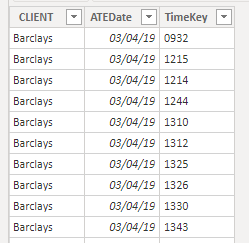
The ATE table looks like this. TimeKey and Date are just standard Date and Time master tables. [ATE Count] is just a countrows on ATE table. 


Any clues appreciated

Mike

5 Replies

  • VijayP's avatar
    VijayP
    Icon for Community Champion rankCommunity Champion

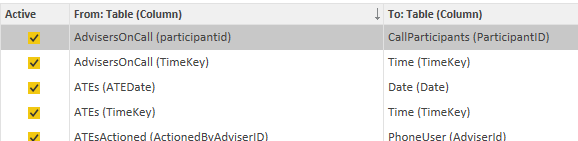
    Some times We all miss some basic thing. Please check the relation ship of all tables is it intact?

    • masplin's avatar
      masplin
      Icon for Impactful Individual rankImpactful Individual

      yep or the first column wouldn't have worked


      • v-joesh-msft's avatar
        v-joesh-msft
        Icon for Solution Sage rankSolution Sage

        Hi masplin ,

        I don't know if it is the result you want. You need to create the following date table.

        Date = CALENDAR(MIN('ATEs'[ATEDate]),MAX('ATEs'[ATEDate]))  

        Then create the following measure:

        Measure 2 =
        VAR TableVar =
            CALCULATETABLE (
                ADDCOLUMNS (
                    SUMMARIZE ( ATEs, 'Time'[TimeKey], 'Date'[Date] ),
                    "ATEs", ATEs[ATE Count]
                ),
                ALL ( 'Date' )
            )
        RETURN
            CALCULATE ( CALCULATE ( SUMX ( TableVar, [ATEs] ), ALL ( 'Date' ) ) )

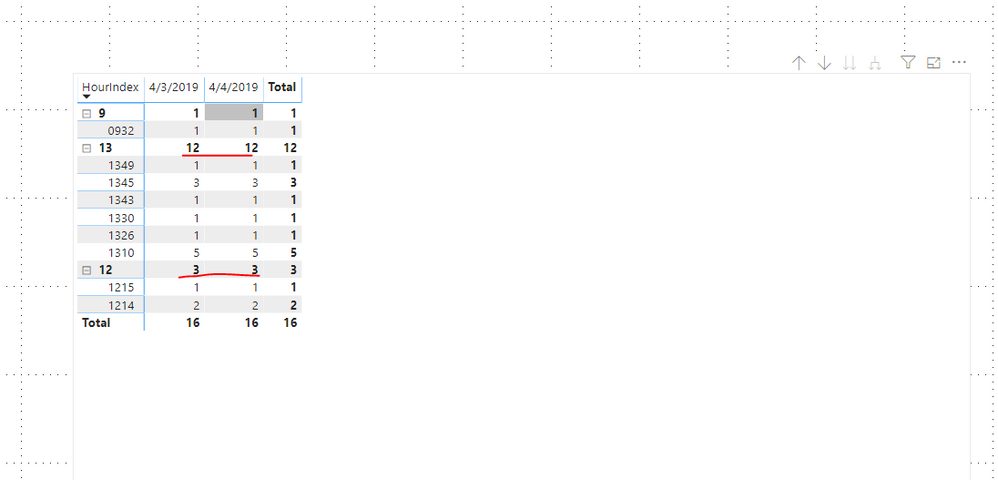
        Results are as follows:

        Here is a demo, please try it:

        https://qiuyunus-my.sharepoint.com/:u:/g/personal/pbipro_qiuyunus_onmicrosoft_com/EQA5J8f9iMVMlgUe0dsy3uoBmrJj57oDfztwqyabGBF6Ig?e=R9z5b1

        Best Regards,

        Community Support Team _ Joey
        If this post helps, then please consider Accept it as the solution to help the other members find it more quickly.