Join us at FabCon Atlanta from March 16 - 20, 2026, for the ultimate Fabric, Power BI, AI and SQL community-led event. Save $200 with code FABCOMM.
Register now!The Power BI Data Visualization World Championships is back! Get ahead of the game and start preparing now! Learn more
Hello Team,
I need your help with a formula. I need to calculate the number of covers per Ticket. The database shows the data as per below:
| Ticket | Cover |
| 12871 | 1 |
| 12874 | 2 |
| 12874 | 2 |
| 12872 | 4 |
| 12872 | 4 |
| 12872 | 4 |
| 12872 | 4 |
| 12876 | 1 |
| 12871 | 1 |
| 12872 | 4 |
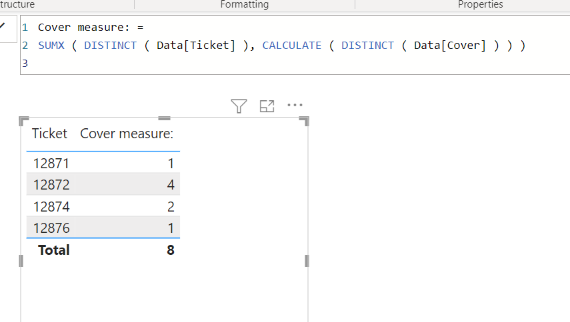
My final result should be like the below:
| Ticket | Cover |
| 12871 | 1 |
| 12872 | 4 |
| 12874 | 2 |
| 12876 | 1 |
| Total | 8 |
Is there a way I can do it?
Thank you.
Solved! Go to Solution.
Hi,
Please check the below picture and the attached pbix file.
Cover measure: =
SUMX ( DISTINCT ( Data[Ticket] ), CALCULATE ( DISTINCT ( Data[Cover] ) ) )
Hi,
Please check the below picture and the attached pbix file.
Cover measure: =
SUMX ( DISTINCT ( Data[Ticket] ), CALCULATE ( DISTINCT ( Data[Cover] ) ) )
Hi Jihwan,
It works, thank you.
Kind Regards
The Power BI Data Visualization World Championships is back! Get ahead of the game and start preparing now!
| User | Count |
|---|---|
| 41 | |
| 38 | |
| 36 | |
| 30 | |
| 28 |
| User | Count |
|---|---|
| 128 | |
| 88 | |
| 79 | |
| 67 | |
| 62 |