FabCon is coming to Atlanta
Join us at FabCon Atlanta from March 16 - 20, 2026, for the ultimate Fabric, Power BI, AI and SQL community-led event. Save $200 with code FABCOMM.
Register now!- Power BI forums
- Get Help with Power BI
- Desktop
- Service
- Report Server
- Power Query
- Mobile Apps
- Developer
- DAX Commands and Tips
- Custom Visuals Development Discussion
- Health and Life Sciences
- Power BI Spanish forums
- Translated Spanish Desktop
- Training and Consulting
- Instructor Led Training
- Dashboard in a Day for Women, by Women
- Galleries
- Data Stories Gallery
- Themes Gallery
- Contests Gallery
- QuickViz Gallery
- Quick Measures Gallery
- Visual Calculations Gallery
- Notebook Gallery
- Translytical Task Flow Gallery
- TMDL Gallery
- R Script Showcase
- Webinars and Video Gallery
- Ideas
- Custom Visuals Ideas (read-only)
- Issues
- Issues
- Events
- Upcoming Events
Get Fabric Certified for FREE during Fabric Data Days. Don't miss your chance! Request now
- Power BI forums
- Forums
- Get Help with Power BI
- Desktop
- Formula DAX such as COUNTIF in Excel
- Subscribe to RSS Feed
- Mark Topic as New
- Mark Topic as Read
- Float this Topic for Current User
- Bookmark
- Subscribe
- Printer Friendly Page

- Mark as New
- Bookmark
- Subscribe
- Mute
- Subscribe to RSS Feed
- Permalink
- Report Inappropriate Content
Formula DAX such as COUNTIF in Excel
Hello! Help me please.
I need formula DAX.
There is a table:
Campaign Cost ClientID
First 900 0001
First 900 0002
First 900 0003
Second 1000 0004
Second 1000 0005
Third 300 0006
I spent 2200 USD on three campaigns. 900 USD on "First", 1000 USD on "Second" and 300 USD on "Third".
And I got 6 Clients. I want to see how much I spent to get each Client.
What should I do to see 300 USD in "First"? Because it repeats 3 times.
The same thing with "Second". There should be 500 USD. Cause I got 2 clients from that Campaign and spent 1000 USD.
In Excel, it is easy to make))
=B2/COUNTIF(A:A;A2)
I'll be very appreciate for help!

- Mark as New
- Bookmark
- Subscribe
- Mute
- Subscribe to RSS Feed
- Permalink
- Report Inappropriate Content
Hi @topalych,
Vvelarde's formula seems well, you can also use blew formula:
Measure:
Current Cost =
var currCampaign=LASTNONBLANK(Table1[Campaign],[Campaign])
Return
DIVIDE(MIN([Cost]),COUNTAX(FILTER(ALL(Table1),[Campaign]=currCampaign),[Campaign]))
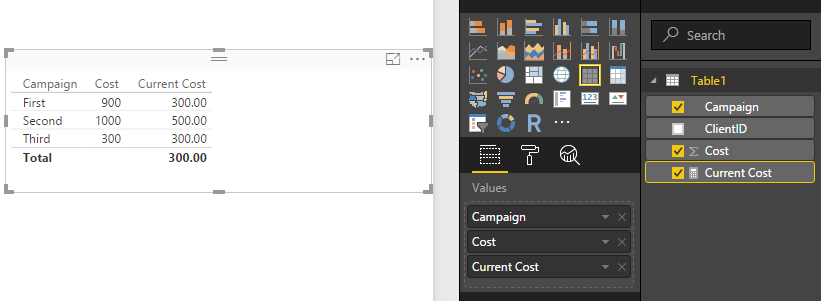
Regards,
Xiaoxin Sheng
- Mark as New
- Bookmark
- Subscribe
- Mute
- Subscribe to RSS Feed
- Permalink
- Report Inappropriate Content
@Anonymous @Vvelarde
Thank You for answer. But it didn't work(
I have data from different tables.
And how can I add screenshots here?)
- Mark as New
- Bookmark
- Subscribe
- Mute
- Subscribe to RSS Feed
- Permalink
- Report Inappropriate Content
Hi @topalych,
Can you share us some sample data to test?
>>And how can I add screenshots here?
You can use the camera button to insert the picture.

Regards,
Xiaoxin Sheng
- Mark as New
- Bookmark
- Subscribe
- Mute
- Subscribe to RSS Feed
- Permalink
- Report Inappropriate Content
Yes, course!
What eMail?
- Mark as New
- Bookmark
- Subscribe
- Mute
- Subscribe to RSS Feed
- Permalink
- Report Inappropriate Content
- Mark as New
- Bookmark
- Subscribe
- Mute
- Subscribe to RSS Feed
- Permalink
- Report Inappropriate Content
- Mark as New
- Bookmark
- Subscribe
- Mute
- Subscribe to RSS Feed
- Permalink
- Report Inappropriate Content
@Anonymous, Did You get the file?
- Mark as New
- Bookmark
- Subscribe
- Mute
- Subscribe to RSS Feed
- Permalink
- Report Inappropriate Content
Hi @topalych,
Yes, I download it. But I faced a trouble(complex relationship) to merge multiple table columns to one and write a measure to calculate them.
Regards,
Xiaoxin Sheng
- Mark as New
- Bookmark
- Subscribe
- Mute
- Subscribe to RSS Feed
- Permalink
- Report Inappropriate Content
Thank You anyway!)


- Mark as New
- Bookmark
- Subscribe
- Mute
- Subscribe to RSS Feed
- Permalink
- Report Inappropriate Content
Hello, use this measure
CostCampaign = DIVIDE(CALCULATE(Min(Table1[Cost]));COUNTROWS(Table1))
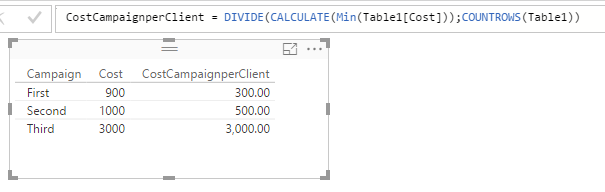
Lima - Peru
Helpful resources

Power BI Monthly Update - November 2025
Check out the November 2025 Power BI update to learn about new features.

Fabric Data Days
Advance your Data & AI career with 50 days of live learning, contests, hands-on challenges, study groups & certifications and more!

FabCon Atlanta 2026
Join us at FabCon Atlanta, March 16-20, for the ultimate Fabric, Power BI, AI and SQL community-led event. Save $200 with code FABCOMM.


