cancel
Showing results for 
Search instead for 
Did you mean: 

The Power BI Data Visualization World Championships is back! Get ahead of the game and start preparing now! Learn more

Reply
carrussen
Regular Visitor

Formating date


Hi


I am unsuccesfully trying to convert a date in text format to a date in date format !


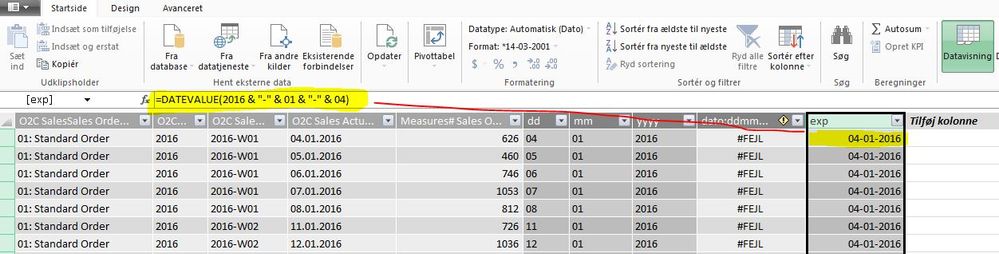
I have inported the raw date "dd.mm.yyyy" and splitted the the text date up in three colums "dd", "mm" and "yyyy" - see the picture below.


My intension was to use the formula in "yellow"! It works fine with hard coded dates - but the formula fails if I change eg. 2016 with [yyyy]


Date.JPG


The funny thing is that I use the same method in another sheet - here it works...


The differnce is that formula works when the input file is a CSV-file - but the formula does not work when the input is a Cube...


... strange - any suggestion to what the problem could be?


Carsten


1 ACCEPTED SOLUTION

Thank you for your help.


After some iterations it worked 


Carsten

View solution in original post

4 REPLIES 4
v-huizhn-msft
Microsoft Employee
Microsoft Employee

Hi @carrussen,

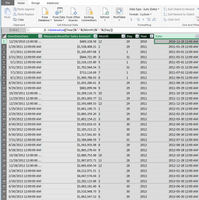
I reproduce your scenario, input data from Cube, the formula still work. Please see the following screenshot.

1(1).PNG

Please use another method to get date type column using DATE function.

Date=DATE([YYYY],[mm],[dd])


In addition, you can change text to date directly in the data formuting under modeling.

Best Regards,
Angelia


Thank you for your help.


After some iterations it worked 


Carsten

Hi @carrussen,

Congratulations, please mark the right reply as answer. So more people will find the solution easily.

Best Regards,
Angelia

Anonymous
Not applicable

The format of date columns in the data model is not set by your DAX code, but by the options Formatting in Modeling tab of the ribbon at the top of Power BI Desktop interface. You can see that on your screenshot. If the desired format is not on the list in Format option, then you are not able to force a column of date type to be presented the way you want. There is no perfect solution for that, but you can use a calculated text column as a kind of label for dates - then you can use for example FORMAT function available in DAX to change the format as desired.

Helpful resources

Announcements
Power BI DataViz World Championships

Power BI Dataviz World Championships

The Power BI Data Visualization World Championships is back! Get ahead of the game and start preparing now!

December 2025 Power BI Update Carousel

Power BI Monthly Update - December 2025

Check out the December 2025 Power BI Holiday Recap!

FabCon Atlanta 2026 carousel

FabCon Atlanta 2026

Join us at FabCon Atlanta, March 16-20, for the ultimate Fabric, Power BI, AI and SQL community-led event. Save $200 with code FABCOMM.

Top Solution Authors