Join us at FabCon Atlanta from March 16 - 20, 2026, for the ultimate Fabric, Power BI, AI and SQL community-led event. Save $200 with code FABCOMM.
Register now!The Power BI Data Visualization World Championships is back! It's time to submit your entry. Live now!
Basically I'm trying to format the date on the visual on a format like yyyy/mm/dd
Can anyone help me?
Solved! Go to Solution.
Hi @idmarino
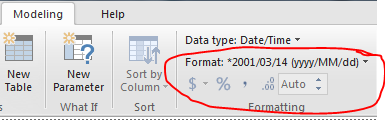
Check Date format under Modeling tab in ribbon pallet, Wheather YYYY/mm/dd format is available or not, if it is not available then change your system date format in YYYY/mm/dd and restart the powerbi application.
Hi @idmarino
Check Date format under Modeling tab in ribbon pallet, Wheather YYYY/mm/dd format is available or not, if it is not available then change your system date format in YYYY/mm/dd and restart the powerbi application.
The Power BI Data Visualization World Championships is back! It's time to submit your entry.
Check out the January 2026 Power BI update to learn about new features.
| User | Count |
|---|---|
| 69 | |
| 45 | |
| 36 | |
| 28 | |
| 23 |
| User | Count |
|---|---|
| 141 | |
| 124 | |
| 59 | |
| 40 | |
| 32 |