cancel
Showing results for 
Search instead for 
Did you mean: 

Get Fabric Certified for FREE during Fabric Data Days. Don't miss your chance! Request now

Reply
perpor
Helper V
Helper V

Forecasting - see descriptions of the dates

I'm using the new forecast feature, using monthly series.


(Interesting, previously I could not see the function but now with the suggestion in this post:

http://community.powerbi.com/t5/Desktop/Forecasting-not-available-in-Options/td-p/115603


i.e. no fields in Legend area, and no filters, I can see it).


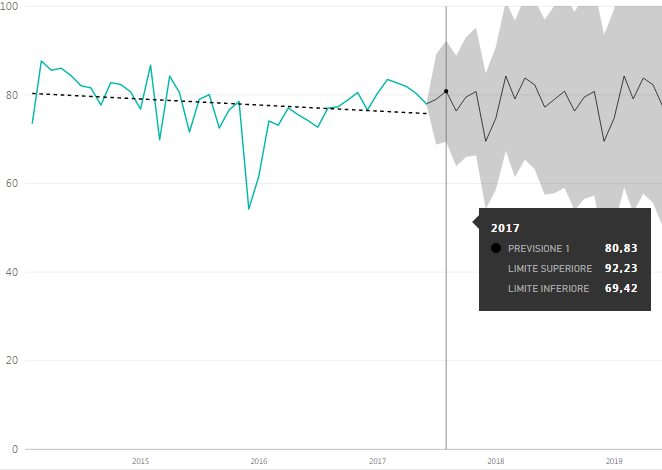
But for the dates I can not see the description of the periods in the forecast, there is only a generic description 'forecast 1' for all the points.


Are there some options that I can't see to do this? thanks


forecastlabels.png

1 ACCEPTED SOLUTION

Thanks to the answer, I think I've already brought a solution

(Actually it made me realize that I still have to understand many things about Powerbi, but I knew that already),
but it made me understand that by using another variable I've already got the result.


It is a variable obtained from the 'date' field, grouping by 'months'

If I use this instead of the other variable obtained directly from the sqlserver table, which has sql 'date'
and is managed hierarchically by PowerBI, the legend appears ...


forecastlabelsok.png

View solution in original post

5 REPLIES 5
v-jiascu-msft
Microsoft Employee
Microsoft Employee

Hi @perpor


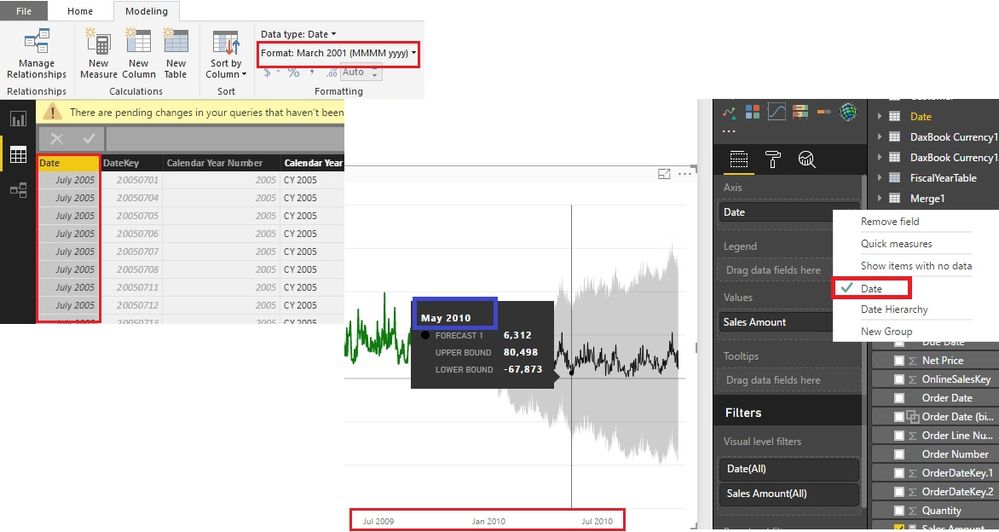
Just see the picture you posted, the Axis unit is year. So the forecast period is year too. That’s why you can’t see the month in the tooltips. Here are the steps to bring the month out.

  1. Change the format of Date (used in Axis) into “Month Year”;
  2. Use “Date” in Axis, not “Date Hierarchy”. 

It will show the month now.


Forecasting - see descriptions of the dates.jpg


Best Regards!

Dale

Community Support Team _ Dale
If this post helps, then please consider Accept it as the solution to help the other members find it more quickly.

Thanks to the answer, I think I've already brought a solution

(Actually it made me realize that I still have to understand many things about Powerbi, but I knew that already),
but it made me understand that by using another variable I've already got the result.


It is a variable obtained from the 'date' field, grouping by 'months'

If I use this instead of the other variable obtained directly from the sqlserver table, which has sql 'date'
and is managed hierarchically by PowerBI, the legend appears ...


forecastlabelsok.png

vanessafvg
Super User
Super User

@perpor are you wanting to drill down into months/weeks  etc?


If I took the time to answer your question and I came up with a solution, please mark my post as a solution and /or give kudos freely for the effort 🙂 Thank you!

Proud to be a Super User!


No for this chart it's enough to see that the first point in the forecast is July 2017 ,  the second August 2017 and so on

@perpor ah ok, i see what you saying, you can see the month in the tool tip but i see what you mean i also am unable to get it to show the month


If I took the time to answer your question and I came up with a solution, please mark my post as a solution and /or give kudos freely for the effort 🙂 Thank you!

Proud to be a Super User!


Helpful resources

Announcements
November Power BI Update Carousel

Power BI Monthly Update - November 2025

Check out the November 2025 Power BI update to learn about new features.

Fabric Data Days Carousel

Fabric Data Days

Advance your Data & AI career with 50 days of live learning, contests, hands-on challenges, study groups & certifications and more!

FabCon Atlanta 2026 carousel

FabCon Atlanta 2026

Join us at FabCon Atlanta, March 16-20, for the ultimate Fabric, Power BI, AI and SQL community-led event. Save $200 with code FABCOMM.

Top Solution Authors
Top Kudoed Authors