Join us at FabCon Atlanta from March 16 - 20, 2026, for the ultimate Fabric, Power BI, AI and SQL community-led event. Save $200 with code FABCOMM.
Register now!The Power BI Data Visualization World Championships is back! Get ahead of the game and start preparing now! Learn more
Solved! Go to Solution.
I figured it out, use ALLEXCEPT instead of ALL. Done.
@Anonymous , Try one of the two options
Customer Focus Ratio (Average) = calculate(DIVIDE(CALCULATE(SUM('Customer Focus Checks'[Count]),'Customer Focus Checks'[Result]="Yes"),COUNT('Customer Focus Checks'[Result])),all('Customer Focus Checks'))
Customer Focus Ratio (Average) = calculate(DIVIDE(CALCULATE(SUM('Customer Focus Checks'[Count]),'Customer Focus Checks'[Result]="Yes"),COUNT('Customer Focus Checks'[Result])),allselected'Customer Focus Checks'))
@amitchandak I should have probably mentioned that there are three different items which get a "Yes" or "No" in the 'Customer Focus Checks' table, so the Average splits into three (see example)
Using your measure, it is creating a result of 29.2% for all three items. So I need measure to still break out into the 'Customer Focus Item' but then not move.
Can we add this to the measure?
Item Average Ratio
FCR 89.2%
MAD 1.9%
Sales 6.2%
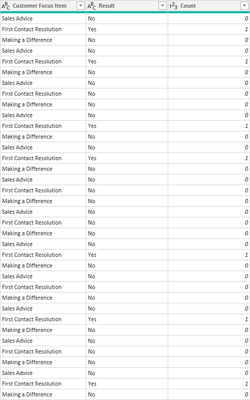
I am unable to share table format data in this website but I can take a screenshot so here you go @amitchandak
The [Count] column totals the 'Yes' so I can create the Ratio
SUM of [Count] divided by COUNT of [Result] as a measure.
Problem with ALL is it's working against the [Customer Focus Item] column within the table. I want it to still be split by this column when I include it in the visual, but then, simply never move from these numbers.
I figured it out, use ALLEXCEPT instead of ALL. Done.
The Power BI Data Visualization World Championships is back! Get ahead of the game and start preparing now!
| User | Count |
|---|---|
| 38 | |
| 38 | |
| 37 | |
| 28 | |
| 28 |
| User | Count |
|---|---|
| 124 | |
| 89 | |
| 73 | |
| 66 | |
| 65 |