cancel
Showing results for 
Search instead for 
Did you mean: 

The Power BI Data Visualization World Championships is back! Get ahead of the game and start preparing now! Learn more

Reply
DataVitalizer
Solution Sage
Solution Sage

Flow to Dataset Streaming

Hi community,


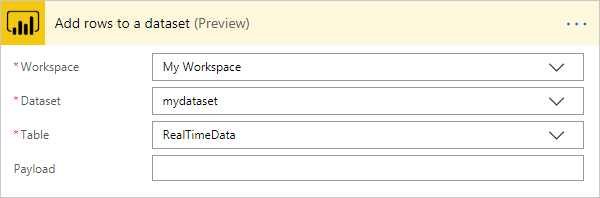
I used a flow template which pushes data from forms to a Power Bi Data streaming, when I select my dataset in the list the only field I get is payfield instead of the fields I have created in my dataset.

Am I missing a step in between ? 


community_flow.png

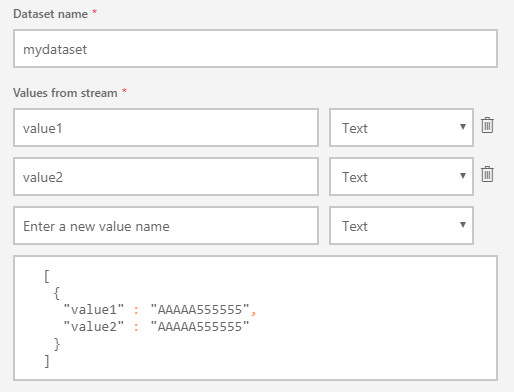
Here is my dataset

community_dataset.png

I need your help.

Thank you in advance


1 ACCEPTED SOLUTION
v-cherch-msft
Microsoft Employee
Microsoft Employee

Hi @DataVitalizer 

Please check if below articles could help.

https://powerbi.microsoft.com/nl-nl/blog/push-rows-to-a-power-bi-streaming-dataset-without-writing-a...

https://community.powerbi.com/t5/Community-Blog/A-simple-and-fun-guide-to-Microsoft-Flow-and-Power-B...

Regards,

Community Support Team _ Cherie Chen
If this post helps, then please consider Accept it as the solution to help the other members find it more quickly.

View solution in original post

3 REPLIES 3
v-cherch-msft
Microsoft Employee
Microsoft Employee

Hi @DataVitalizer 

Please check if below articles could help.

https://powerbi.microsoft.com/nl-nl/blog/push-rows-to-a-power-bi-streaming-dataset-without-writing-a...

https://community.powerbi.com/t5/Community-Blog/A-simple-and-fun-guide-to-Microsoft-Flow-and-Power-B...

Regards,

Community Support Team _ Cherie Chen
If this post helps, then please consider Accept it as the solution to help the other members find it more quickly.

Hi 


The first link made things clear. Just to clarify things, while creating the flow and trying to add rows to a dataset, and after selecting the RealTimeTable we are not supposed to retrieve all the previously created fields in our streaming dataset, what we have to do is to copy paste the streaming dataset code [{ ... }] in the payload field then replace the values.


Thank you 🙂 

Hi @DataVitalizer 

Got it, if you have resolved the issue, please mark the right reply as answer, and welcome to share your own solution. More people will benefit from here.

Regards,

Community Support Team _ Cherie Chen
If this post helps, then please consider Accept it as the solution to help the other members find it more quickly.

Helpful resources

Announcements
Power BI DataViz World Championships

Power BI Dataviz World Championships

The Power BI Data Visualization World Championships is back! Get ahead of the game and start preparing now!

December 2025 Power BI Update Carousel

Power BI Monthly Update - December 2025

Check out the December 2025 Power BI Holiday Recap!

FabCon Atlanta 2026 carousel

FabCon Atlanta 2026

Join us at FabCon Atlanta, March 16-20, for the ultimate Fabric, Power BI, AI and SQL community-led event. Save $200 with code FABCOMM.