Join us at FabCon Atlanta from March 16 - 20, 2026, for the ultimate Fabric, Power BI, AI and SQL community-led event. Save $200 with code FABCOMM.
Register now!The Power BI Data Visualization World Championships is back! Get ahead of the game and start preparing now! Learn more
Hello,
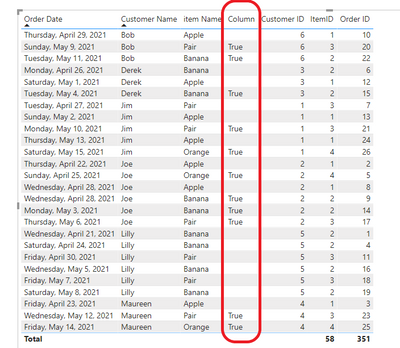
I Have created some dummy data to simulate a problem I'm trying to solve in Power BI Desktop:
I am trying to create a column which flags "TRUE" every time a customer orders an Item that is not an Apple, only after they have 1 order which contains an Apple.
For example, Jim has ordered Pair on 4/27, Apple on 5/2, Pair on 5/10, Apple on 5/13, and Orange on 5/15. I would only like to flag the column TRUE, on the instance where Jim has ordered Pair on 5/10 and Orange on 5/15.
Also if the same customer has 2 orders on the same day, one containing Apple and one containing a different item. I would like to flag the order that contains the different item. For example on 4/28 Joe has made one order of Apple and one order of Banana. I would Like to flag the Banana order on 4/28 as TRUE, and every other order that is not an Apple from thereon forward.
Thank you very much, your help is much appreciated.
Solved! Go to Solution.
Hi @Anonymous ,
Based on your description, you can create a calculated column as follows.
Column =
VAR x1 =
SUMMARIZE (
FILTER ( ALL ( 'Orders' ), [item Name ] = "Apple" ),
[Customer Name ]
)
RETURN
IF (
[Customer Name ]
IN x1
&& [item Name ] <> "Apple"
&& [Order ID ]
> MINX (
FILTER ( ALL ( 'Orders' ), [Customer ID ] = EARLIER ( Orders[Customer ID ] ) ),
[Order ID ]
),
"True"
)
Result:
Hope that's what you were looking for.
Best Regards,
Yuna
If this post helps, then please consider Accept it as the solution to help the other members find it more quickly.
Hi @Anonymous ,
Based on your description, you can create a calculated column as follows.
Column =
VAR x1 =
SUMMARIZE (
FILTER ( ALL ( 'Orders' ), [item Name ] = "Apple" ),
[Customer Name ]
)
RETURN
IF (
[Customer Name ]
IN x1
&& [item Name ] <> "Apple"
&& [Order ID ]
> MINX (
FILTER ( ALL ( 'Orders' ), [Customer ID ] = EARLIER ( Orders[Customer ID ] ) ),
[Order ID ]
),
"True"
)
Result:
Hope that's what you were looking for.
Best Regards,
Yuna
If this post helps, then please consider Accept it as the solution to help the other members find it more quickly.
@Anonymous , Try a new column like
new column =
var _max = maxx(filter(orders, [customerID] = earlier([customerID]) && [order ID] <earlier([order ID])), [order ID])
var _maxItem = countx(filter(orders, [customerID] = earlier([customerID]) && [order ID] = _max && [ItemName] ="Apple" ), [order ID]) +0
return
if( [ItemName] ="Apple" && _maxItem=0 , True(), blank())
The Power BI Data Visualization World Championships is back! Get ahead of the game and start preparing now!
| User | Count |
|---|---|
| 40 | |
| 38 | |
| 36 | |
| 29 | |
| 28 |
| User | Count |
|---|---|
| 127 | |
| 88 | |
| 78 | |
| 66 | |
| 65 |