cancel
Showing results for 
Search instead for 
Did you mean: 

The Power BI Data Visualization World Championships is back! Get ahead of the game and start preparing now! Learn more

Reply
BraedonCook
Regular Visitor

Flag Missing Rows Based on Date/Time

Hi All,


I have a list that looks like this:

Bag NumberDateandTimeTransactionType
110/08/2020 8:00amSign Out
110/08/2020 2:00pmSign In
210/08/2020 9:00amSign Out
310/08/2020 10:00amSign Out
310/08/2020 4:00pmSign In
211/08/2020 9:00amSign Out
211/08/2020 3:00pmSign In


As you can see, bag number 2 was never signed back in,

What I am looking to do is flag, if a bag wasn't signed back in within 12 hours,

ie:

Bag NumberDateandTimeTransactionTypeSignedIn?
110/08/2020 8:00amSign Out 
110/08/2020 2:00pmSign In 
210/08/2020 9:00amSign OutFALSE
310/08/2020 10:00amSign Out 
310/08/2020 4:00pmSign In 
211/08/2020 9:00amSign Out 
211/08/2020 3:00pmSign In 


Any assistance with this would be greatly appreciated

(also I'm unsure if this was posted in the right section)

6 REPLIES 6
Anonymous
Not applicable

Hi @BraedonCook 

Could you tell me if your problem has been solved? If it is, kindly Accept it as the solution. More people will benefit from it. Or you are still confused about it, please provide me with more details about your problem or share me with your pbix file from your Onedrive for Business.


Best Regards,

Rico Zhou

Hi Rico,

While this didn't end up solving my issue, we have engaged a partner to assist with building out our solution,
Not sure if you could ever call this one resolved, but I can delete the post if needed?

Anonymous
Not applicable

Hi @BraedonCook 

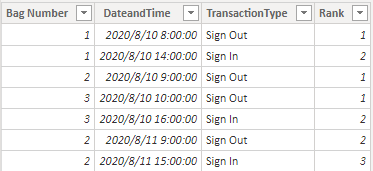
Build a table like yours to have a test.

1.png

Build a calculated column:


Rank = RANKX(FILTER(ALL('Table'),'Table'[Bag Number]=EARLIER('Table'[Bag Number])),'Table'[DateandTime],,ASC)


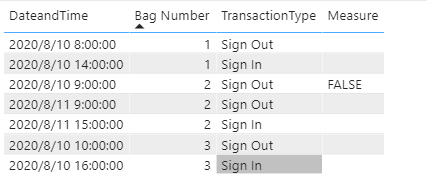
Build a measure to achieve your goal:


Measure = 
VAR _a = MAX('Table'[DateandTime])
VAR _b = CALCULATE(MAX('Table'[DateandTime]),FILTER(ALL('Table'),'Table'[Rank]=MAX('Table'[Rank])+1&&'Table'[Bag Number]=MAX('Table'[Bag Number])))
RETURN
IF(DATEDIFF(_a,_b,HOUR)>12,"FALSE",BLANK())


Result:

 2.png

You can download the pbix file from this link: Flag Missing Rows Based on Date/Time


Best Regards,

Rico Zhou


If this post helps, then please consider Accept it as the solution to help the other members find it more quickly. 


amitchandak
Super User
Super User

@BraedonCook , Try like

if(isblank(countx(filter(Table, [DateandTime] >=earlier([DateandTime]) && [DateandTime] <=earlier([DateandTime]) Time(12,0,0) && [TransactionType] ="Sign In"),[Bag Number])),blank(),"FALSE")

Share with Power BI Enthusiasts: Full Power BI Video (20 Hours) YouTube
Microsoft Fabric Series 60+ Videos YouTube
Microsoft Fabric Hindi End to End YouTube

Hi @amitchandak 

It's saying "syntax for 'Time' is incorrect"

@BraedonCook , try


if(isblank(countx(filter(Table, [DateandTime] >=earlier([DateandTime]) && [DateandTime] <=earlier([DateandTime]) + Time(12,0,0) && [TransactionType] ="Sign In"),[Bag Number])),blank(),"FALSE")

Share with Power BI Enthusiasts: Full Power BI Video (20 Hours) YouTube
Microsoft Fabric Series 60+ Videos YouTube
Microsoft Fabric Hindi End to End YouTube

Helpful resources

Announcements
Power BI DataViz World Championships

Power BI Dataviz World Championships

The Power BI Data Visualization World Championships is back! Get ahead of the game and start preparing now!

December 2025 Power BI Update Carousel

Power BI Monthly Update - December 2025

Check out the December 2025 Power BI Holiday Recap!

FabCon Atlanta 2026 carousel

FabCon Atlanta 2026

Join us at FabCon Atlanta, March 16-20, for the ultimate Fabric, Power BI, AI and SQL community-led event. Save $200 with code FABCOMM.