Join us at FabCon Atlanta from March 16 - 20, 2026, for the ultimate Fabric, Power BI, AI and SQL community-led event. Save $200 with code FABCOMM.
Register now!The Power BI Data Visualization World Championships is back! Get ahead of the game and start preparing now! Learn more
Hi,
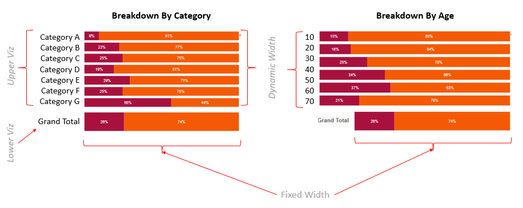
I have (vertically) two viz to show the breakdown of a metric.
Upper Viz is showing the Y-axis broken down, and the Lower Viz is showing the total breakdown.
I am giving the user the option to change the breakdown by / stack by dimension.
As the Y-axis labels can change depending on the user selection, in the upper viz, the width of the bars are changing.
This results in unalignment between the upper viz and lower viz.
Is there any way to fix the width of the bars across all viz ?
Thanks
Hi @Saniat ,
What kind of visual are you trying to use? I think it is not stack bar chart in Power BI.
Maybe you can try to change the size of your visual.
Can you share a sample file with us? This will make us easier to find the solution.
Best Regards,
Rico Zhou
If this post helps, then please consider Accept it as the solution to help the other members find it more quickly.
Hi,
I tried with stacked bar and 100% stacked bar.
Is there any way to fix the width of label for them ?
Thanks.
Hi @Saniat ,
How did you get grand total in 100% stacked bar? I think you want to fix the label of grand total part. Can you share a sample file with me? This will make me easier to find the solution.
Best Regards,
Rico Zhou
If this post helps, then please consider Accept it as the solution to help the other members find it more quickly.
The Power BI Data Visualization World Championships is back! Get ahead of the game and start preparing now!
| User | Count |
|---|---|
| 39 | |
| 37 | |
| 33 | |
| 33 | |
| 29 |
| User | Count |
|---|---|
| 134 | |
| 96 | |
| 78 | |
| 67 | |
| 65 |